

 OptimalScale
[BUG]Some specified arguments are not used by the HfArgumentParser: {remaining_args}
Describe the bug
When I tried to run the chatbot, a ValueError was raised
raise ValueError(f"Some specified arguments are not used by the HfArgumentParser: {remaining_args}") ValueError: Some specified arguments are not used by the HfArgumentParser: ['--model_nameor_path', 'gpt2']
My command was bash ./scripts/run_chatbot.sh and I also tried bash ./scripts/run_chatbot.sh gpt2.
Due to transformers #22171, the error seems like to be a problem caused by transformers, but I can't solve it.
My env is showed below:

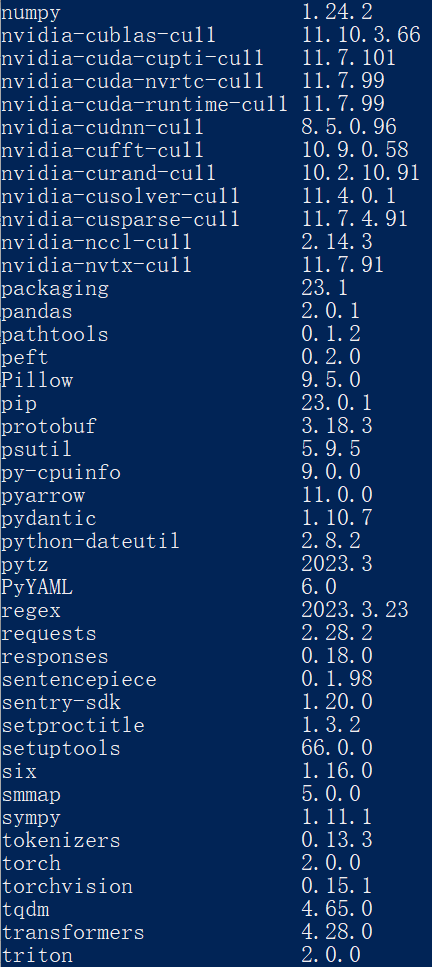
 The package
 lmflow was locally installed so it's not shown in the list.
Full INFO
srun --gres=gpu:1 bash ./scripts/run_chatbot.sh gpt2
Unable to find hostfile, will proceed with training with local resources only. Detected CUDA_VISIBLE_DEVICES=0: setting --include=localhost:0 [INFO] [runner.py:550:main] cmd = /home/anaconda3/envs/LMF/bin/python -u -m deepspeed.launcher.launch --world_info=eyJsb2NhbGhvc3QiOiBbMF19 --master_addr=127.0.0.1 --master_port=29500 --enable_each_rank_log=None examples/chatbot.py --deepspeed configs/ds_config_chatbot.json --model_nameor_path gpt2 [INFO] [launch.py:142:main] WORLD INFO DICT: {'localhost': [0]} [INFO] [launch.py:148:main] nnodes=1, num_local_procs=1, node_rank=0 [INFO] [launch.py:161:main] global_rank_mapping=defaultdict(<class 'list'>, {'localhost': [0]}) [INFO] [launch.py:162:main] dist_world_size=1 [INFO] [launch.py:164:main] Setting CUDA_VISIBLE_DEVICES=0 Traceback (most recent call last): File "/home/pyProject/LMFlow/examples/chatbot.py", line 155, in
main() File "/home/pyProject/LMFlow/examples/chatbot.py", line 63, in main parser.parse_args_into_dataclasses() File "/home/anaconda3/envs/LMF/lib/python3.9/site-packages/transformers/hf_argparser.py", line 341, in parse_args_into_dataclasses raise ValueError(f"Some specified arguments are not used by the HfArgumentParser: {remaining_args}") ValueError: Some specified arguments are not used by the HfArgumentParser: ['--model_nameor_path', 'gpt2']

Seems that you are using slurm and the installation is not sucessful.
The first step is to ensure installing lmflow successfully. Could you check the message during installation again to see whether there are errors?

The server cannot connect to github.com so I had to install the env in local system and exported the .yml file of the env.
In local system I followed the instructions below and installed successfully.
# In local system
git clone https://github.com/OptimalScale/LMFlow.git
cd LMFlow
conda create -n lmflow python=3.9 -y
conda activate lmflow
conda install mpi4py
pip install -e .
Then I used conda env export > lmf.yml and clone the lmf.yml in the server with conda env create -f lmf.yml.
It seems lmflow cannot installed correctly by pip so I copy ./src/lmflow/ to ~/anaconda3/envs/lmf/lib/python3.9/site-packages/.
Then was the problem [Some specified arguments are not used by the HfArgumentParser: {remaining_args}]
Note:
There are 3 packages cannot be installed so I changed their version to the mostly matched version.
The raw yml is shown below and the changed packages are: peft==0.3.0.dev0 => peft==0.2.0; transformers==4.28.0.dev0 => transformers==4.28.0; trl==0.4.2.dev0 => trl==0.4.1
dependencies:
  - _libgcc_mutex=0.1=main
  - _openmp_mutex=5.1=1_gnu
  - ca-certificates=2023.01.10=h06a4308_0
  - ld_impl_linux-64=2.38=h1181459_1
  - libffi=3.4.2=h6a678d5_6
  - libgcc-ng=11.2.0=h1234567_1
  - libgfortran-ng=7.5.0=ha8ba4b0_17
  - libgfortran4=7.5.0=ha8ba4b0_17
  - libgomp=11.2.0=h1234567_1
  - libstdcxx-ng=11.2.0=h1234567_1
  - mpi=1.0=mpich
  - mpi4py=3.1.4=py39hfc96bbd_0
  - mpich=3.3.2=hc856adb_0
  - ncurses=6.4=h6a678d5_0
  - openssl=1.1.1t=h7f8727e_0
  - pip=23.0.1=py39h06a4308_0
  - python=3.9.16=h7a1cb2a_2
  - readline=8.2=h5eee18b_0
  - setuptools=66.0.0=py39h06a4308_0
  - sqlite=3.41.2=h5eee18b_0
  - tk=8.6.12=h1ccaba5_0
  - wheel=0.38.4=py39h06a4308_0
  - xz=5.2.10=h5eee18b_1
  - zlib=1.2.13=h5eee18b_0
  - pip:
      - accelerate==0.18.0
      - aiohttp==3.8.4
      - aiosignal==1.3.1
      - appdirs==1.4.4
      - async-timeout==4.0.2
      - attrs==23.1.0
      - certifi==2022.12.7
      - charset-normalizer==3.1.0
      - click==8.1.3
      - cmake==3.26.3
      - cpm-kernels==1.0.11
      - datasets==2.10.1
      - deepspeed==0.8.3
      - dill==0.3.6
      - docker-pycreds==0.4.0
      - filelock==3.12.0
      - flask==2.2.3
      - flask-cors==3.0.10
      - frozenlist==1.3.3
      - fsspec==2023.4.0
      - gitdb==4.0.10
      - gitpython==3.1.31
      - hjson==3.1.0
      - huggingface-hub==0.13.4
      - icetk==0.0.7
      - idna==3.4
      - importlib-metadata==6.6.0
      - itsdangerous==2.1.2
      - jinja2==3.1.2
      - lit==16.0.1
      - markupsafe==2.1.2
      - mpmath==1.3.0
      - multidict==6.0.4
      - multiprocess==0.70.14
      - networkx==3.1
      - ninja==1.11.1
      - numpy==1.24.2
      - nvidia-cublas-cu11==11.10.3.66
      - nvidia-cuda-cupti-cu11==11.7.101
      - nvidia-cuda-nvrtc-cu11==11.7.99
      - nvidia-cuda-runtime-cu11==11.7.99
      - nvidia-cudnn-cu11==8.5.0.96
      - nvidia-cufft-cu11==10.9.0.58
      - nvidia-curand-cu11==10.2.10.91
      - nvidia-cusolver-cu11==11.4.0.1
      - nvidia-cusparse-cu11==11.7.4.91
      - nvidia-nccl-cu11==2.14.3
      - nvidia-nvtx-cu11==11.7.91
      - packaging==23.1
      - pandas==2.0.1
      - pathtools==0.1.2
      - peft==0.3.0.dev0
      - pillow==9.5.0
      - protobuf==3.18.3
      - psutil==5.9.5
      - py-cpuinfo==9.0.0
      - pyarrow==11.0.0
      - pydantic==1.10.7
      - python-dateutil==2.8.2
      - pytz==2023.3
      - pyyaml==6.0
      - regex==2023.3.23
      - requests==2.28.2
      - responses==0.18.0
      - sentencepiece==0.1.98
      - sentry-sdk==1.20.0
      - setproctitle==1.3.2
      - six==1.16.0
      - smmap==5.0.0
      - sympy==1.11.1
      - tokenizers==0.13.3
      - torch==2.0.0
      - torchvision==0.15.1
      - tqdm==4.65.0
      - transformers==4.28.0.dev0
      - triton==2.0.0
      - trl==0.4.2.dev0
      - typing-extensions==4.5.0
      - tzdata==2023.3
      - urllib3==1.26.15
      - wandb==0.14.0
      - werkzeug==2.2.3
      - xxhash==3.2.0
      - yarl==1.9.1
      - zipp==3.15.0
I see. These three packages are important, especially their version. It is essential to ensure the same version as specified.
An option is to download them to the local disk first and then install it by pip install ..
Take peft as an example, first download it from the official repo and then check out the correct commit deff03f2c251534fffd2511fc2d440e84cc54b1b. Then run pip install .
This issue has been marked as stale because it has not had recent activity. If you think this still needs to be addressed please feel free to reopen this issue. Thanks