

 OfficeDev
Tell us more about your awesome experience using MCCA :)

It's great to hear that you enjoyed using our product! Please share your feedback on how we can further improve your MCCA experience.
NOTE: Please do not share any personal or sensitive information related to your organization and/or yourself.
Tell us about:
- Why do you use MCCA?
- What do you like about MCCA?
- What do you want to see more of?
- What role (admin, leadership, engineer, etc) do you belong to & which other stakeholders in your or use MCCA?
- Any other feedback that you want us to work on.
Interested in discussing more? Leave your email address and we will reach out to you or drop us an email at [email protected].

Good day karashah1. I like MCCA a lot. It makes it easier to show people what they have to OK for me to apply in Compliance. My position is Compliance Specialist. What I believe is necessary is to be able to download the report and share it in Teams or by email. At the moment. At the moment I have to show it on screen. The print is not in color, which is OK, but not as good as the color version. [email protected]

Good day karashah1. I like MCCA a lot. It makes it easier to show people what they have to OK for me to apply in Compliance. My position is Compliance Specialist. What I believe is necessary is to be able to download the report and share it in Teams or by email. At the moment. At the moment I have to show it on screen. The print is not in color, which is OK, but not as good as the color version. [email protected]
@NiekM51 Thanks for taking the time to share feedback!
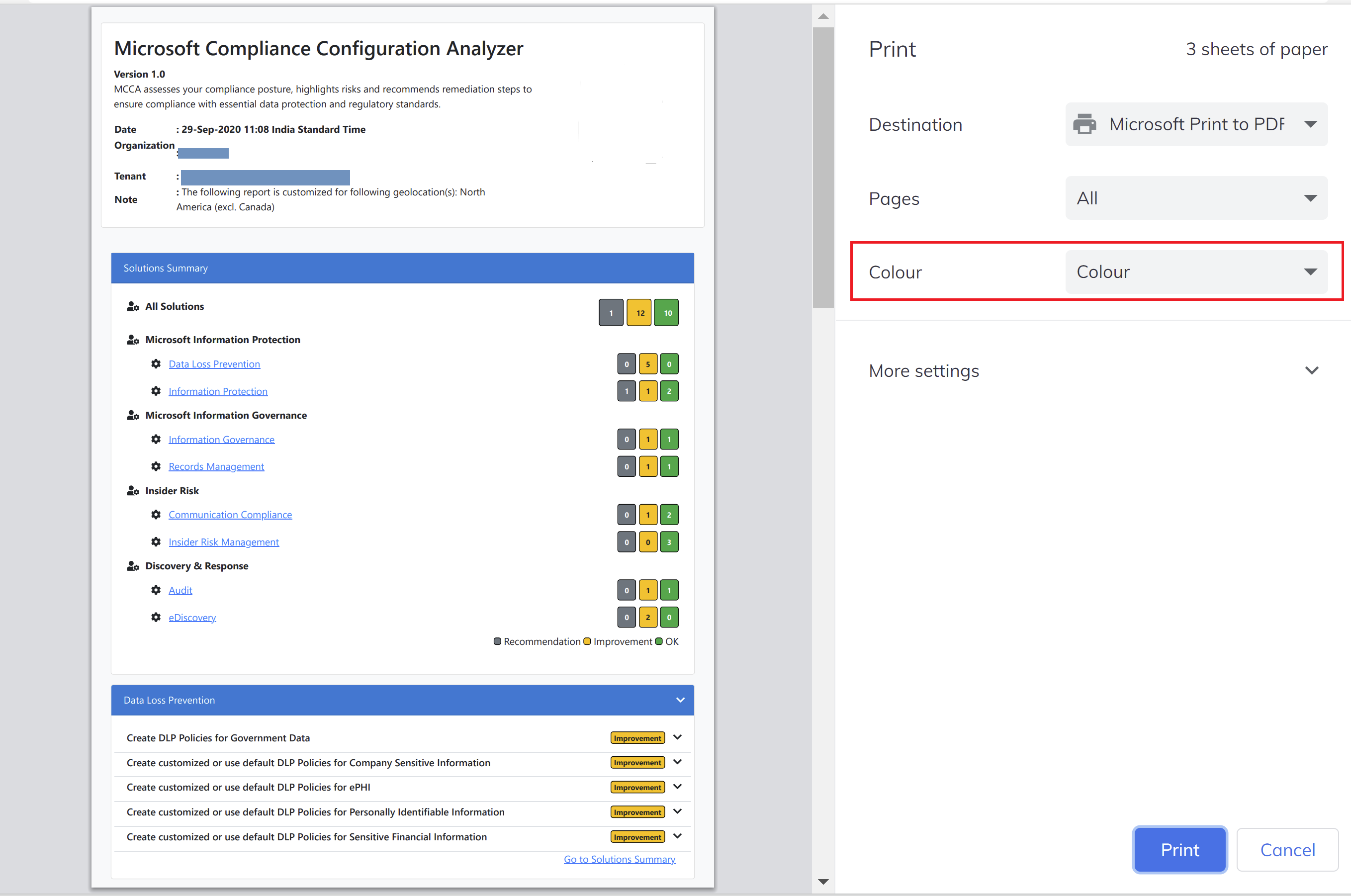
To your feature request - We are able to print in colour (screenshot below). Are you sure your default print settings are not set to black & white ? Alternatively, you can directly share the HTML report via email/teams as well.
Hi Karashah1, I have looked at my settings and cannot see where the problem may lie. How can I share or email the document directly?
@.***
Compliance Specialist Niek Meerkotter +27-72-358-4688 @.@.>
@.***https://m365compliance.com/
From: karashah1 @.> Sent: Wednesday, 06 April 2022 13:09 To: OfficeDev/MCCA @.> Cc: Niek Meerkotter @.>; Mention @.> Subject: Re: [OfficeDev/MCCA] Tell us more about your awesome experience using MCCA :) (Issue #39)
You don't often get email from @.@.>. Learn why this is importanthttp://aka.ms/LearnAboutSenderIdentification
Good day karashah1. I like MCCA a lot. It makes it easier to show people what they have to OK for me to apply in Compliance. My position is Compliance Specialist. What I believe is necessary is to be able to download the report and share it in Teams or by email. At the moment. At the moment I have to show it on screen. The print is not in color, which is OK, but not as good as the color version. @.@.>
@NiekM51https://github.com/NiekM51 Thanks for taking the time to share feedback!
To your feature request - We are able to print in colour (screenshot below). Are you sure your default print settings are not set to black & white ? Alternatively, you can directly share the HTML report via email/teams as well.
— Reply to this email directly, view it on GitHubhttps://github.com/OfficeDev/MCCA/issues/39#issuecomment-1090143215, or unsubscribehttps://github.com/notifications/unsubscribe-auth/AWXAKJZI2GVVXHYOFICL3P3VDVWDDANCNFSM5PQK2SFQ. You are receiving this because you were mentioned.Message ID: @.@.>>
The report is great as it pulls together a lot of information and provides a nice summary and next level of detail. It's a great tool for Microsoft partners as a report to run before, during, and post delivery of a project. What I'd like to see is an option to export the results in a json file. The option could either have the output only be HTML or Json, or maybe it produces both: -filetype json,html I could then store these results within blob storage and then use Power BI to show trends over time. HTML is great when you view it one at a time, but makes it harder if I want to compare the summary scores over a period of time. Let's say I automate running the report monthly, and I want to see how we've improved (based on the nice recommendations) during the last six months.

Hi Conrad This is a great idea. I concur totally with this.
@.***
Compliance Specialist Niek Meerkotter +27-72-358-4688 @.@.>
@.***https://m365compliance.com/
[A picture containing text, sign Description automatically generated] [A picture containing icon Description automatically generated] [A picture containing text, sign Description automatically generated]
From: Conrad Agramont @.> Sent: Thursday, 21 July 2022 18:41 To: OfficeDev/MCCA @.> Cc: Niek Meerkotter @.>; Mention @.> Subject: Re: [OfficeDev/MCCA] Tell us more about your awesome experience using MCCA :) (Issue #39)
You don't often get email from @.*** Learn why this is importanthttps://aka.ms/LearnAboutSenderIdentification
The report is great as it pulls together a lot of information and provides a nice summary and next level of detail. It's a great tool for Microsoft partners as a report to run before, during, and post delivery of a project. What I'd like to see is an option to export the results in a json file. The option could either have the output only be HTML or Json, or maybe it produces both: -filetype json,html I could then store these results within blob storage and then use Power BI to show trends over time. HTML is great when you view it one at a time, but makes it harder if I want to compare the summary scores over a period of time. Let's say I automate running the report monthly, and I want to see how we've improved (based on the nice recommendations) during the last six months.
— Reply to this email directly, view it on GitHubhttps://github.com/OfficeDev/MCCA/issues/39#issuecomment-1191709853, or unsubscribehttps://github.com/notifications/unsubscribe-auth/AWXAKJYXBP66E47YVAVLR4TVVF4RRANCNFSM5PQK2SFQ. You are receiving this because you were mentioned.Message ID: @.***>