

 OctopusDeploy
An error may occur when a Channel is deleted that is scoped to a Variable in a Git-enabled Project Variable Set
Severity
Somewhat blocking
Version
Confirmed in 2022.4.8471 and 2023.2.2028
Latest Version
None
What happened?
An error may occur when a Channel is deleted that is scoped to a Variable in a Git-enabled Project Variable Set
Reproduction
- Scope a Variable to a Channel in a Git-enabled Project with Git-enabled Project Variables
- Delete the scoped Channel
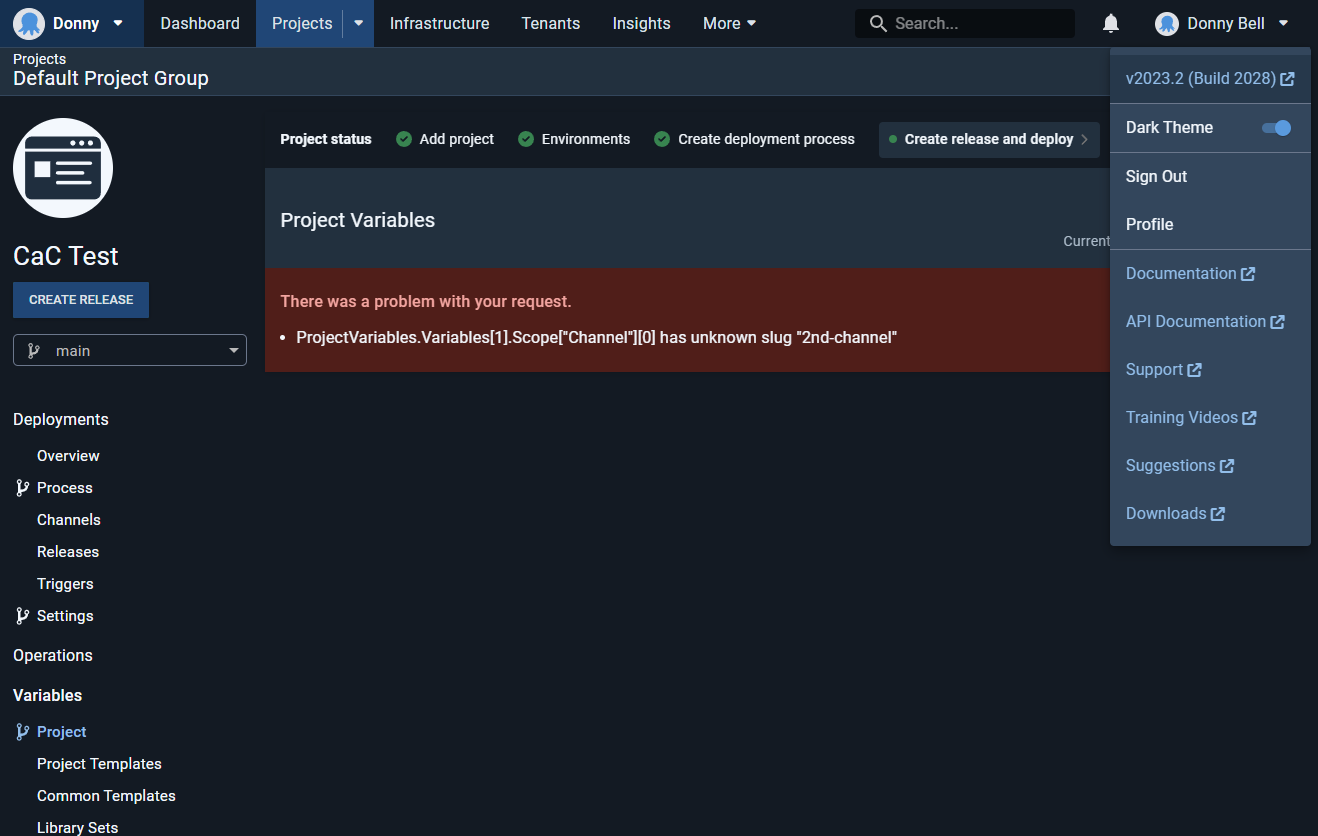
Error and Stacktrace
No response
More Information
No response
Workaround
To get unblocked by this, re-create a Channel with the same name within the Project. The error will contain Channel the Variable is looking for.
Example error:
ProjectVariables.Variables[1].Scope["Channel"][0] has unknown slug "2nd-channel"
Slug the Variable is looking for:
2nd-channel
Name of the Channel needed to re-create:
2nd Channel
Once you have re-created the Channel with the same name, you should be able to manually remove the Scopings in the Project Variables, then delete the Channel.

Another client report: Similar behavior when deleting a machine scoped to a version-controlled project variable.

I'm just going to ask direct, given there doesn't seem to be an appetite to fix this, is it possible to move a project out of version control? - we are affected too. Every single time a PR is merged, the channel is deleted, and if we had custom variables for the PR deployment (eg to point to a test environment backend with related changes) then that's the end of the project variables screen. (until someone directly edits the git repo)
