

 OctopusDeploy
Unable to change prompted variables for complex types
Team
- [X] I've assigned a team label to this issue
Severity
bad user experience, potentially blocking
Version
any
Latest Version
I could reproduce the problem in the latest build
What happened?
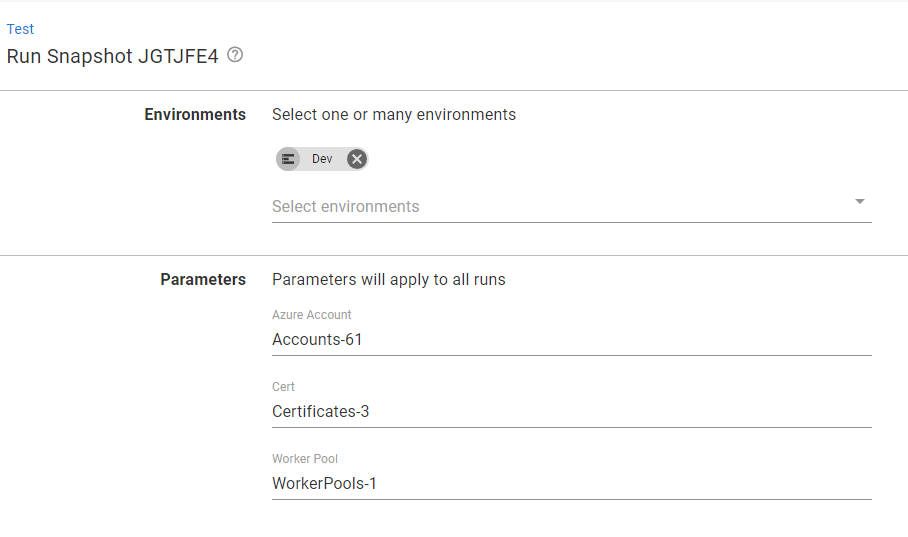
When a variable is a complex type (i.e. account, certificate, or worker pool), and is set to prompt for value, this gets shown on the page as a text input that takes the id of the actual option (e.g. Accounts-61 and WorkerPools-1). There are 2 issues:
- The id makes it hard to know what the default option is.
- Manually editing the value doesn't seem to actually change the variable for either deployments or runbook runs.
Reproduction
- Create a few dummy Azure/AWS/Google accounts.
- Create a project variable for the chosen account type with a default.
- Either go to the runbook
Runpage or theDeploypage for a release. - See under
Parametersthe prompted variables are showing the id of the default account. - Change the id to a different value and create another runbook run or deployment.
- See that the snapshot still contains the default variable value.
Same thing happens with certificates and worker pools.
Error and Stacktrace
More Information
Also worth confirming if we should allow all of these variable types to be prompted.
Related issue: https://github.com/OctopusDeploy/Issues/issues/7044
Workaround
~~The workaround involves finding out the ids for the different options, and manually editing the field.~~ No workaround.

Note: The workaround listed may not actually change the variable selected. When testing an Azure account variable on 2022.1, 2022.2, and 2022.3 (pre-release), the variable Id changes to the one selected after manual edit. All other properties appear to be from the default one selected in the variable editor.


Customer here experiencing this issue (internal) - https://octopus.zendesk.com/agent/tickets/142560

Hi - we are the customer having this issue in the comment by @Clare-Octopus.
We are in the process of moving all of our homegrown scripts into Octopus to support a significant change in our cloud infrastructure, but as we have started to provision our new production environments, subscriptions and Azure Accounts, we have come up against these issues which are going to block us from using Octopus for some of our tasks.
Our processes require us to copy things across Environments. These Environments have a 1:1 affinity with an Azure Subscription and an Azure Account within Octopus. Each Azure Subscription has no public access and is segregated from each other. We host a private network inside the Azure Subscription on which we host Octopus Workers. We need to be able to pick the Azure Accounts and Octopus Workers of our source and destination in order to complete our processes, but the bugs described in this issue prevent us from doing so. We use both Azure Account and WorkerPool variable types.
Whilst the UI element of these variables when prompted is very poor, it really isn't as important as the fact they don't change/update/respect scoping of runbooks. To me this seems like a pretty critical thing which just doesn't work, as opposed to something that could work better.
We would really appreciate any fixes in this area as this is likely to block our transition to Octopus away from our legacy tooling.
