

 OctopusDeploy
Unable to download a package with metadata from a GitHub NuGet feed
Team
- [X] I've assigned a team label to this issue
Severity
One customer blocked, the workaround isn't available for the step they're using.
Version
2021.3
Latest Version
I could reproduce the problem in the latest build
What happened?
When a package with metadata (e.g. 1.0.0.21+2f052aba) is added to GitHub Packages and retrieved via an external NuGet feed it will not retrieve the metadata and then fail due to a mismatch.
e.g.
The package version ‘1.0.0.21+2f052aba’ for ‘xxx’ returned from the package repository doesn’t match the requested package version ‘1.0.0.21’
Reproduction
- Add a package with version
1.0.0.21+2f052abato a GitHub Packages NuGet repository - Configure a NuGet external feed in Octopus for this repository
- Add a
Deploy a Packagestep that makes use of this feed and package - When creating a Release, note that the package version states
1.0.0.21and doesn't include the metadata - Attempt a deployment, it will then fail due to a version mismatch
Error and Stacktrace
The package version '1.0.0.21+2f052aba' for 'Sample.NuGet.Package' returned from the package repository doesn't match the requested package version '1.0.0.21'. For a detailed troubleshooting guide go to http://g.octopushq.com/TroubleshootMissingPackages
More Information
We tested this using an Artifactory NuGet feed without experiencing any problems. When creating the release using that feed the metadata was returned for the package.
I have a Cloud instance and GitHub repo configured for this issue and can provide access if needed.
Workaround
If using a step that targets a Tentacle selecting the option to download the package directly on the target should allow the package to be retrieved successfully. e.g.
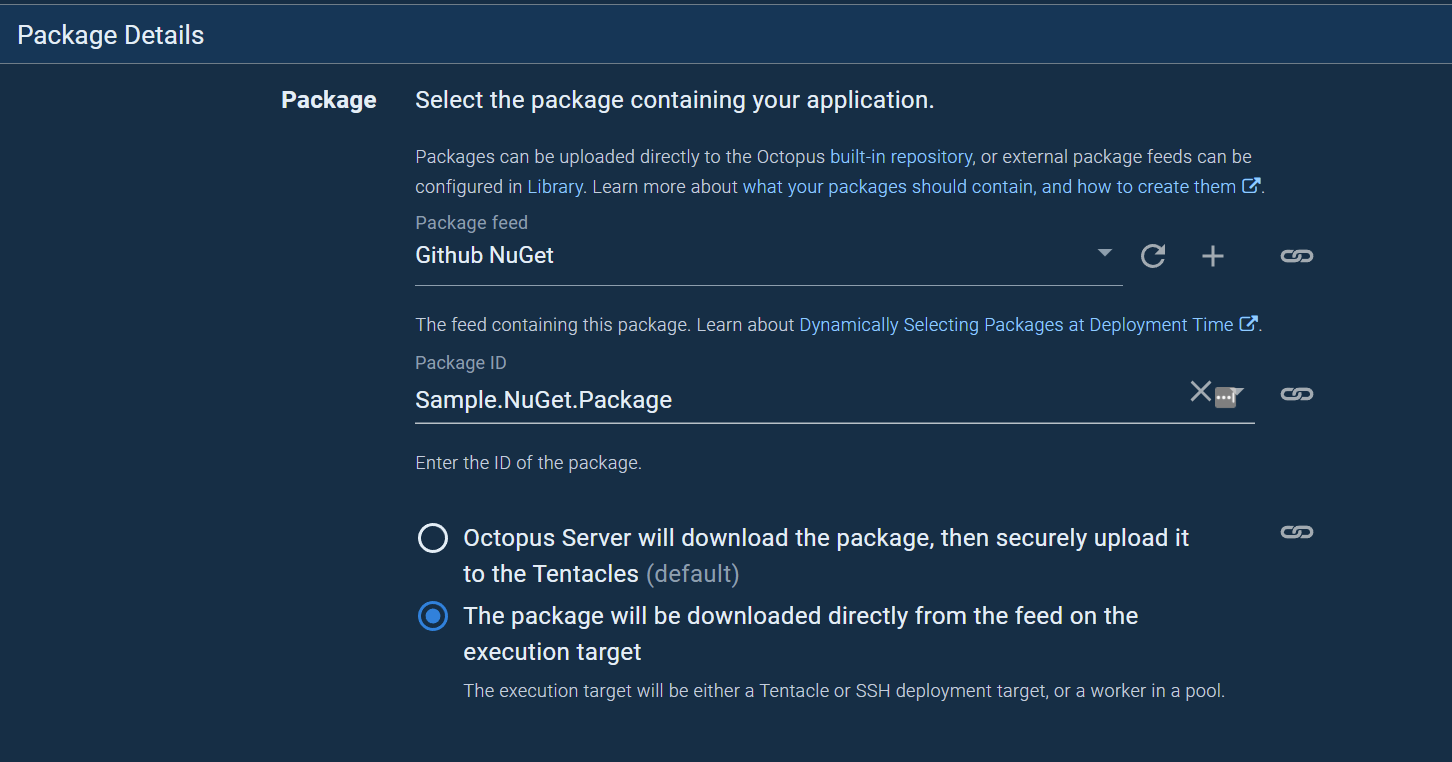

Given that you say Octopus can resolve packages using build metadata in an Artifactory feed, Is this a bug against Octopus server or GitHub Packages Nuget Repository?

I hit this issue today with ProGet. I dont think this is vendor specific but just a generally huge regression with packages that have SemVer Build metadata in the version string. Build metadata shouldn't affect channel version matching and/or
The workaround does work, but it's kind of annoying, given it's not the default way Octopus works, so it means manually reconfiguring every package.

Given that you say Octopus can resolve packages using build metadata in an Artifactory feed, Is this a bug against Octopus server or GitHub Packages Nuget Repository?
@pmcevoy
This is a bug against Octopus Server. It is specifically the piece where they validate whether a package matches the channel's version rules. In the case where you don't specify any channel version scheme, Major.Minor.Patch+BuildMetadata should be accepted rather than rejected, since build metadata does not confer any release semantics according to SemVer.
My guess is if you set a channel version scheme regex that accepts build metadata, it may work - but that is also very annoying and basically a non-starter for me since it means updating hundreds of channels across dozens of projects, with no automated way to make sure I didn't miss one. FYI to @calverp
I uploaded a package with metadata in the version to MyGet, and "Github NuGet feed", it appears that the "Github NuGet feed" is stripping the metadata in the version and therefore does not return metadata in the responses.
MyGet (and i assume that Artifactory NuGet feed) do not strip the metadata and support the metadata in the endpoint url and also in the response's (version) property.
Because Github NuGet feed is stripping the metadata from the version (you can see in the response below) this leads me to the conclusion that this is primarily an issue with the Github NuGet Feed.
Octopus Server operates on what is returned from the NuGet Feed as its the feeds "source of truth", but once the package is downloaded from the feed, we store it and then validate that the downloaded actual package's version ("with metadata") matches the requested version ("without metadata") as it was informed by GitHub NuGet Feed.
This returns the error seen above is because of this miss-match, the packed version with metadata doesn't match the version selected during the create release process (the version we were told about by GitHub NuGet Feed).
If there is a requirement to use "metadata" in the package version (that Octopus Deploy supports) you could also consider using a NuGet feed provider that also supports it.
Further testing details below:
Package Uploaded to Github Nuget Feed and MyGet:
NuGet:
https://nuget.pkg.github.com/enf0rc3/Acme.Core/1.11.0-bugfix.AAA.22+meta.01.json
NuGet:
https://nuget.pkg.github.com/enf0rc3/Acme.Core/1.11.0-bugfix.AAA.22.json
Where with MyGet you get the following:
https://www.myget.org/F/will-test-octo/api/v3/registration1/acme.core/1.11.0-bugfix.aaa.22+meta.01.json
https://www.myget.org/F/will-test-octo/api/v3/registration1/acme.core/1.11.0-bugfix.aaa.22.json
