
vscode-VueHelper
 vscode-VueHelper copied to clipboard
 OYsun
OYsun
:monkey_face:vscode插件,vue,vue-router和vuex的代码提示

我想请教一下如何修改提示优先级?我的ts语法类型定义的提示往往会被vueHelper的一些无关提示给挤占到下面去,导致开发变得更麻烦了,修改vscode的snippet为top并不能解决问题 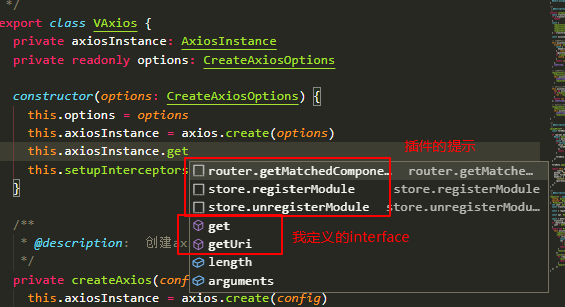  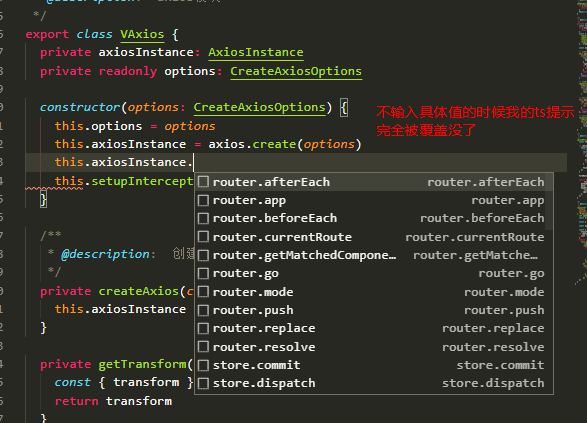 十分感谢您的插件,期待您的回复

vertu 和 vuehelper 都有Snippet,如何关闭 vertu都snippet?


## my vscode 版本 1.24.1 提交 24f62626b222e9a8313213fb64b10d741a326288 日期 2018-06-13T17:52:25.282Z Shell 1.7.12 渲染器 58.0.3029.110 Node 7.9.0 架构 ia32 ## vscode packages installed `vetur` and `vuehelper` ## bug Every time when i...

what happen? Is there anyone else have the same problem? ` /Users/JzKUO/.vscode/extensions/octref.vetur-0.6.1/client/server/node_modules/typescript/lib/typescript.js:10566 throw new Error("start < 0"); ^ Error: start < 0 at createTextSpan (/Users/JzKUO/.vscode/extensions/octref.vetur-0.6.1/client/server/node_modules/typescript/lib/typescript.js:10566:19) at Object.createTextSpanFromBounds (/Users/JzKUO/.vscode/extensions/octref.vetur-0.6.1/client/server/node_modules/typescript/lib/typescript.js:10575:16) at getErrorSpanForNode...


输入beforeRouteEnter和beforeRouteLeave,得出 beforeRouteEnter((to, from, next) => { //does NOT have access to `this` component instance }),语法报错,应该改成 beforeRouteEnter(to, from, next) { //does NOT have access to `this` component instance }这样才对

"files.associations": { // ".vue": "html" ".vue": "vue" } 设置为vue进行解析,vuehelper失效。


