OWASP
OWASP
Vehicleid for existing users not showing up
When accessing the forum, a GET request to /community/api/v2/community/posts/recent is done to receive information about posts and comments. There are 3 existing posts made by the 3 default users, however there is no information about their vehicles.
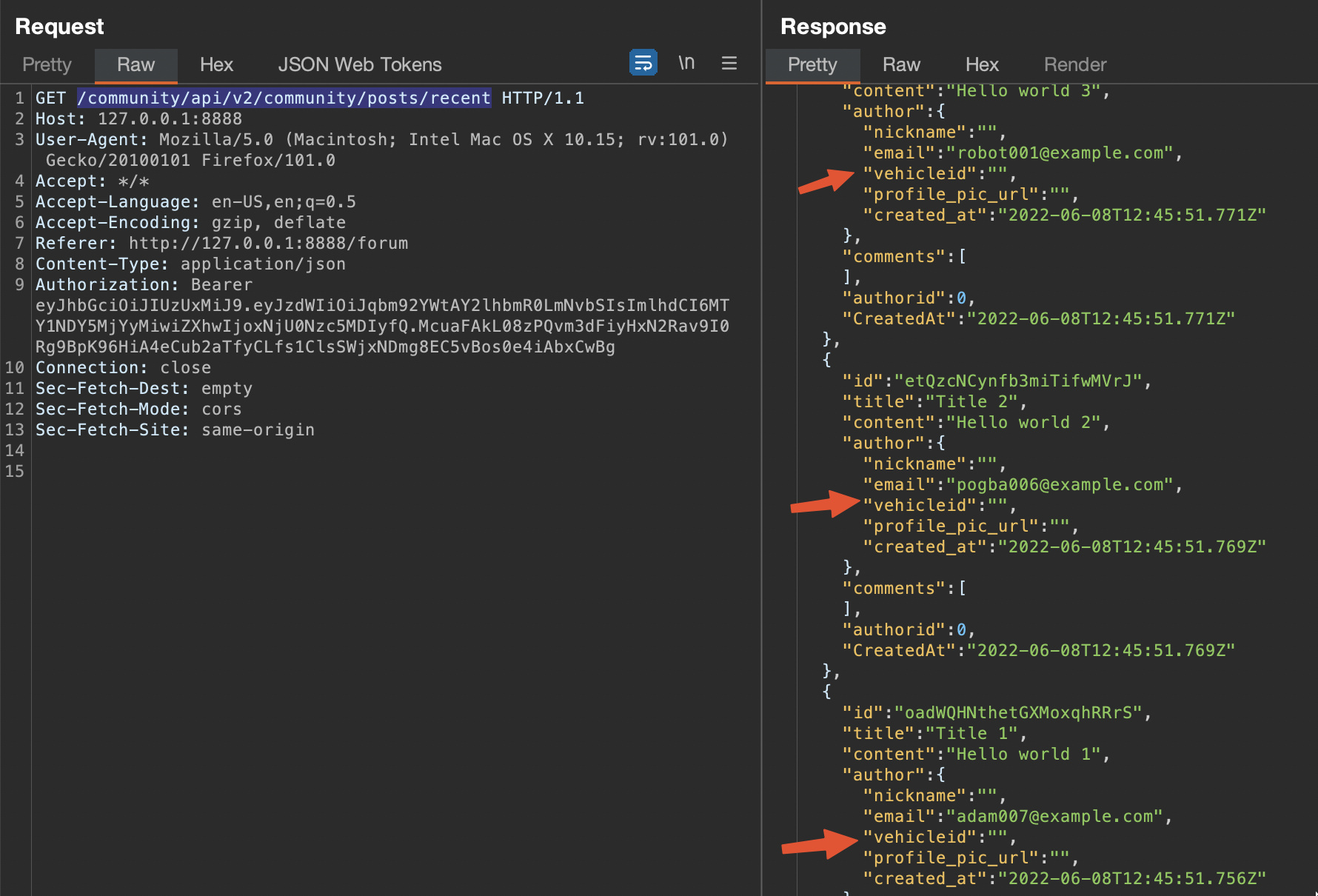
Which is honestly not a big deal, you can simply create two users, post something and use their vehicle guids for the challenges. However, I think it would be nice to already have some pre-built vehicleids so the challenge progress feels more natural. I think the vehicles are already created because there is mechanic reports for the default users, so I'm not sure if this is the expected behaviour.
Both last stable and development versions have this behaviour. Environment: Macbook M1, macOS Monterey 12.4, Docker 4.7.1 (77678).

I was not able to reproduce this bug. Can you give the logs of crapi-identity container? Run the command
docker logs crapi-identity

Hey @Ph4t3, I apologize for taking so long to upload the logs, as at first I couldn't replicate the issue anymore. Today when running the compose from the start it happened again.
crapi-identity.txt crapi-identity-err.txt

Did this error occur while running the /community/api/v2/community/posts/recent API request as the errors indicated in the log files pertains to setting a token. I was not able to replicate this bug while pulling the pre-built images from dockerhub.

@mathew-jose yes I am running /community/api/v2/community/posts/recent API request because its where I can see if the posts were populated correctly after bringing the stack up, but the endpoint itself seems to not be related to the issue.
I updated docker for testing purposes and tested multiple times while removing all volumes and even trying download images again. In any case, I have been able to replicate the issue quite consistently.
I though it was weird that the e-mail would show up but not the other data like nickname, so I looked at the code and noticed that posts, e-mails and their insertion in mongodb are defined in services/community/api/seed/seeder.go, while the user information (name, e-mail and tepehone number) comes from services/identity/src/main/java/com/crapi/config/InitialDataConfig.java, which will only run based on call below (line 83).
    @EventListener
    public void setup(ApplicationReadyEvent event){

        addLocation();
        addVehicleModel();
        addUser();
    }
This seems to wait for the application to be ready before creating the users.
In one of my last tests a scenario, Adam had a nickname in addition to e-mail, while the others had only e-mails:
HTTP/1.1 200 OK
Server: openresty/1.17.8.2
Date: Sat, 18 Jun 2022 16:12:02 GMT
Content-Type: application/json
Connection: close
Access-Control-Allow-Headers: Accept, Content-Type, Content-Length, Accept-Encoding, X-CSRF-Token, Authorization
Access-Control-Allow-Methods: POST, GET, OPTIONS, PUT, DELETE
Access-Control-Allow-Origin: *
Content-Length: 827

[
  {
    "id": "JHekNigM85BG8jrqGJtrvc",
    "title": "Title 3",
    "content": "Hello world 3",
    "author": {
      "nickname": "",
      "email": "[email protected]",
      "vehicleid": "",
      "profile_pic_url": "",
      "created_at": "2022-06-18T16:09:43.865Z"
    },
    "comments": [],
    "authorid": 0,
    "CreatedAt": "2022-06-18T16:09:43.865Z"
  },
  {
    "id": "hbBoQSusURQvHPempqWzJn",
    "title": "Title 2",
    "content": "Hello world 2",
    "author": {
      "nickname": "",
      "email": "[email protected]",
      "vehicleid": "",
      "profile_pic_url": "",
      "created_at": "2022-06-18T16:09:43.863Z"
    },
    "comments": [],
    "authorid": 0,
    "CreatedAt": "2022-06-18T16:09:43.863Z"
  },
  {
    "id": "hjAC2Aa5W7c6abwG4UbqyR",
    "title": "Title 1",
    "content": "Hello world 1",
    "author": {
      "nickname": "Adam",
      "email": "[email protected]",
      "vehicleid": "",
      "profile_pic_url": "",
      "created_at": "2022-06-18T16:09:43.844Z"
    },
    "comments": [],
    "authorid": 1,
    "CreatedAt": "2022-06-18T16:09:43.844Z"
  }
]
So I decided to take a look at the database. It had the 3 users, Adam, Dogba and Robot, including their telephone number, as well as three vehicles. So the issue doesn't seem to be related to InitialDataConfig.java:
postgresdb user_details:

postgresdb vehicle_details:

However, the mongodb crapi.post collection seems empty:
switched to db crapi
crapi> db.post.find().pretty()
[
  {
    _id: ObjectId("62adf8c7d3ff5daa6a1e239a"),
    id: 'hjAC2Aa5W7c6abwG4UbqyR',
    title: 'Title 1',
    content: 'Hello world 1',
    author: {
      nickname: 'Adam',
      email: '[email protected]',
      vehicleid: '',
      picurl: '',
      createdat: ISODate("2022-06-18T16:09:43.844Z")
    },
    comments: [],
    authorid: Long("1"),
    createdat: ISODate("2022-06-18T16:09:43.844Z")
  },
  {
    _id: ObjectId("62adf8c7d3ff5daa6a1e239b"),
    id: 'hbBoQSusURQvHPempqWzJn',
    title: 'Title 2',
    content: 'Hello world 2',
    author: {
      nickname: '',
      email: '[email protected]',
      vehicleid: '',
      picurl: '',
      createdat: ISODate("2022-06-18T16:09:43.863Z")
    },
    comments: [],
    authorid: Long("0"),
    createdat: ISODate("2022-06-18T16:09:43.863Z")
  },
  {
    _id: ObjectId("62adf8c7d3ff5daa6a1e239c"),
    id: 'JHekNigM85BG8jrqGJtrvc',
    title: 'Title 3',
    content: 'Hello world 3',
    author: {
      nickname: '',
      email: '[email protected]',
      vehicleid: '',
      picurl: '',
      createdat: ISODate("2022-06-18T16:09:43.865Z")
    },
    comments: [],
    authorid: Long("0"),
    createdat: ISODate("2022-06-18T16:09:43.865Z")
  }
]
Is it possible that data is being added to mongodb collection before the addition of Adam, Robot and Pogba to postgres? This would explain why the postgresdb seems to contain all info but mongodb lacks data, as well as a possible explanation for the scenario above where only Adam has a nickname. I apologize if this has nothing to do with the issue as I'm not familiar with java.
Can't reproduce this issue either. Have you attempted to add a vehicle after signup manually by grabbing the VIN and Pin from MailHog? I just scripted out some tests, and all posts are showing the vehicle ID.

@mikeacjones I was able to add vehicles with no issues, the entire application works fine. It's just the existing info that don't show up to me. I ended up not being able to find the root cause and testing in different scenarios works fine, so I guess it's something related to my specific setup. (macOS Monterey M1, Docker 20.10.16, etc)
I am experiencing this issue as well today, on a Ubuntu 22.04 device. No vehicleId's appear in the response for recent posts.