

 OPM
OPM
Add 'Lock view' and 'Lock size' attributes for views
(2021.10.1) Would it be possible to implement 'Lock view' and 'Lock size' modes on individual views. Applies to views of all types, when there is a certain angle and/or window size that is being used to paste into reports or presentations, it is particularly desirable to keep the same exact view angles, axes scales and window sizes so that the figures can be generated in an identical fashion without the risk of accidentally touching the view angles or plot scales. (For 'Lock size' the view should be exempted from the 'Tile Windows' mode, but I guess you can allow it to be maximised / minimised normally).

If you maximize a view, all views will get identical size if you select Export->Snapshot All Views. https://resinsight.org/export/snapshots/#snapshots-of-existing-views
Then, if you want to produce the same snapshots with a different case, you can either modify the path in project file
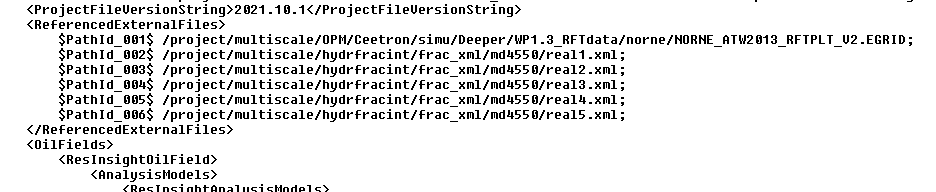
or you can do a replace case
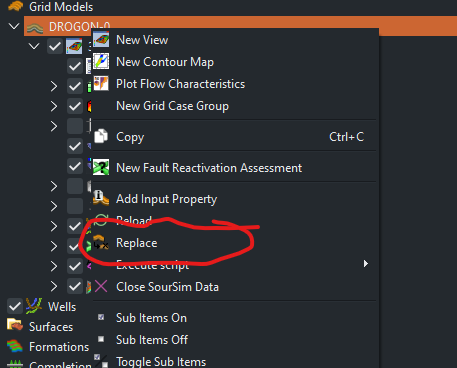
and export all snapshots again.
Will these options work for you?

Yes this is a partial workaround for 'Lock size', but even when maximised the size of the image depends on the window size. This is what I do, when I want to paste e.g. a series of maps of different layers, time steps or properties in power point so that you get a kind of movie. However when you come back later the window (views and/or app) may have been moved around for one reason or another and things no longer line up. An alternative workaround would be to provide an interface to read and set the pixel sizes of the view and/or app window.
However the really annoying occurrence that needs a 'Lock view' is to prevent accidentally touching the view such that the mouse rotates or shifts the viewpoint. Or in 2D plots you get a zoom in effect disturbing the previously set scales. Of course you can then edit / adjust them back (with some effort, especially for a 3d view). Again if needing to come back later viewpoints or scales may have changed for many reasons and reestablishing a like for like view (and make presentations smoother) is tedious. An alternative to Lock views would be some kind of view template with an export / import / apply interface, either to an area in the project tree or perhaps to an Ascii file ... that would allow multiple defined views to be kept 'safe' for future reference.