

 NginxProxyManager
Running non-ssl protocols over ssl port (i.e. using SSH over Nginx using $ssl_preread_protocol )
This article describes exactly what I want to do:
https://www.nginx.com/blog/running-non-ssl-protocols-over-ssl-port-nginx-1-15-2/
Basically, for one of my domain names (vhost), I would like port 443 to be accepted and redirect connections to my SSH server, rather than a http/https service.
The code to do it is in the article and pasted below (checks if the 443 packets are destined for https or SSH and redirects accordingly, but I am unsure where to insert this or how to use it with NPM). Could someone please give me a hint, what I would need to do to get this working for just one domain name?
stream {
    upstream ssh {
        server 192.0.2.1:22;
    }

    upstream web {
        server 192.0.2.2:443;
    }

    map $ssl_preread_protocol $upstream {
        default ssh;
        "TLSv1.2" web;
    }

    # SSH and SSL on the same port
    server {
        listen 443;

        proxy_pass $upstream;
        ssl_preread on;
    }
}
Any advice or help would be really appreciated.

At first it seems that NPM can do this with "Add Stream" (in this section):
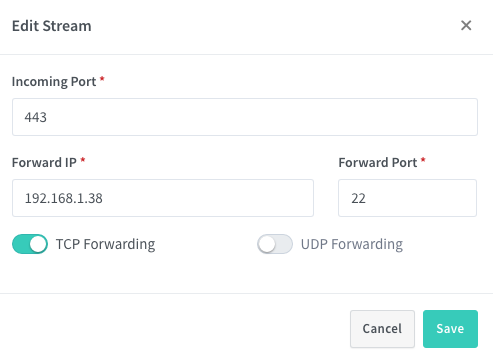
However, the implementation here seems to NOT use $ssl_preread_protocol - so if there is another service already listening on 443, the above does not work. So it leaves a couple more questions:
- Can I add for just requests coming to one vhost rather than all?
- NPM is running on docker, so what to add in the "IP address" field if I want it to forward the connection above outside of the docker network (to another bare metal IP on the LAN, for example)?
At first it seems that NPM can do this with "Add Stream" (in this section):
However, the implementation here seems to NOT use $ssl_preread_protocol - so if there is another service already listening on 443, the above does not work. So it leaves a couple more questions:
* Can I add for just requests coming to one vhost rather than all?

* NPM is running on docker, so what to add in the "IP address" field if I want it to forward the connection above outside of the docker network (to another bare metal IP on the LAN, for example)?
I think your query is related precisely to this issue that I just read. #344

Issue is now considered stale. If you want to keep it open, please comment :+1:
![github-actions[bot] avatar](https://avatars.githubusercontent.com/in/15368?v=4 "Published by a pub.dev verified publisher")
Any help from anyone?
Have you tried the alternative mentioned here?: #344 Due to lack of time I have not been able to try it.
Issue is now considered stale. If you want to keep it open, please comment :+1:
Bump
On Wed, Dec 18, 2024, 3:06 AM github-actions[bot] @.***> wrote:
Issue is now considered stale. If you want to keep it open, please comment 👍
— Reply to this email directly, view it on GitHub https://github.com/NginxProxyManager/nginx-proxy-manager/issues/646#issuecomment-2550131621, or unsubscribe https://github.com/notifications/unsubscribe-auth/AAKS7W6N6FLZVDCIFWOZGBL2GDKCZAVCNFSM6AAAAABTZVQDT6VHI2DSMVQWIX3LMV43OSLTON2WKQ3PNVWWK3TUHMZDKNJQGEZTCNRSGE . You are receiving this because you authored the thread.Message ID: @.***>
@maltokyo I'm pretty sure you can make this work by using this method: https://nginxproxymanager.com/advanced-config/#custom-nginx-configurations
Essentially, create a /data/nginx/custom/ directory in your NPM docker data directory if it doesn't already exist, then create a file called /data/nginx/custom/stream.conf and paste the contents of your stream directive in there, without the outer stream block, something like:
    upstream ssh {
        server 192.0.2.1:22;
    }

    upstream web {
        server 192.0.2.2:443;
    }

    map $ssl_preread_protocol $upstream {
        default ssh;
        "TLSv1.2" web;
    }

    # SSH and SSL on the same port
    server {
        listen 443;

        proxy_pass $upstream;
        ssl_preread on;
    }
There is a caveat, however, which is this will only work if you have nothing else listening on port 443, meaning if you have any standard proxy hosts assigned to HTTPS, this will conflict and cause NPM to complain about 0.0.0.0:443 already being bound at startup.
Unfortunately, NPM doesn't allow you to set the incoming port for proxy hosts, as the only options are HTTP/HTTPS from the "scheme" dropdown box. Therefore, you can't forward to a different internal port from the stream directive which is already listening on 443.
There is a way to do this using a standard nginx install, if you choose to go that route, but you'll lose the pretty GUI of NPM and the built-in SSL cert renewal functionality. For example, I have a setup similar to this running on a standard non-NPM nginx install on a linux server, and what I did there was something like this:
stream {
    upstream ssh {
        server 127.0.0.1:12345;
    }

    upstream web {
        server 127.0.0.1:444;
    }

    map $ssl_preread_protocol $upstream {
        default ssh;
        "TLSv1.2" web;
        "TLSv1.3" web;
    }

    # SSH and SSL on the same port
    server {
        listen 443;
        proxy_pass $upstream;
        ssl_preread on;
    }
}
In this case, the stream listens to port 443, and uses ssl_preread_protocol to determine whether it's TLS (I only check for 1.2 or 1.3, as the others are deprecated and I don't allow them to be used, but change this to your preference), and if it does not return a TLS version, it assumes it's an SSH connection.
Notice, the upstreams are both using localhost (127.0.0.1). The ssh server, is the same machine as the nginx service, but running on port 12345, while all other HTTPS requests are forwarded back to the same machine via localhost, but using port 444, which is not exposed beyond the firewall. However, all subsequent HTTPS directives in my nginx.conf look to port 444 instead of 443, like so:
server {
        listen 444 ssl;
        ssl_certificate /etc/nginx/certs/wildcard/fullchain.pem;
        ssl_certificate_key /etc/nginx/certs/wildcard/privkey.pem;

        server_name subdomain.some.tld some.tld;
        root    /usr/share/nginx/html/some.tld;

        location / {
            try_files $uri $uri/ $uri.html =404;
        }
    }
In other words, a request from a public IP would go like this:
- Hits my firewall, which has only exposed 443
- Firewall forwards to internal IP running nginx, also at 443
- stream directive determines if TLS or not (i.e. ssh, or something else)
- if ssh forward to ssh_server_ip:port
- if TLS proxy_pass to localhost at 127.0.0.1:444, which will hit the same nginx service, but does not need to be exposed publicly on the firewall
- http directive containing servers with listen directives for port 444 can be used to host internal services and forward via proxy_pass
More details here: https://blog.thewalr.us/2019/04/05/using-nginx-stream-directive-to-host-ssh-and-multiple-https-servers-on-the-same-port/

Issue is now considered stale. If you want to keep it open, please comment :+1: