

 NginxProxyManager
Refuses to work with unknown host in proxy_hosts
- Have you pulled and found the error with
jc21/nginx-proxy-manager:latestdocker image?- Yes
- Are you sure you're not using someone else's docker image?
- Yes
Describe the bug When you defined a proxy host for some container and then stop the container, nginx proxy manager can not restart anymore. Or said container is not on auto-start for bootup, npm also cant start. Leaving access to your containers off.
Nginx Proxy Manager Version 2.9.19 5920b0c
To Reproduce Steps to reproduce the behavior: Setup npm Define a bunch of other containers with web stuff Setup proxy_hosts for them. Now shutdown one of the web stuff containers, but not remove their proxy_host. Restart npm, kaboom
Expected behavior Detect it breaks, remove the proxy host config from container, possibly switch proxy_host to disabled. Neds parsing of nginx error.log, match for "host not found", the line contains the file that makes nginx refuses to work.
2023/01/05 12:15:28 [emerg] 7507#7507: host not found in upstream "HOSTNAME" in /data/nginx/proxy_host/5.conf:66

I can't seem to reproduce this issue.
Here's what i did:
- create a Proxy Host and TLS certificate for the container (I used librespeed)
- make sure the Proxy works
- stop the container:
docker stop librespeed - restart NPM:
docker restart nginx-proxy-manager
NPM started normally and the visiting the Proxy URL returned,as expected, HTTP 502 Bad Gateway.
As a sidenote, I'm using NPM with mariadb as a database so perhaps that makes a difference.

Hi
I just retried, I can reproduce. :smile:
Except, my initial description was sh*t, a bit, sorry. :disappointed: It's not just another container. I actually use portainer, and have stacks defined in them. npm is one stack, consisting of npm-app and npm-db (mariadb). Two networks, npm-internal and nginxproxy. npm-db has network only npm-internal, npm-app has nginxproxy and npm-internal.
Now any other stack with a web container has nginxproxy network too.
Shutdown other stack, wile npm running, and yes, I get a 502 bad gateway. Restart the npm one with other stack still down, and it does not come back up, nginx doesn't know about the host. Which is correct - docker does no longer resolve the other host, as its stack is down.
Greetings Ganneff
Hi.
Okay so to add more info. This issue is occurring after the latest update(V2.9.19)
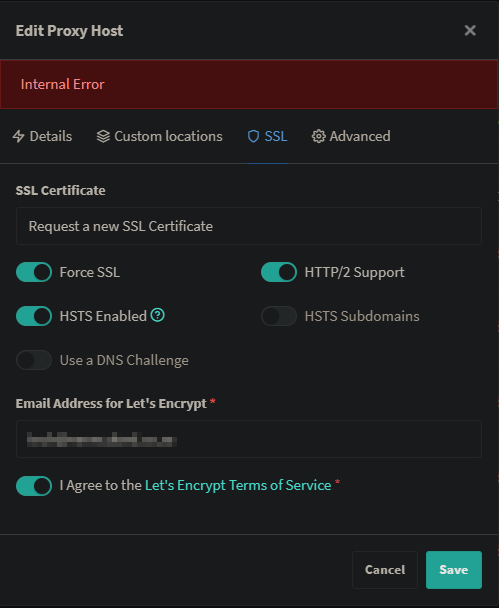
In my case, I am unable to add a new proxy host and then also request and add a Lest Encrypt Certificate. Once you try and add a certificate it says (Internal Error) and marks the added proxy as "Unknown".
I also tried manually adding certificates and its the same issue. I also checked the permissions of the folder where the permissions is stored and its again the same issue.
In some cases it can break NGINX Proxy manager completely as it then no longer allows you to view the login page due to certificate issues.
Screenshots attached:


I had the same issue. I raised a PR with a fix: https://github.com/NginxProxyManager/nginx-proxy-manager/pull/2672
If anyone on this thread can check out my PR and test it, that would be superb.

Issue is now considered stale. If you want to keep it open, please comment :+1:
![github-actions[bot] avatar](https://avatars.githubusercontent.com/in/15368?v=4 "Published by a pub.dev verified publisher")