

 NginxProxyManager
OVH DNS Renewal fails -- was working before
Checklist
- Have you pulled and found the error with
jc21/nginx-proxy-manager:latestdocker image?- Yes
- Are you sure you're not using someone else's docker image?
- Yes
- Have you searched for similar issues (both open and closed)?
- Yes
Describe the bug When auto-renewing a certificate, it fails with the following error :
[12/4/2021] [4:53:04 PM] [SSL      ] › ✖  error     Error: Command failed: certbot renew --non-interactive --quiet --config "/etc/letsencrypt.ini" --preferred-challenges "dns,http" --disable-hook-validation
Failed to renew certificate npm-1 with error: Missing command line flag or config entry for this setting:
Input the path to your OVH credentials INI file
The docs here https://certbot-dns-ovh.readthedocs.io/en/stable/ say:
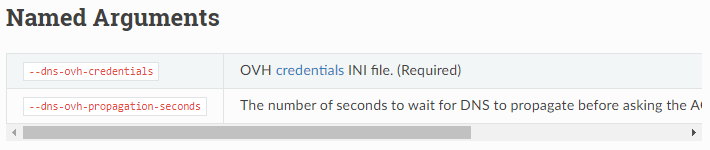
If I log into the container and modify the command line to include :
--dns-ovh-credentials /etc/letsencrypt/credentials/credentials-1
It works.
Nginx Proxy Manager Version v2.9.12
To Reproduce Try to renew an OVH certificate
Expected behavior The certificate is correctly renewed.
Screenshots
If trying to manually renew from the webpage :
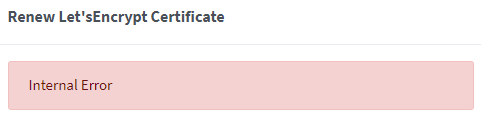
Operating System Docker
Additional context Was working with a previous NPM version. Certbot version is 1.21.0

Hello, I also have a python error when trying to generate certificate using the OVH DNS challenge... seems related to ARM architecture. Here is the full log.
NPM version v2.9.18 (docker latest image) - certbot 1.25.0
Error: Command failed: pip install certbot-dns-ovh==$(certbot --version | grep -Eo '[0-9](\.[0-9]+)+')
  error: subprocess-exited-with-error

  × pip subprocess to install build dependencies did not run successfully.
  │ exit code: 1
  ╰─> [125 lines of output]
      Collecting setuptools!=60.9.0,>=40.6.0
        Downloading setuptools-62.3.2-py3-none-any.whl (1.2 MB)
           ━━━━━━━━━━━━━━━━━━━━━━━━━━━━━━━━━━━━━━━━ 1.2/1.2 MB 858.7 kB/s eta 0:00:00
      Collecting wheel
        Using cached wheel-0.37.1-py2.py3-none-any.whl (35 kB)
      Collecting cffi>=1.12
        Downloading cffi-1.15.0.tar.gz (484 kB)
           ━━━━━━━━━━━━━━━━━━━━━━━━━━━━━━━━━━━━━ 484.1/484.1 KB 695.8 kB/s eta 0:00:00
        Preparing metadata (setup.py): started
        Preparing metadata (setup.py): finished with status 'done'
      Collecting setuptools-rust>=0.11.4
        Downloading setuptools_rust-1.3.0-py3-none-any.whl (21 kB)
      Collecting pycparser
        Downloading pycparser-2.21-py2.py3-none-any.whl (118 kB)
           ━━━━━━━━━━━━━━━━━━━━━━━━━━━━━━━━━━━━━ 118.7/118.7 KB 448.6 kB/s eta 0:00:00
      Collecting semantic-version<3,>=2.8.2
        Downloading semantic_version-2.10.0-py2.py3-none-any.whl (15 kB)
      Collecting typing-extensions>=3.7.4.3
        Downloading typing_extensions-4.2.0-py3-none-any.whl (24 kB)
      Building wheels for collected packages: cffi
        Building wheel for cffi (setup.py): started
        Building wheel for cffi (setup.py): finished with status 'error'
        error: subprocess-exited-with-error

        × python setup.py bdist_wheel did not run successfully.
        │ exit code: 1
        ╰─> [36 lines of output]
            running bdist_wheel
            running build
            running build_py
            creating build
            creating build/lib.linux-armv7l-3.7
            creating build/lib.linux-armv7l-3.7/cffi
            copying cffi/vengine_gen.py -> build/lib.linux-armv7l-3.7/cffi
            copying cffi/commontypes.py -> build/lib.linux-armv7l-3.7/cffi
            copying cffi/model.py -> build/lib.linux-armv7l-3.7/cffi
            copying cffi/lock.py -> build/lib.linux-armv7l-3.7/cffi
            copying cffi/vengine_cpy.py -> build/lib.linux-armv7l-3.7/cffi
            copying cffi/verifier.py -> build/lib.linux-armv7l-3.7/cffi
            copying cffi/backend_ctypes.py -> build/lib.linux-armv7l-3.7/cffi
            copying cffi/setuptools_ext.py -> build/lib.linux-armv7l-3.7/cffi
            copying cffi/__init__.py -> build/lib.linux-armv7l-3.7/cffi
            copying cffi/error.py -> build/lib.linux-armv7l-3.7/cffi
            copying cffi/cffi_opcode.py -> build/lib.linux-armv7l-3.7/cffi
            copying cffi/ffiplatform.py -> build/lib.linux-armv7l-3.7/cffi
            copying cffi/recompiler.py -> build/lib.linux-armv7l-3.7/cffi
            copying cffi/api.py -> build/lib.linux-armv7l-3.7/cffi
            copying cffi/cparser.py -> build/lib.linux-armv7l-3.7/cffi
            copying cffi/pkgconfig.py -> build/lib.linux-armv7l-3.7/cffi
            copying cffi/_cffi_include.h -> build/lib.linux-armv7l-3.7/cffi
            copying cffi/parse_c_type.h -> build/lib.linux-armv7l-3.7/cffi
            copying cffi/_embedding.h -> build/lib.linux-armv7l-3.7/cffi
            copying cffi/_cffi_errors.h -> build/lib.linux-armv7l-3.7/cffi
            running build_ext
            building '_cffi_backend' extension
            creating build/temp.linux-armv7l-3.7
            creating build/temp.linux-armv7l-3.7/c
            arm-linux-gnueabihf-gcc -pthread -DNDEBUG -g -fwrapv -O2 -Wall -g -fstack-protector-strong -Wformat -Werror=format-security -Wdate-time -D_FORTIFY_SOURCE=2 -fPIC -DUSE__THREAD -DHAVE_SYNC_SYNCHRONIZE -I/usr/include/ffi -I/usr/include/libffi -I/usr/include/python3.7m -c c/_cffi_backend.c -o build/temp.linux-armv7l-3.7/c/_cffi_backend.o
            c/_cffi_backend.c:2:10: fatal error: Python.h: No such file or directory
             #include
                      ^~~~~~~~~~
            compilation terminated.
            error: command 'arm-linux-gnueabihf-gcc' failed with exit status 1
            [end of output]

        note: This error originates from a subprocess, and is likely not a problem with pip.
        ERROR: Failed building wheel for cffi
        Running setup.py clean for cffi
      Failed to build cffi
      Installing collected packages: wheel, typing-extensions, setuptools, semantic-version, pycparser, setuptools-rust, cffi
        Running setup.py install for cffi: started
        Running setup.py install for cffi: finished with status 'error'
        error: subprocess-exited-with-error

        × Running setup.py install for cffi did not run successfully.
        │ exit code: 1
        ╰─> [36 lines of output]
            running install
            running build
            running build_py
            creating build
            creating build/lib.linux-armv7l-3.7
            creating build/lib.linux-armv7l-3.7/cffi
            copying cffi/vengine_gen.py -> build/lib.linux-armv7l-3.7/cffi
            copying cffi/commontypes.py -> build/lib.linux-armv7l-3.7/cffi
            copying cffi/model.py -> build/lib.linux-armv7l-3.7/cffi
            copying cffi/lock.py -> build/lib.linux-armv7l-3.7/cffi
            copying cffi/vengine_cpy.py -> build/lib.linux-armv7l-3.7/cffi
            copying cffi/verifier.py -> build/lib.linux-armv7l-3.7/cffi
            copying cffi/backend_ctypes.py -> build/lib.linux-armv7l-3.7/cffi
            copying cffi/setuptools_ext.py -> build/lib.linux-armv7l-3.7/cffi
            copying cffi/__init__.py -> build/lib.linux-armv7l-3.7/cffi
            copying cffi/error.py -> build/lib.linux-armv7l-3.7/cffi
            copying cffi/cffi_opcode.py -> build/lib.linux-armv7l-3.7/cffi
            copying cffi/ffiplatform.py -> build/lib.linux-armv7l-3.7/cffi
            copying cffi/recompiler.py -> build/lib.linux-armv7l-3.7/cffi
            copying cffi/api.py -> build/lib.linux-armv7l-3.7/cffi
            copying cffi/cparser.py -> build/lib.linux-armv7l-3.7/cffi
            copying cffi/pkgconfig.py -> build/lib.linux-armv7l-3.7/cffi
            copying cffi/_cffi_include.h -> build/lib.linux-armv7l-3.7/cffi
            copying cffi/parse_c_type.h -> build/lib.linux-armv7l-3.7/cffi
            copying cffi/_embedding.h -> build/lib.linux-armv7l-3.7/cffi
            copying cffi/_cffi_errors.h -> build/lib.linux-armv7l-3.7/cffi
            running build_ext
            building '_cffi_backend' extension
            creating build/temp.linux-armv7l-3.7
            creating build/temp.linux-armv7l-3.7/c
            arm-linux-gnueabihf-gcc -pthread -DNDEBUG -g -fwrapv -O2 -Wall -g -fstack-protector-strong -Wformat -Werror=format-security -Wdate-time -D_FORTIFY_SOURCE=2 -fPIC -DUSE__THREAD -DHAVE_SYNC_SYNCHRONIZE -I/usr/include/ffi -I/usr/include/libffi -I/usr/include/python3.7m -c c/_cffi_backend.c -o build/temp.linux-armv7l-3.7/c/_cffi_backend.o
            c/_cffi_backend.c:2:10: fatal error: Python.h: No such file or directory
             #include
                      ^~~~~~~~~~
            compilation terminated.
            error: command 'arm-linux-gnueabihf-gcc' failed with exit status 1
            [end of output]

        note: This error originates from a subprocess, and is likely not a problem with pip.
      error: legacy-install-failure

      × Encountered error while trying to install package.
      ╰─> cffi

      note: This is an issue with the package mentioned above, not pip.
      hint: See above for output from the failure.
      WARNING: You are using pip version 22.0.4; however, version 22.1.2 is available.
      You should consider upgrading via the '/usr/bin/python3 -m pip install --upgrade pip' command.
      [end of output]

  note: This error originates from a subprocess, and is likely not a problem with pip.
error: subprocess-exited-with-error

× pip subprocess to install build dependencies did not run successfully.
│ exit code: 1
╰─> See above for output.

note: This error originates from a subprocess, and is likely not a problem with pip.
WARNING: You are using pip version 22.0.4; however, version 22.1.2 is available.
You should consider upgrading via the '/usr/bin/python3 -m pip install --upgrade pip' command.

    at ChildProcess.exithandler (node:child_process:399:12)
    at ChildProcess.emit (node:events:526:28)
    at maybeClose (node:internal/child_process:1092:16)
    at Process.ChildProcess._handle.onexit (node:internal/child_process:302:5)
I tried to install some (potentially) missing packages into the container, but could not fix this error...

I am facing a similar issue which boils down to certbot reporting my credentials as invalid, even though I double checked them. Steps to reproduce:
- Register a new OVH app.
- Using `curl -XPOST -H "X-Ovh-Application:
" -H "Content-type: application/json" https://eu.api.ovh.com/1.0/auth/credential -d '{"accessRules":[{"method":"POST","path":"/domain/zone/ /record" },{"method":"POST","path":"/domain/zone/ /refresh"},{"method":"DELETE","path":"/domain/zone/ /record/*"}], "redirection": "https:// "}' - Note the consumer key and validate the app (it went correctly in my case, checked with OVH Console).
- Paste the secrets to container's ~/.secrets/certbot/ovh.ini, as described here
- Run
>   --dns-ovh \
>   --dns-ovh-credentials ~/.secrets/certbot/ovh.ini \
>   -d example.com \
>   -d www.example.com
- Get the
Error determining zone identifier for mjholub.me: 403 Client Error: Forbidden for url: https://eu.api.ovh.com/1.0/domain/zone/. (Are your Application Key and Consumer Key values correct?)
error Same happens with WebUI, the error message apart from irrelevant traceback output is exactly the same, just w/o the unsafe permissions warning.

I have the exact same error as the one above: Error determining zone identifier for auth.myhiddendomain.com: 403 Client Error: Forbidden for url: https://eu.api.ovh.com/1.0/domain/zone/. (Are your Application Key and Consumer Key values correct?)

I resolved the issue, it is super stupid.
The solution is, that you have to create a application key for the whole account and all domains in it!
If you restrict access to one domain in your account, certbot wont work!
Here is the solution:
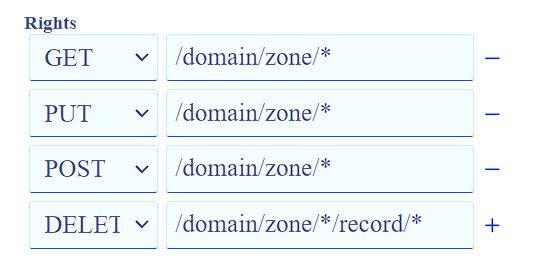
This issue happens only with certbot and is only certbot related. You can use otherwise restricted application keys with acme.sh/dehydrated and whatever traefik uses works either! Only certbot doesn't work! For the stupid certbot you have to open your whole account and have fun if someone gets access to your keys... All your domains will be gone then 👍
That an huge security risk! and this method should be seen only as an solution to get nginx proxy manager working with certbot! This is not an fix or something. Cheers
Issue is now considered stale. If you want to keep it open, please comment :+1:
![github-actions[bot] avatar](https://avatars.githubusercontent.com/in/15368?v=4 "Published by a pub.dev verified publisher")