

 NativeScript
Blank screen after update code on emulator and ActionBar behind StatusBar
Please, I need some help. I convince my boss to use the new released @nativescript/schematics with angular 10 in a project that must be developed for Web and Mobile. .
I create a new project using: ng new -c=@nativescript/schematics test-proj --shared
Then I run: tns run android
The app was opened in the simulator;
But I'm stuck in two problems:
-
I figured out that the ActionBar was behind the StatusBar;
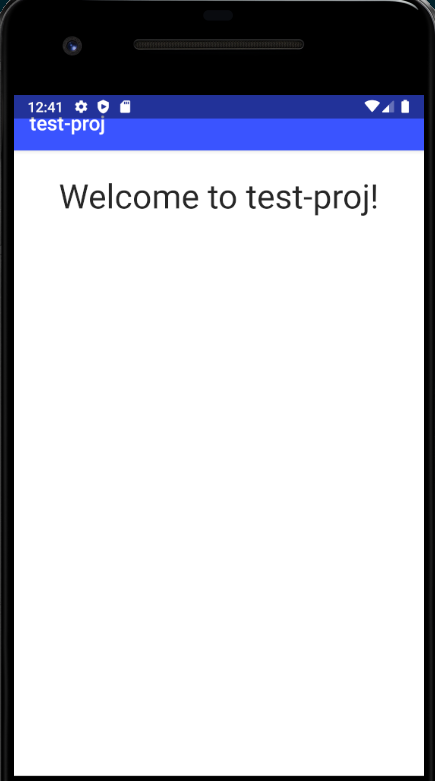
-
After I update a code and save, the app reloads but with a Blank Page.

Thank you guys for help in advance.
Environment
Provide the content of the package.json file in the project:
{
"name": "test-proj",
"nativescript": {
"id": "org.nativescript.testproj",
"tns-android": {
"version": "6.5.3"
}
},
"version": "0.0.0",
"scripts": {
"ng": "ng",
"start": "ng serve",
"build": "ng build",
"test": "ng test",
"lint": "ng lint",
"e2e": "ng e2e",
"android": "tns run android --no-hmr",
"ios": "tns run ios --no-hmr",
"mobile": "tns run",
"preview": "tns preview",
"ngcc": "ngcc --properties es2015 module main --first-only",
"postinstall": "npm run ngcc"
},
"private": true,
"dependencies": {
"@angular/animations": "~10.0.0",
"@angular/common": "~10.0.0",
"@angular/compiler": "~10.0.0",
"@angular/core": "~10.0.0",
"@angular/forms": "~10.0.0",
"@angular/platform-browser": "~10.0.0",
"@angular/platform-browser-dynamic": "~10.0.0",
"@angular/router": "~10.0.0",
"core-js": "^2.6.9",
"@nativescript/angular": "~10.0.0",
"@nativescript/core": "rc",
"@nativescript/theme": "~2.2.1",
"reflect-metadata": "~0.1.12",
"rxjs": "~6.5.5",
"tslib": "1.10.0",
"zone.js": "~0.10.2"
},
"devDependencies": {
"@angular/cli": "~10.0.0",
"@angular/compiler-cli": "~10.0.0",
"@angular-devkit/build-angular": "~0.1000.2",
"@nativescript/tslint-rules": "~0.0.5",
"@types/jasmine": "~3.5.0",
"@types/jasminewd2": "~2.0.3",
"@types/node": "^12.11.1",
"codelyzer": "^5.1.2",
"jasmine-core": "~3.5.0",
"jasmine-spec-reporter": "~4.2.1",
"karma": "~4.4.1",
"karma-chrome-launcher": "~3.1.0",
"karma-coverage-istanbul-reporter": "~2.1.0",
"karma-jasmine": "~3.0.1",
"karma-jasmine-html-reporter": "^1.4.2",
"@nativescript/webpack": "~2.0.0",
"protractor": "~5.4.3",
"ts-node": "~8.3.0",
"tslint": "~6.1.0",
"typescript": "~3.9.0"
}
}

@miguelarcan turn hmr off - we are looking to replace hmr with sockets so run your app like this:
nsc debug android --no-hmr

Hello @NathanWalker, thank you, this worked.
But now the app needs to be reloaded after any change in the code, and we lost a great productivity tool without HMR.
Do you have any idea when the Sockets will be released?
I understand that you guys is working hard to improve and fix everything. I know that is no easy and will keep advocating for the NS here in the company man. :)
About the the ActionBar behind the StatusBar, must I do some conifg?
Thank you so much for all your support
@miguelarcan HMR never worked reliably for Angular projects particularly and we are going to replace it as part of {N} 7.0 release at end of August. There have always been issues with it when making .ios/.android file changes and in particular any class/logic change would result in some unexpected behavior which is why it's not recommended to use with Angular projects. The current reload is reliable and definitely the way we develop large production apps. HMR in general was only good for style passes however even then was still unreliable for any real production development; feel good turning it off.
For the ActionBar, you can control that in App_Resources/Android/values-v21/styles.xml.
Change this:
<!-- Application theme -->
    <style name="AppThemeBase21" parent="AppThemeBase">
        <item name="android:windowTranslucentStatus">true</item>
        <item name="android:datePickerStyle">@style/SpinnerDatePicker</item>
        <item name="android:timePickerStyle">@style/SpinnerTimePicker</item>
    </style>
to this:
<!-- Application theme -->
    <style name="AppThemeBase21" parent="AppThemeBase">
        <item name="android:datePickerStyle">@style/SpinnerDatePicker</item>
        <item name="android:timePickerStyle">@style/SpinnerTimePicker</item>
    </style>
We may update the default schematic template resources to reflect that to avoid confusion as it's an app configuration detail that you are free to tweak for the style of app you're building.
@NathanWalker, thank you very much for response my questions.
I already have experienced NS with angular 8 two months ago, in fact, some times the HRM had a strange behavior, but, overall, it worked very well.
But I understand you and I will be very grateful when this new reload tool to be available.
Thanks man!
Keep doing this great work! ;)
Hello @NathanWalker
Forgive me if I'm abusing of your support.
I wanna ask you if you could give any tip of how to be productive when styling my app screen without HMR.
I'm working on windows machine, and for every change that I do I have to wait around 15seconds to see the the change in the app and this is very improductive for me.
I did try to change the style using chrome tools, but it is not possible?
Do you have a workflow to deal with that while working on production apps?
thank you you very much man!
EDIT: maybe disabling ivy, can make HMR work?
