

 NativeScript
tns run/devices fails (w/ fix info)
Environment
- CLI: 5.3.1
Describe the bug
After upgrading to the latest version of the Android Studio Emulator, Images, SDK; tns devices fails with the following error:
Connected devices & emulators
Searching for devices...
Cannot find connected devices. Reconnect any connected devices, verify that your system recognizes them, and run this command again.
tns run android fails with:
Searching for devices...
Cannot find connected devices.
Emulator start failed with: No emulator image available for device identifier 'undefined'.
To list currently connected devices and verify that the specified identifier exists, run 'tns device'.
To list available emulator images, run 'tns device <Platform> --available-devices'.
Doing a tns devices --log full gives me this:
spawn: /home/.../Android/Sdk/platform-tools/adb "devices"
Error while checking for devices. TypeError [ERR_INVALID_ARG_TYPE]: The "path" argument must be of type string. Received type undefined
    at assertPath (path.js:39:11)
    at Object.join (path.js:1155:7)
    at AndroidVirtualDeviceService.<anonymous> (/usr/local/lib/node_modules/nativescript/lib/common/mobile/android/android-virtual-device-service.js:65:38)
    at Generator.next (<anonymous>)
    at fulfilled (/usr/local/lib/node_modules/nativescript/lib/common/mobile/android/android-virtual-device-service.js:10:58)
    at process._tickCallback (internal/process/next_tick.js:68:7)
Cannot find connected devices. Reconnect any connected devices, verify that your system recognizes them, and run this command again.
(node:14038) [DEP0079] DeprecationWarning: Custom inspection function on Objects via .inspect() is deprecated
Key line being: android-virtual-device-service.js:65
tns doctor shows no issues.
adb devices -- does show the running emulators properly...
To Reproduce
Upgrade to the latest sdk, tools:
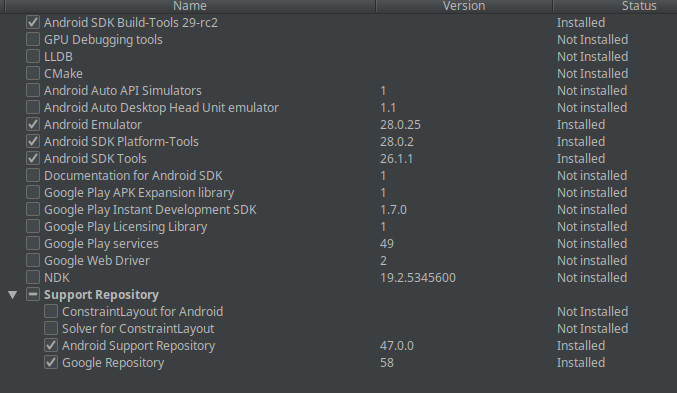
Expected behavior It actually works. :grinning:
Additional context
Setting the
ANDROID_AVD_HOME & ANDROID_SDK_ROOT fixes the issue. From what I can gather ANDROID_HOME is now depreciated... So this might need to be an added error in TNS doctor; and a warning here instead of throwing an error that is unhelpful...
ANDROID_SDK_ROOT should be the same value as ANDROID_HOME
ANDROID_AVD_HOME on my Linux machine ends up being /home/<USER_NAME>/.android/avd/
On mac, it will probably be /Users/<USER_NAME>/.android/avd/

Hey @NathanaelA , We've tried to reproduce the issue, but without success. I've updated my local SDK installation as per yours, but still I'm unable to reproduce it. I've also tried:
- removing my ANDROID_HOME environment variable
- Setting ANDROID_SDK_ROOT
- Executing
./gradlew assembleDebugin a project'splatforms/androiddirectory. The strange is that the build failed:
FAILURE: Build failed with an exception.

* Where:
Build file '/home/rvladimirov/Work/nativescript-cli/scratch/appJs/platforms/android/app/build.gradle' line: 591

* What went wrong:
A problem occurred evaluating project ':app'.
> Cannot invoke method getAbsolutePath() on null object
Which is this line So it looks like our gradle version currently does not work without ANDROID_HOME. I've noticed the documentation here that says ANDROID_HOME is deprecated, but it looks like we will have to update our gradle version as well.
Anyway, I'm wondering what might have caused the issue on your side. Are you using the official Android Studio version or you have downloaded the updates from the Release Candidate or even the Canary build? Btw I've tried to reproduce the issue with latest Canary release as well and again everything worked as expected on my side.

@rosen-vladimirov - I didn't remove my ANDROID_HOME I left it configured (just in case :grinning:)
To duplicate do NOT set the ANDROID_SDK_ROOT or ANDROID_AVD_HOME, then make sure you are using the latest STOCK Android Studio (at least on Linux).
According to my OS; I'm currently using:
Android Debug Bridge version 1.0.40
Version 28.0.2-5303910
Notes: I had been doing stuff earlier in the morning; then did an Android Studio upgrade and then that afternoon I couldn't do anything with NativeScript because of the error message I posted. Did some research and found out that the Android home was depreciated; manually tried adding the two new variables. It worked; I opened another terminal (that didn't have those set); tried it again and it failed with the same error message. Copied the two variables into it and it worked. So I set it system wide and haven't had any more issues. Then I posted the issue in case it was something new. Maybe it was a specific version of something in the android studio that caused me issues.
All I can really tell you for sure;
- Was working fine
- Opened Android Studio; did update to latest.
- Started failing w/ error above.
- Set additional Variables
- Worked. :grinning:
If you can't duplicate it; then maybe we just keep this and change the title to the error message so others searching for it can find this error, if it pops up in the future...