

 NativeScript
SafeArea on Android with notch
Hi to all,
I am using latest NativeScript with Sidekick: Version: 1.14.1-v.2018.11.23.3 (latest) NativeScript CLI version: 5.1.0 CLI extension nativescript-cloud version: 1.15.0 CLI extension nativescript-starter-kits version: 0.3.5
I have a problem with Android (Pixel 3 XL, android P) where phones notch cuts into ActionBar. Application is Drawer Navigation application which comes with Native Script (built in). Check attached preview. You can not see the notch but it cuts over "Home" action bar title.

I have tried with CSS top margin 50 but then it will effect other phones which does not have notch or notch height is different. Is there a proper way to deal with this?
I could not find any solution. I think that NativeScript should be able to handle this by default, but it does not.
Want to back this issue? Post a bounty on it! We accept bounties via Bountysource.

Hi @markosole,
I have tested the described scenario with the Huawei P20 device with enabled notch option, however, was unable to recreate the issue. For your convenience, I am attaching a screenshot and the project, that I used for testing. Please review it and check if I am missing something.
Archive.zip


Hi @tsonevn thanks for reply. I have tested this app you sent and it is same. When I run app and Splash screen is displayed, I can see top darkened (dark blue) line same height as notch. Looks like it has to do something with different notches. P20 has lower notch, 1-2mm smaller than Pixel 3XL (and maybe some other phones now and in the future). For now I can see only one solution: name all phones with notch in array and adjust height manually over CSS. When I disable cut out (hide notch) than it displayed properly. Do you have any other suggestions? - Anyone else with Pixel 3 XL willing to try this? Thanks!
Hi @markosole, Indeed, one option is to check the device name and to compare it with the names from your list. Another option that I found is to get the StatusBar size and check if its height is more then 24dp. Check out this thread in StackOverflow. Keep in mind that I haven't tested the scenario with the StatusBar and I can not ensure that it will work as expected.
Also, I will try again to recreate the issue.
Hi @tsonevn , Sorry for late reply. Here is what works for me, tested on pixel 2XL emulator, One Plus 3T, Pixel 3XL. So far so good.
var utils = require("tns-core-modules/utils/utils");

const platforma = {

StatusBar: function(page) {
    var result = 0;
    var resourceId = utils.ad.getApplicationContext().getResources().getIdentifier("status_bar_height",
"dimen", "android");
    if (resourceId > 0) {
        result = utils.ad.getApplicationContext().getResources().getDimensionPixelSize(resourceId);
    }
    // result is height
    if (result > 100) {
        page.css = '.action-bar {padding-top: 45;}';
    }
    //return result;
}
}

exports.platforma = platforma;
And then import it on each page:
const ProvjeriPlatformu = require("~/check-platform.js").platforma;

function onNavigatingTo(args) {
const page = args.object;
page.bindingContext = new SettingsViewModel();

console.log(ProvjeriPlatformu.StatusBar(page))
 }
Someone may find this useful. There is still no out of the box solution for android P / Pixel 3
UPDATE:
When it is used in app-root (to get effective for all pages at once) it messes up sideDrawer.
nativescript-ui-sidedrawer
It reset css style on it. I have no idea why it does that. When ever is page.css = '.dummy-class {color: blue;}'; used in app-root.js it gives a problems.
Hi @markosole, I was able to recreate the issue with the notch on Android simulator. Regarding that, I will mark the issue as a bug.
About the workaround that you have suggested I tested it with my sample project, however, it doesn't seem to work. Maybe I am missing something. Can you check the attached project? I set up the ProvjeriPlatformu inside the app-root.js file.
Archive.zip
Hi @tsonevn,
I have recreated it without problem in app you sent.
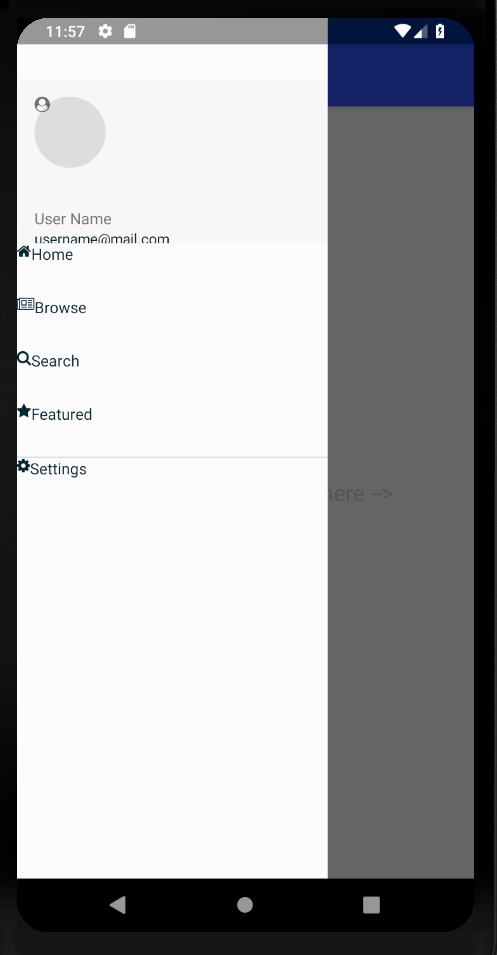
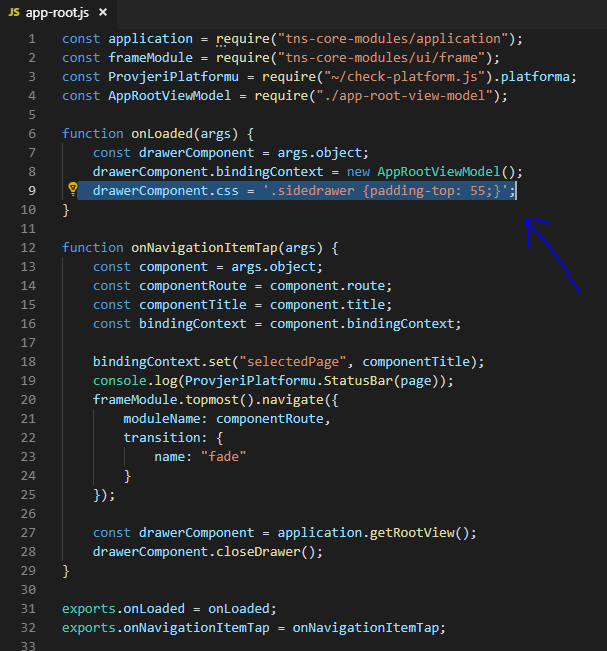
Just add any css style to app-root.js and it bill break things apart.
drawerComponent.css = '.dummy-css-class {padding-top: 55;}';
When ever I add or try to manipulate with any CSS over drawer it gives me problems.
Only thing what I could to is use Observable and add padding/style using that "workaround".
fyi - just got a customer report: he's experiencing the same issue on Samsung S10 where the camera "hole" (so not a notch in the "classic" sense) effective blocks UI elements.
UPDATE: just found that Android SDK >= 28 provides an API to check for "display cutouts" so I suppose this scenario could be solved generally by the {N} android runtime https://stackoverflow.com/questions/55148440/how-to-check-if-there-is-a-hole-cut-in-the-screen https://developer.android.com/guide/topics/display-cutout

Hi all, thanks for info. I have seen few apps having problems with height and notch (not nativescript apps). MI Fit for example and few others. I think that this support should be added and controlled in some sort of settings. I am using CSS to fix the problem, but who knows what to expect with other phones.
For anyone having this issue and using Angular and RadSideDrawer, I was able to get it to adjust for the notch without changing every page (I think):
Assuming RadSideDrawer is at root of app:
In app.component.ts:
if (isAndroid) {
// determine if android phone has a notch (i.e. Pixel 3XL) by looking at status bar height
            let result = 0;
            const resourceId = utils.ad.getApplicationContext().getResources().getIdentifier('status_bar_height', 'dimen', 'android');
            if (resourceId > 0) {
                result = utils.ad.getApplicationContext().getResources().getDimensionPixelSize(resourceId);
            }
            // result is height
            if (result > 100) {
                this.hasNotch = true;
            } else {
                this.hasNotch = false;
            }
}
In app.component.html where you insert page router outlet: ......
<GridLayout tkMainContent>
 <StackLayout [ngClass]="isAndroidDevice && hasNotch ? 'notch-fill' : 'no-notch'" row="0"><page-router-outlet></page-router-outlet></StackLayout>
</GridLayout>
...........
In app.component.css:
.notch-fill {background: #000000;padding-top: 30;}
(adjust to your needs)

@CaptainDingle - Your code if (result > 100) { will fail on different phone w/ different resolutions DPI's. You really want to use the code I have in my NS-Platforms plugin which converts the value back into DP value; which then if the DP value is greater than 24 it has a notch.
https://github.com/NathanaelA/nativescript-platform/blob/master/src/nsplatform.js#L119-L127
In addition, the NS-Platforms-css plugin has been updated to support adding a ".notch" css value to the top item which allows you to have rules in your css like this:
Page.notch { padding-top: 24; }
Page.notch.landscape { padding-left: 24; padding-right: 24; }
I am probably going to update my ns-orientation plugin to actually drop a .landscape-left or .landscape-right into the CSS so that you can actually differentiate between which direction landscape is active... Currently it only supports .landscape -- But that is on my todo list... :-)

Thanks so much @NathanaelA for your response. Switched over to your plugin to detect notch - working great. Thanks again.
I can see that this thread is a little bit old, but found solution for the Notch problem without calculating anything. Just do this in the code:
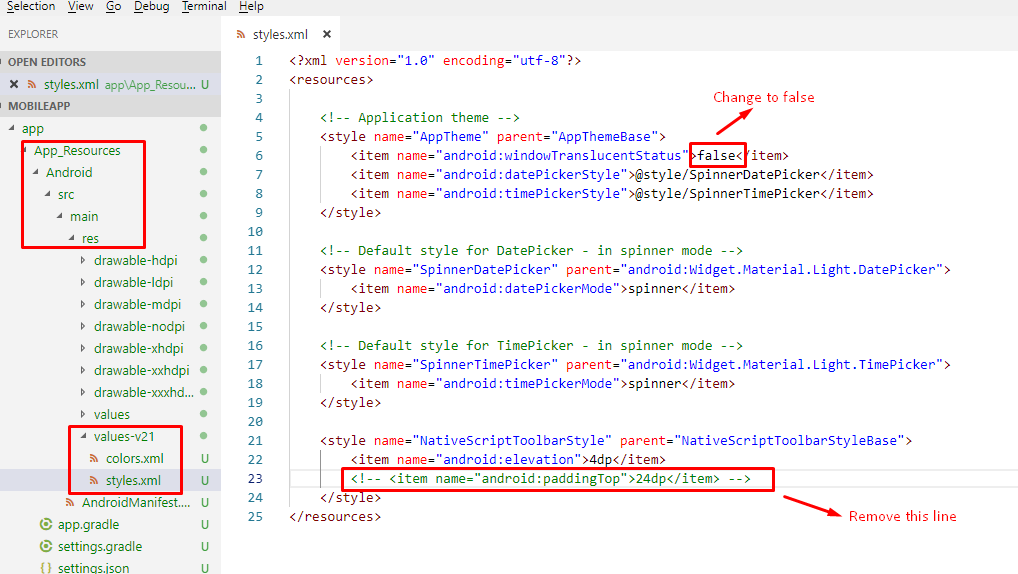 And the effect is like below:
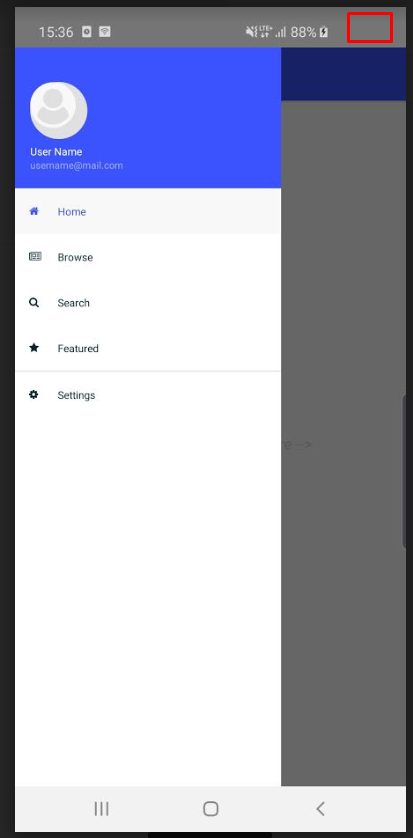 (This is just a screenshot. I've marked Notch with red rectangle). Tested on Samsung Galaxy S10

@CaptainDingle you're a life saver man !
By the way, you can also change that default grey color with :
<item name="android:statusBarColor">@color/your_color</item>

Bu iş parçacığının biraz eski olduğunu, ancak hiçbir şey hesaplamadan Notch sorununa çözüm bulduğunu görebiliyorum. Sadece kodda bunu yapın: Ve etkisi aşağıdaki gibidir: (Bu sadece bir ekran görüntüsü. Notch'u kırmızı dikdörtgenle işaretledim). Samsung Galaxy S10 üzerinde test edildi
thank you so much..

Another thing you could do and this is probably the root cause:
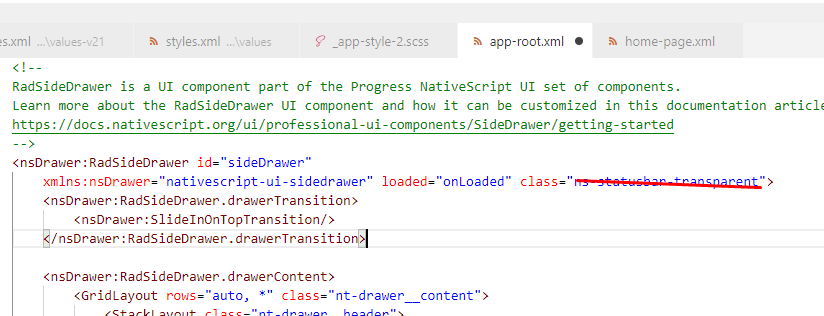 together with
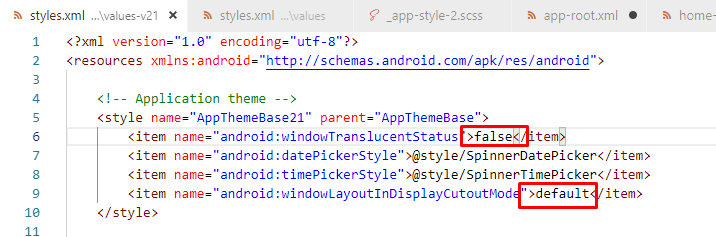

@programista25, This thing works. However I wonder why this isn't included by default with the templates? Do you see any UI issues will occur with this solution on the devices without notch?
I don't think so. I would like to have this implemented by default, because prior coming to this thread I did tried fixing with the CSS and ended up in issues. Later I google this thing and came across this thread. NativeScript is good, however things like this make it look bad in general.
N Baua

@nbaua - Create a PR for these two items, and we will add it to the default....
@CaptainDingle you're a life saver man ! By the way, you can also change that default grey color with :
<item name="android:statusBarColor">@color/your_color</item>
To anyone else who is trying to add this, make sure you're putting this in values-v21 as this requires a minimum of Android 21 and up!
