

 NVIDIAGameWorks
Data format for the Texture::create3D's pInitData parameter
What is the expected data format for Texture::create* methods' pInitData parameters?
I've been trying to use Texture::create3D using ResourceFormat::RGBA16Float, providing four floats per texel to the pInitData parameter, which resulted in a green texture, when all color values were set to white.
I've also tried ResourceFormat::RGBA8Uint, providing four unsigned chars per texel to the pInitData parameter, which resulted in a completely black texture, despite having set all color values to (255, 255, 255).
Is there anything else to consider? Maybe I've missed something or provided wrong parameters somewhere... the BindFlags maybe?
Is there some example code for uploading data to a (prefably 3D) texture which I could use for guidance?

You need to provide more then 4 elements.
The expected input is width*height*depth*mipLevels*arraySize elements (where each element is float4 or uint4)
If you want to use a single value, use clearRTV()

Sorry if I described it imprecisely. I provided four values per texel, so what I meant by that is width * height * depth * 4, I'm only using one MIP-level.
More specifically, I provided the data via a std::vector<float> data(width * height * depth * 4) for ResourceFormat::RGBA16Float, and std::vector<unsigned char> data(width * height * depth * 4) for ResourceFormat::RGBA8Uint, providing &data[0] to pInitData, respectively.
I want to set different color values, but in order to test it, I'll try clearRTV(), thanks for the pointer.
RGBA16Float is not a 32-bit float format. It'a 16-bit and incompatible with C++ float.
You'll have to use RGBA32Float or write a float->half conversion function (Falcor doesn't do that automatically, though I should probably write a conversion function)

Thanks for your comments. I've managed to provide the data in the right format, now it works.
I, however do not understand, why providing an array of 4 uint8_t values per texel works for the texture format ResourceFormat::RGBA8Unorm but does not work for ResourceFormat::RGBA8Uint. What format is ResourceFormat::RGBA8Uint expecting?
In case it is useful for anyone, here is the helper function which I've written to create volumetric test data for a 3D texture in the shape of a sphere:
/**	Helper function used in genenateVolumeSphereData to convert one single
 *	texel's color channel's value.
 */
template <typename T, typename PType, typename PFunc>
T convertForVolumeData(double value, PFunc packingFunc)
{
	if (std::is_floating_point<PType>()) // Attention: whether or not to *255 depends on PType
		return static_cast<T>(packingFunc(static_cast<PType>(value)));
	return static_cast<T>(packingFunc(static_cast<PType>(value * 255)));
}

/** Generates volumetric data in the shape of a sphere,  where texels
 *   inside a the radius of the shortest side  are set to values != 0, and
 *   values outside the radius are set to 0
 */
template <size_t W, size_t H, size_t D, size_t C, typename T, typename PType, typename PFunc>
std::unique_ptr<std::array<T, W*H*D*C>> genenateVolumeSphereData(PFunc packingFunc)
{
	const auto size = W*H*D*C;
	auto data = std::make_unique<std::array<T, size>>();
	double width_lf = static_cast<double>(W);
	double height_lf = static_cast<double>(H);
	double depth_lf = static_cast<double>(D);

	glm::dvec3 sphere_center(width_lf / 2.0, height_lf / 2.0, depth_lf / 2.0);
	double sphere_radius = glm::min(width_lf, height_lf, depth_lf) / 2;
	for (auto k = 0; k < D; ++k)
	{
		for (auto j = 0; j < H; ++j)
		{
			for (auto i = 0; i < W; ++i)
			{
				auto dist = glm::sqrt(
					glm::pow2(i - sphere_center.x) + glm::pow2(j - sphere_center.y) + glm::pow2(k - sphere_center.z)
				);

				auto factor = dist < sphere_radius ? 1.0 : 0.0;

				for (auto c = 0; c < C; ++c)
				{
					if      (0 == c) (*data)[0 + i * C + j * W * C + k * H * W * C] = convertForVolumeData<T, PType>(factor * static_cast<double>(i / width_lf), packingFunc);
					else if (1 == c) (*data)[1 + i * C + j * W * C + k * H * W * C] = convertForVolumeData<T, PType>(factor * static_cast<double>(j / height_lf), packingFunc);
					else if (2 == c) (*data)[2 + i * C + j * W * C + k * H * W * C] = convertForVolumeData<T, PType>(factor * static_cast<double>(k / depth_lf), packingFunc);
					else             (*data)[c + i * C + j * W * C + k * H * W * C] = convertForVolumeData<T, PType>(1.0, packingFunc);
				}
			}
		}
	}
	return data;
}
Example usage:
const auto vsize = 64;
auto volume_data = genenateVolumeSphereData<vsize, vsize, vsize, 4, uint8_t, uint8_t>([](auto v) { return v; });

auto tex3D = Texture::create3D(
	vsize, vsize, vsize,				// texture size
	ResourceFormat::RGBA8Unorm,	// texture format
	1,							// MIP-levels
	volume_data.get()->data(),		// data pointer
	Resource::BindFlags::ShaderResource | Resource::BindFlags::UnorderedAccess,
	false							// false => it is not a sparse texture
);
For the texture format ResourceFormat::RGBA32Float, the following call would create suitable data:
auto volume_data = genenateVolumeSphereData<vsize, vsize, vsize, 4, float, float>([](auto v) { return v; });
And to pack the data for e.g. ResourceFormat::RGBA16Float, one of glm's packing functions can be used with the function by passing the packing function as an argument. (Note the changed type of the second to last template argument, which represents the storage type of the volume data in the std::array):
auto volume_data = genenateVolumeSphereData<vsize, vsize, vsize, 4, uint16_t, float>(packHalf1x16);
Rendering the volumetric data looks somewhat like the sphere in the attached image.
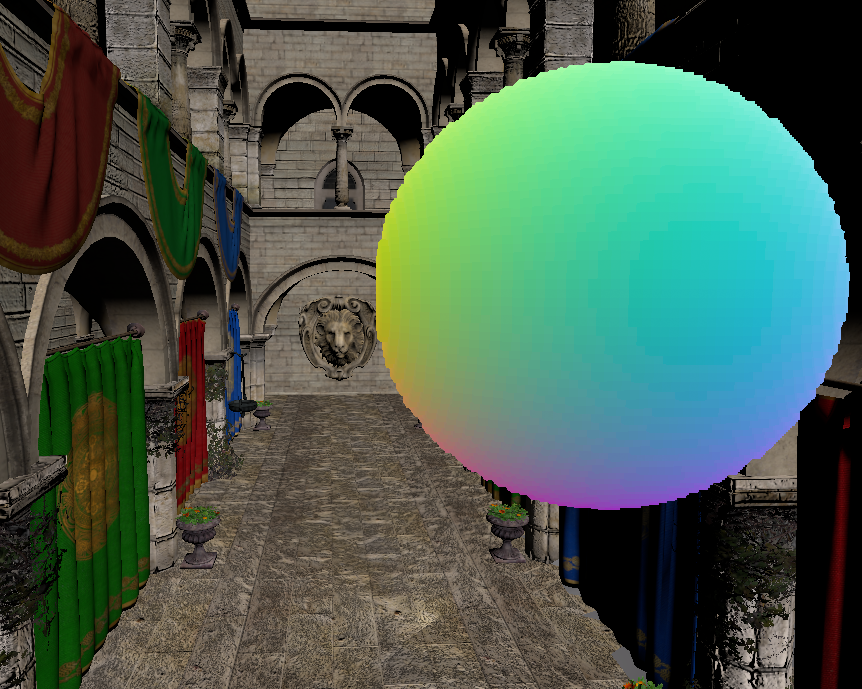
P.S.: Sorry, @nbenty for using Sponza in the background ¯\(ツ)/¯