

 NVIDIA
High refresh rate (>60 Hz) not effectively applied on multi-monitor setup
NVIDIA Open GPU Kernel Modules Version
515.65.01
Does this happen with the proprietary driver (of the same version) as well?
Yes
Operating System and Version
Arch / Cinnamon 5.4.9 DE
Kernel Release
5.19.6-arch1-1
Hardware: GPU
GPU 0: NVIDIA GeForce RTX 2080 (UUID: GPU-b0867e4b-eda0-c18b-65ec-6155a2c0cc55)
Describe the bug
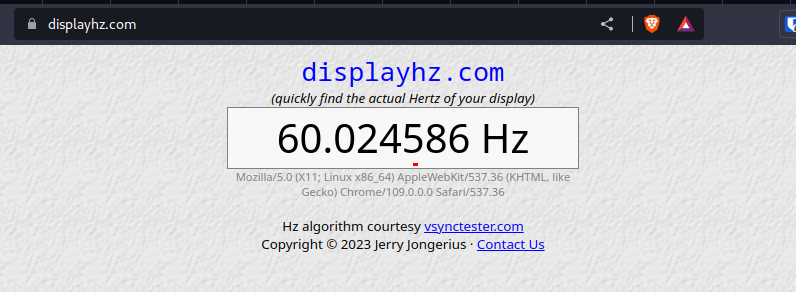
High refresh rate not applied for high refresh rate monitors when connected with additionnal 60 Hz monitors
To Reproduce
-- use X11 (not Wayland) -- plug at least two monitors: one with refresh rate >60Hz, the others monitors with a max refresh rate of 60Hz -- Set the high refresh monitor to a value > 60 Hz, for instance 100Hz and other "old" monitors to their max refresh of 60 Hz -- Measure the effective/real refresh rate on the high refresh rate monitor, (eg. https://www.displayhz.com/)
Bug Incidence
Always
nvidia-bug-report.log.gz
More Info
To note : if the 60 Hz monitors are physically disconnected from the GPU, the high refresh rate monitor will then work automatically and properly at its max refresh rate.


Still an issue, on both open and proprietary driver, i'm using RTX 3060
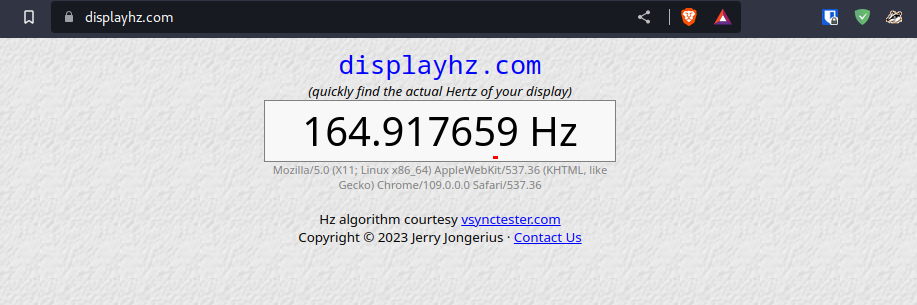
60Hz monitor off:
60Hz monitor on:
Any chance of getting this fixed anytime soon, or any workarounds?
This seems like a big problem for anyone using multiple screens while gaming/working on videos/etc.
I don't need my second screen to be more than 60 Hz, i use it for system information and utilities, but i expect my 165 Hz screen to perform at 165 Hz in games

After doing some research:
found that setting __GL_SYNC_DISPLAY_DEVICE=DP-4 ( Where DP-4 use your highest refresh rate screen name from xrandr output)
in your /etc/environment and rebooting PC fixes refresh rate at https://www.displayhz.com/ and https://testufo.com/
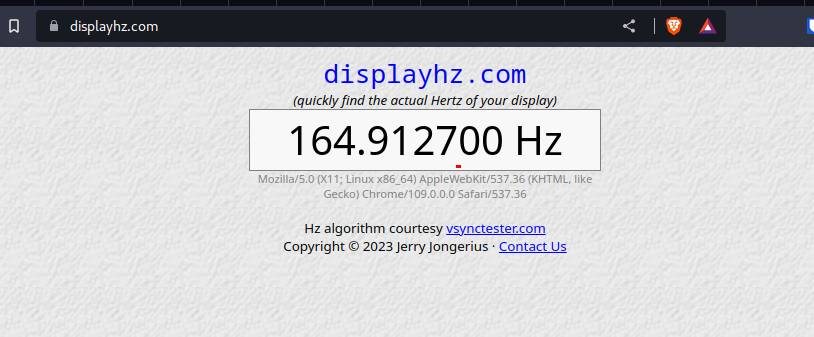
Found solution here: https://gitlab.gnome.org/GNOME/mutter/-/issues/503#note_463305
Edit: Testing in games with V-Sync on also seems to show more than 60 FPS now
@sTiKyt Same problem with the last driver release 530.41.03 (released yesterday) Related to #471

@sTiKyt Same problem with the last driver release 530.41.03 (released yesterday) Related to #471
Well, for now just add /etc/environment setting as described above
I'm glad you found the __GL_SYNC_DISPLAY_DEVICE environment variable. I believe there is equivalent control within nvidia-settings, too.
Given multiple monitors, as part of the same desktop, with different refresh rates, is the sync-to-vblank behavior well defined? We can only really sync to one monitor, and then presentation on all other monitors will tear.
Maybe the driver could default to whichever monitor has the highest refresh rate, but I worry changing default behavior would break existing configurations for other users.
Is there particular behavior that you think the driver should adopt as the default?

I'm glad you found the __GL_SYNC_DISPLAY_DEVICE environment variable. I believe there is equivalent control within nvidia-settings, too.
Given multiple monitors, as part of the same desktop, with different refresh rates, is the sync-to-vblank behavior well defined? We can only really sync to one monitor, and then presentation on all other monitors will tear.
Maybe the driver could default to whichever monitor has the highest refresh rate, but I worry changing default behavior would break existing configurations for other users.
Is there particular behavior that you think the driver should adopt as the default?
I didn't have any visual issues since setting that variable, but I'm not sure about any corner cases this env var might produce
Screen tearing seems to be the major issue when setting that variable
Didn't have any throughout my experience so far, may differ for others tho
I'm glad you found the __GL_SYNC_DISPLAY_DEVICE environment variable. I believe there is equivalent control within nvidia-settings, too. Given multiple monitors, as part of the same desktop, with different refresh rates, is the sync-to-vblank behavior well defined? We can only really sync to one monitor, and then presentation on all other monitors will tear. Maybe the driver could default to whichever monitor has the highest refresh rate, but I worry changing default behavior would break existing configurations for other users. Is there particular behavior that you think the driver should adopt as the default?
I didn't have any visual issues since setting that variable, but I'm not sure about any corner cases this env var might produce
Just a little update, been using that variable for over a year now, and i'm still not experiencing any issues
I'm glad you found the __GL_SYNC_DISPLAY_DEVICE environment variable. I believe there is equivalent control within nvidia-settings, too.
Given multiple monitors, as part of the same desktop, with different refresh rates, is the sync-to-vblank behavior well defined? We can only really sync to one monitor, and then presentation on all other monitors will tear.
Maybe the driver could default to whichever monitor has the highest refresh rate, but I worry changing default behavior would break existing configurations for other users.
Is there particular behavior that you think the driver should adopt as the default?
Would be really nice if you could clarify where is forementioned control located in nvidia-settings, because i coudn't find anything like that and i think it would be useful to many users finding this issue later