

 NVIDIA
Electron applications do not redraw properly to reflect latest input (reuse old frames)
NVIDIA Driver Version 515.43.04
GPU NVIDIA RTX 2070 Super Max-Q
Describe the bug Electron apps such as Visual Studio Code or the Tidal Hi-Fi application regularly reuse old frames or their visual contents seem to "lag behind" the actual state of the application. This only happens on Wayland (possibly only with GNOME, I'm not sure), not on X11.
To Reproduce
- Start a GNOME 42.1 Wayland session (using GBM).
- Start Visual Studio Code (tested with 1.67).
- Open the terminal, type some text, such as
This is a very long command. - Use the left arrow key to move the cursor in the terminal back, one position at a time.
- Notice how often the cursor temporarily quickly jumps back to the right a fraction of a second. Sometimes this also happens when typing input; the last-typed character is not immediately reflected until the window must redraw due to another event, such as typing another character.
Alternatively:
- Start a GNOME 42.1 Wayland session (using GBM).
- Start the Tidal Hi-Fi application.
- Type something in the search bar above.
- Notice the contents of the search bar lagging behind what has actually been typed sometimes.
This bug is also present in the proprietary drivers, and has been since at least GBM support was added (November 2021, I believe), and IIRC even when only EGLStreams was present. It only seems to happen with various Electron-based applications.
Expected behavior There is no lag in redrawing and input is immediately properly reflected in the application.
Please reproduce the problem, run nvidia-bug-report.sh, and attach the resulting nvidia-bug-report.log.gz.


I actually stopped seeing this after updating to the open source drivers. I also run Discord in Flatpak, so that may be related.

This also seems to happen in Anki with it using QTWebEngine to display cards although the issue seems slightly different hovering over the QTWebEngine widget seems to force it to show the new frame also just waiting will do the same
Also it's worth noting I'm not using the open source kernel modules but seems present in both equally

See related: https://gitlab.freedesktop.org/xorg/xserver/-/issues/1317
Sigh, yes, this does seem to be yet another instance of the general Xwayland synchronization problem. I'm prioritizing trying to get this fixed. As mentioned in my last comment on the above issue, I intend to propose a patch adding the necessary infrastructure to Xwayland.
For the time being, it may be possible to work around the issue by setting __GL_MaxFramesAllowed=1. For graphics-intensive applications like games this can have a significant performance impact (30% to 50% lower FPS in some cases), but for something like VS Code or Anki that's probably not a huge issue.

See related: https://gitlab.freedesktop.org/xorg/xserver/-/issues/1317
Sigh, yes, this does seem to be yet another instance of the general Xwayland synchronization problem. I'm prioritizing trying to get this fixed. As mentioned in my last comment on the above issue, I intend to propose a patch adding the necessary infrastructure to Xwayland.
For the time being, it may be possible to work around the issue by setting __GL_MaxFramesAllowed=1. For graphics-intensive applications like games this can have a significant performance impact (30% to 50% lower FPS in some cases), but for something like VS Code or Anki that's probably not a huge issue.
Only thing purely NVIDIA related(to my knowledge at least) stopping me from using Wayland keep up the great work
Only other issues I haven't tested on non NVIDIA cards so I don't feel like making a issue, if anyone has AMD or Intel hardware and is willing to test might be worth looking into these
- Android studio emulator doesn't start
- Krita image canvas will not render
- KDenLive color picker will not let you pick a color only returns dark blue
- weird shadow under mouse cursor that gets darker over time under cursor in KDE when hovering on blurred taskbar
- Alacritty on GNOME title bar sometimes glitches out when moving window
- Hyprland default wallpaper looks strange moving the mouse will fix the area around it in a box shape
- KDE start menu under
right click -> show alternatives -> application menudoesn't change category sometimes when changing focus to another category or when it does sometimes menu will be half blurred and half transparent - Chrome fails to use hardware compositor when using Wayland natively works on xwayland
For the time being, it may be possible to work around the issue by setting __GL_MaxFramesAllowed=1. For graphics-intensive applications like games this can have a significant performance impact (30% to 50% lower FPS in some cases), but for something like VS Code or Anki that's probably not a huge issue.
FWIW I tried this from a terminal, but it had no effect for me. VSCode does launch its own process outside the terminal, so perhaps the environment variables aren't properly being passed on.
@erik-kz Seriously, thank you and everyone else at NVIDIA who works on Wayland. You are brilliant.
Thanks to your hard work I was able to switch to Wayland a few months ago and only encounter a few minor issues. Mainly the judder due to lack of explicit sync in XWayland apps (Discord and Vscode).
Since you mentioned PRIME/laptops, I can confirm that the judder happens for me on RTX3090 on a Single-GPU desktop too.
But I saw your comments from a week ago on your linked ticket, about experimenting with explicit sync in X Wayland. It is clearly the right way forward (rather than trying to hack implicit sync into the NVIDIA driver). And I appreciate that you went above and beyond to solve this the right way. That is perfection and genius!
There are only a few things with NVIDIA Wayland that still hurt. The experience overall is good but the issues I'd say are:
- Sync issues that lead to juddering app GUIs, as mentioned here. They are pretty severe but I can live with it for now.
- Lack of support for the Wayland color temperature setting API, so color profiles for color correction and night light are not possible.
- The Gamescope compositor still crashes on NVIDIA even with the latest NVIDIA driver and Gamescope version.
That list is honestly it. It's a small list. Gaming in general works very well, and so do most applications.
And considering that you guys achieved this high level of Wayland compatibility in such a short time after you began to implement GBM is stunning.
It's also fascinating to see you jump in and correct the design of X Wayland to sync explicitly, even after their current maintainers gave the usual Linux response of "works for me already, implicit sync is fine so you should slow down your driver by implementing it like everyone else". 😉 But it was great to see them receptive to your explicit sync work when you mentioned that you have actually put in the effort to implement it! The inertia of Linux is painful, no doubt about it. So I always appreciate when someone skilled steps in and helps, like you just did.
Clearly NVIDIA hires absolute geniuses!
I'll keep using Wayland since the upsides outweigh the downsides. And I look forward to the results of your awesome developments in the future! 😊❤️

See related: https://gitlab.freedesktop.org/xorg/xserver/-/issues/1317
Sigh, yes, this does seem to be yet another instance of the general Xwayland synchronization problem. I'm prioritizing trying to get this fixed. As mentioned in my last comment on the above issue, I intend to propose a patch adding the necessary infrastructure to Xwayland. For the time being, it may be possible to work around the issue by setting __GL_MaxFramesAllowed=1. For graphics-intensive applications like games this can have a significant performance impact (30% to 50% lower FPS in some cases), but for something like VS Code or Anki that's probably not a huge issue.
Only thing purely NVIDIA related(to my knowledge at least) stopping me from using Wayland keep up the great work
Only other issues I haven't tested on non NVIDIA cards so I don't feel like making a issue, if anyone has AMD or Intel hardware and is willing to test might be worth looking into these
- Android studio emulator doesn't start
- Krita image canvas will not render
- KDenLive color picker will not let you pick a color only returns dark blue
- weird shadow under mouse cursor that gets darker over time under cursor in KDE when hovering on blurred taskbar
- Alacritty on GNOME title bar sometimes glitches out when moving window
- Hyprland default wallpaper looks strange moving the mouse will fix the area around it in a box shape
- KDE start menu under
right click -> show alternatives -> application menudoesn't change category sometimes when changing focus to another category or when it does sometimes menu will be half blurred and half transparent- Chrome fails to use hardware compositor when using Wayland natively works on xwayland
About Android Studio Emulator, once I switched to SwiftShader it started working.
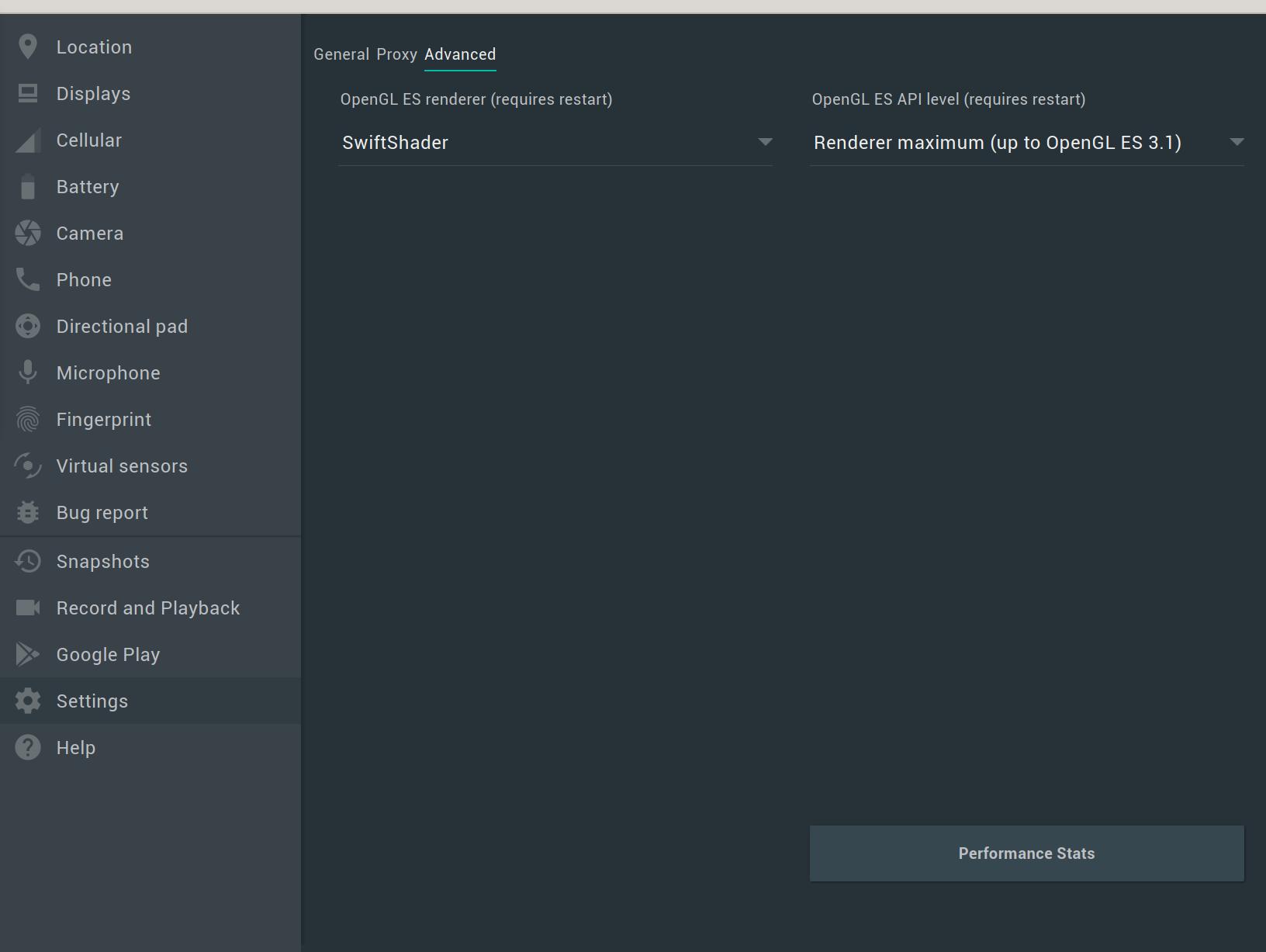

I saw this with my note application Obsidian that also uses Electron platform. When I'm typing something fast (and I'm a fast typer), there are strange blinks and lags. I'm using NVIDIA 525.60.11 driver.

Definitely happening in several Electron apps with no known workaround from what I can tell:
- Obsidian
- Notion
- Slack


I saw this with my note application Obsidian that also uses Electron platform. When I'm typing something fast (and I'm a fast typer), there are strange blinks and lags. I'm using NVIDIA 525.60.11 driver.
Same here, many of the applications I use are electron based and I've noticed this same problem (blinks and lags) when writing.
Linux: Arch Kernel: 6.4.4-zen1 NVIDIA Propietary Drivers: 535.86 Wayland: 1.22 Plasma: 5.27


This most probably has to do with Xwayland:
https://gitlab.freedesktop.org/xorg/xserver/-/issues/1317
You see it the most in Electron apps because they use Xwayland by default, not native Wayland. I suggest forcing your Electron apps to use native Wayland by adding the following parameters to them at launch:
--enable-features=UseOzonePlatform --ozone-platform=wayland

Same problem here on Fedora 38, Nvidia RTX 4070, in some apps: Visual Studio Code, Mattermost, Obsidian. I think they are all electron apps.

I have the same issue happening in Discord. Nvidia RTX 3060 Ti driver: 545.29.06 kernel: 6.7.4-zen1-1-zen

You can help testing the initial implementation of explicit sync https://gitlab.freedesktop.org/xorg/xserver/-/merge_requests/967
If you are on Arch, this AUR package makes installing the patch easy https://aur.archlinux.org/packages/xorg-xwayland-explicit-sync-git

You can help testing the initial implementation of explicit sync https://gitlab.freedesktop.org/xorg/xserver/-/merge_requests/967
If you are on Arch, this AUR package makes installing the patch easy https://aur.archlinux.org/packages/xorg-xwayland-explicit-sync-git
Note that to fully solve the problem, the above patch will need to be accompanied by an upcoming NVIDIA driver release. The patch by itself might help in some cases, but corruption is still possible.
Good to see this being added finally, puts NVIDIA cards back on the table for me perhaps next time
I have the same issue happening in Discord. Nvidia RTX 3060 Ti driver: 545.29.06 kernel: 6.7.4-zen1-1-zen
Turning off hardware acceleration in Discord worked for me, but I'm on the 555 beta now. Issue persists in other electron apps despite 555 beta. Consider trying it.

Yes desktops need to support explicit sync, this can be closed. Everything is fixed on NVIDIA end, just need to wait for desktops. I think for now GNOME has a MR for it, not sure state of KDE etc. I know it's planned for Hyprland once Vaxry rewrites all of the wlroots implementations and replaces them with Hyprland ones
Yes desktops need to support explicit sync, this can be closed. Everything is fixed on NVIDIA end, just need to wait for desktops. I think for now GNOME has a MR for it, not sure state of KDE etc. I know it's planned for Hyprland once Vaxry rewrites all of the wlroots implementations and replaces them with Hyprland ones
GNOME does not have a MR for it; it already has it. Explicit sync support is available in the latest stable version of Mutter (>= 46.1). You also need XWayland >= 24.1.
I don't know for sure about KDE, but it seems that explicit sync support has been added in KWin 6.1 beta, and the stable release is coming soon, too. So, you either already have it (or almost), of course assuming you are using the latest version of software.

I don't have this problem any more now that explicit sync is in since GNOME 46.1 :tada: . Closing this.
Hyprland you can enable it in experimental option on git branch, since switched to AMD but now that XWayland expects explicit sync had a short moment where AMD was like NVIDIA in terms of stutter and that's fixed 😅
KDE I think everything is good now? On wlroots (Hyprland isn't wlroots anymore) I think it's almost done or partially implemented?
If NVIDIA isn't buggy on Wayland may very well consider it in future