

 NVIDIA
trtexec failed due to datatype problems
Description
I was using the following notebook to convert a detectron2 model (using base configs and weights) to .onnx format, which succeeded. I then downloaded the weights and I installed TensorRT and all required dependencies on Python 3.6.9. Note that my device is Jetson TX2. I tried to use the create_onnx.py that was given in the samples/detectron2, however I came to the conclusion that that would need python3.7, which is incompatible with legit every installation I have, so I used the model.onnx I had. When I ran /usr/src/tensorrt/bin/trtexec --onnx path/to/model.onx --saveEngine=/savePath I got the following output which I put below
&&&& RUNNING TensorRT.trtexec [TensorRT v8201] # /usr/src/tensorrt/bin/trtexec --onnx=/home/ecoation/updated_model.onnx --saveEngine=/home/ecoation/Downloads/engine.trt --useCudaGraph
[07/28/2022-12:39:18] [I] === Model Options ===
[07/28/2022-12:39:18] [I] Format: ONNX
[07/28/2022-12:39:18] [I] Model: /home/ecoation/updated_model.onnx
[07/28/2022-12:39:18] [I] Output:
[07/28/2022-12:39:18] [I] === Build Options ===
[07/28/2022-12:39:18] [I] Max batch: explicit batch
[07/28/2022-12:39:18] [I] Workspace: 16 MiB
[07/28/2022-12:39:18] [I] minTiming: 1
[07/28/2022-12:39:18] [I] avgTiming: 8
[07/28/2022-12:39:18] [I] Precision: FP32
[07/28/2022-12:39:18] [I] Calibration:
[07/28/2022-12:39:18] [I] Refit: Disabled
[07/28/2022-12:39:18] [I] Sparsity: Disabled
[07/28/2022-12:39:18] [I] Safe mode: Disabled
[07/28/2022-12:39:18] [I] DirectIO mode: Disabled
[07/28/2022-12:39:18] [I] Restricted mode: Disabled
[07/28/2022-12:39:18] [I] Save engine: /home/ecoation/Downloads/engine.trt
[07/28/2022-12:39:18] [I] Load engine:
[07/28/2022-12:39:18] [I] Profiling verbosity: 0
[07/28/2022-12:39:18] [I] Tactic sources: Using default tactic sources
[07/28/2022-12:39:18] [I] timingCacheMode: local
[07/28/2022-12:39:18] [I] timingCacheFile:
[07/28/2022-12:39:18] [I] Input(s)s format: fp32:CHW
[07/28/2022-12:39:18] [I] Output(s)s format: fp32:CHW
[07/28/2022-12:39:18] [I] Input build shapes: model
[07/28/2022-12:39:18] [I] Input calibration shapes: model
[07/28/2022-12:39:18] [I] === System Options ===
[07/28/2022-12:39:18] [I] Device: 0
[07/28/2022-12:39:18] [I] DLACore:
[07/28/2022-12:39:18] [I] Plugins:
[07/28/2022-12:39:18] [I] === Inference Options ===
[07/28/2022-12:39:18] [I] Batch: Explicit
[07/28/2022-12:39:18] [I] Input inference shapes: model
[07/28/2022-12:39:18] [I] Iterations: 10
[07/28/2022-12:39:18] [I] Duration: 3s (+ 200ms warm up)
[07/28/2022-12:39:18] [I] Sleep time: 0ms
[07/28/2022-12:39:18] [I] Idle time: 0ms
[07/28/2022-12:39:18] [I] Streams: 1
[07/28/2022-12:39:18] [I] ExposeDMA: Disabled
[07/28/2022-12:39:18] [I] Data transfers: Enabled
[07/28/2022-12:39:18] [I] Spin-wait: Disabled
[07/28/2022-12:39:18] [I] Multithreading: Disabled
[07/28/2022-12:39:18] [I] CUDA Graph: Enabled
[07/28/2022-12:39:18] [I] Separate profiling: Disabled
[07/28/2022-12:39:18] [I] Time Deserialize: Disabled
[07/28/2022-12:39:18] [I] Time Refit: Disabled
[07/28/2022-12:39:18] [I] Skip inference: Disabled
[07/28/2022-12:39:18] [I] Inputs:
[07/28/2022-12:39:18] [I] === Reporting Options ===
[07/28/2022-12:39:18] [I] Verbose: Disabled
[07/28/2022-12:39:18] [I] Averages: 10 inferences
[07/28/2022-12:39:18] [I] Percentile: 99
[07/28/2022-12:39:18] [I] Dump refittable layers:Disabled
[07/28/2022-12:39:18] [I] Dump output: Disabled
[07/28/2022-12:39:18] [I] Profile: Disabled
[07/28/2022-12:39:18] [I] Export timing to JSON file:
[07/28/2022-12:39:18] [I] Export output to JSON file:
[07/28/2022-12:39:18] [I] Export profile to JSON file:
[07/28/2022-12:39:18] [I]
[07/28/2022-12:39:18] [I] === Device Information ===
[07/28/2022-12:39:18] [I] Selected Device: NVIDIA Tegra X2
[07/28/2022-12:39:18] [I] Compute Capability: 6.2
[07/28/2022-12:39:18] [I] SMs: 2
[07/28/2022-12:39:18] [I] Compute Clock Rate: 1.3 GHz
[07/28/2022-12:39:18] [I] Device Global Memory: 7858 MiB
[07/28/2022-12:39:18] [I] Shared Memory per SM: 64 KiB
[07/28/2022-12:39:18] [I] Memory Bus Width: 128 bits (ECC disabled)
[07/28/2022-12:39:18] [I] Memory Clock Rate: 1.3 GHz
[07/28/2022-12:39:18] [I]
[07/28/2022-12:39:18] [I] TensorRT version: 8.2.1
[07/28/2022-12:39:20] [I] [TRT] [MemUsageChange] Init CUDA: CPU +266, GPU +0, now: CPU 285, GPU 7525 (MiB)
[07/28/2022-12:39:21] [I] [TRT] [MemUsageSnapshot] Begin constructing builder kernel library: CPU 285 MiB, GPU 7525 MiB
[07/28/2022-12:39:21] [I] [TRT] [MemUsageSnapshot] End constructing builder kernel library: CPU 314 MiB, GPU 7554 MiB
[07/28/2022-12:39:21] [I] Start parsing network model
[07/28/2022-12:39:21] [I] [TRT] ----------------------------------------------------------------
[07/28/2022-12:39:21] [I] [TRT] Input filename: /home/ecoation/updated_model.onnx
[07/28/2022-12:39:21] [I] [TRT] ONNX IR version: 0.0.8
[07/28/2022-12:39:21] [I] [TRT] Opset version: 9
[07/28/2022-12:39:21] [I] [TRT] Producer name: pytorch
[07/28/2022-12:39:21] [I] [TRT] Producer version: 1.10
[07/28/2022-12:39:21] [I] [TRT] Domain:
[07/28/2022-12:39:21] [I] [TRT] Model version: 0
[07/28/2022-12:39:21] [I] [TRT] Doc string:
[07/28/2022-12:39:21] [I] [TRT] ----------------------------------------------------------------
[07/28/2022-12:39:22] [I] [TRT] No importer registered for op: AliasWithName. Attempting to import as plugin.
[07/28/2022-12:39:22] [I] [TRT] Searching for plugin: AliasWithName, plugin_version: 1, plugin_namespace:
[07/28/2022-12:39:22] [E] [TRT] ModelImporter.cpp:773: While parsing node number 0 [AliasWithName -> "297"]:
[07/28/2022-12:39:22] [E] [TRT] ModelImporter.cpp:774: --- Begin node ---
[07/28/2022-12:39:22] [E] [TRT] ModelImporter.cpp:775: input: "data"
output: "297"
op_type: "AliasWithName"
attribute {
name: "name"
s: "data"
type: STRING
}
attribute {
name: "is_backward"
i: 0
type: INT
}
[07/28/2022-12:39:22] [E] [TRT] ModelImporter.cpp:776: --- End node --- [07/28/2022-12:39:22] [E] [TRT] ModelImporter.cpp:779: ERROR: builtin_op_importers.cpp:4870 In function importFallbackPluginImporter: [8] Assertion failed: creator && "Plugin not found, are the plugin name, version, and namespace correct?" [07/28/2022-12:39:22] [E] Failed to parse onnx file [07/28/2022-12:39:22] [I] Finish parsing network model [07/28/2022-12:39:22] [E] Parsing model failed [07/28/2022-12:39:22] [E] Failed to create engine from model. [07/28/2022-12:39:22] [E] Engine set up failed &&&& FAILED TensorRT.trtexec [TensorRT v8201] # /usr/src/tensorrt/bin/trtexec --onnx=/home/ecoation/updated_model.onnx --saveEngine=/home/ecoation/Downloads/engine.trt --useCudaGraph
Environment
TensorRT Version: 8.2.1 NVIDIA GPU: Not sure what to put here NVIDIA Driver Version: Not sure CUDA Version: 10.2 CUDNN Version: Not sure Operating System: Ubuntu 18.04 Python Version (if applicable): 3.6.9 Tensorflow Version (if applicable): NA PyTorch Version (if applicable): 1.8.1 Baremetal or Container (if so, version): baremetal
Relevant Files
File used for turning detectron2 to model.onnx - https://github.com/frankvp11/readme/blob/main/train_detectron2.ipynb File used for trtexec - trtexec file that is given with tensorRT instrall
Steps To Reproduce
Download and install TensorRT, then install all the requirements (Cuda 10.2, torch, all the requirements.txt) then run /usr/src/tensorrt/bin/trtexec --onnx=/home/ecoation/Downloads/model.onnx --saveEngine=/home/ecoation/Downloads/engine.trt --useCudaGraphdpkg -l | grep TensorRT If you need my environment/more information please let me know, and let me know how I can get that information for you. Thanks in advance

[07/28/2022-12:39:22] [I] [TRT] Searching for plugin: AliasWithName, plugin_version: 1, plugin_namespace: [07/28/2022-12:39:22] [E] [TRT] ModelImporter.cpp:773: While parsing node number 0 [AliasWithName -> "297"]: [07/28/2022-12:39:22] [E] [TRT] ModelImporter.cpp:774: --- Begin node --- [07/28/2022-12:39:22] [E] [TRT] ModelImporter.cpp:775: input: "data" output: "297" op_type: "AliasWithName" attribute { name: "name" s: "data" type: STRING } attribute { name: "is_backward" i: 0 type: INT }
[07/28/2022-12:39:22] [E] [TRT] ModelImporter.cpp:776: --- End node --- [07/28/2022-12:39:22] [E] [TRT] ModelImporter.cpp:779: ERROR: builtin_op_importers.cpp:4870 In function importFallbackPluginImporter: [8] Assertion failed: creator && "Plugin not found, are the plugin name, version, and namespace correct?"
You need to implement a plugin for AliasWithName

@frankvp11 When you export detectron2 model to ONNX you will end up with a graph that has ONNX ops as well as Caffe2 ops which we do not support. As a result it is required to surge NN graph to replace unsupported ops with TensorRT supported ops, which is what create_onnx.py does.
Please convert model on your PC (i.e. run create_onnx.py) and only after that take resulted ONNX and convert it on Jetson device. I think using trtexec will be much easier dependencies wise compared to build_engine.py. Keep in mind, this converter converts Detectron 2 Mask R-CNN R50-FPN 3x specifically. It will not work with any other detectron 2 model. However, it should be pretty easy to adjust for other similar models.
There is also a TensorRT 8.4.1 version requirement which came out about a month ago. JetPack is usually a bit behind with regards to latest TRT versions. So you'll have to figure out how to install TRT 8.4.1 on a Jetson device. @rajeevsrao maybe you can give some advice?

Alright, I'll give that a try and get back to you with the results so that we can go from there
@frankvp11 build_engine.py can produce properly calibrated int8 engine that will be much faster, this is especially important for jetson devices. So as soon as you'll get through create_onnx.py, try trtexec. After that, try to properly install ARM compatible dependencies for libraries that are required to do int8 calibration.
Hi @azhurkevich , so I've run the export_onnx.py from detectron2 (which ran successfully) and I tried to use the create_onnx.py as you told me, but I'm getting an error. I've posted the output and command below.
ecoation@ubuntu:~/TensorRT/samples/python/detectron2$ python3 create_onnx.py --exported_onnx /home/ecoation/Downloads/model.onnx --onnx /home/ecoation/Downloads/converted.onnx --det2_config ../Detectron2Install/detectron2/configs/COCO-InstanceSegmentation/mask_rcnn_R_50_FPN_3x.yaml --det2_weights detectron2://ImageNetPretrained/MSRA/R-50.pkl --sample_image /home/ecoation/Downloads/sampleImage.jpeg
INFO:ModelHelper:ONNX graph loaded successfully
INFO:ModelHelper:Number of FPN output channels is 256
INFO:ModelHelper:Number of classes is 80
INFO:ModelHelper:First NMS max proposals is 1000
INFO:ModelHelper:First NMS iou threshold is 0.7
INFO:ModelHelper:First NMS score threshold is 0.01
INFO:ModelHelper:First ROIAlign type is ROIAlignV2
INFO:ModelHelper:First ROIAlign pooled size is 7
INFO:ModelHelper:First ROIAlign sampling ratio is 0
INFO:ModelHelper:Second NMS max proposals is 100
INFO:ModelHelper:Second NMS iou threshold is 0.5
INFO:ModelHelper:Second NMS score threshold is 0.05
INFO:ModelHelper:Second ROIAlign type is ROIAlignV2
INFO:ModelHelper:Second ROIAlign pooled size is 14
INFO:ModelHelper:Second ROIAlign sampling ratio is 0
INFO:ModelHelper:Individual mask output resolution is 28x28
[Variable (x.1): (shape=[3, 800, 1202], dtype=float32)]
Traceback (most recent call last):
File "create_onnx.py", line 659, in
@frankvp11 seems that your model could've been changed or retrained based on your --det2_weights name should be model_final_f10217.pkl. Also you are not following instructions on how to properly export the public model. This is your input shape 3, 800, 1202, it should be 3, 1344, 1344. Please read instructions carefully and follow them, 95% of the issues stem from the fact that people are skipping steps or not following them closely. Keep in mind that this converter is guaranteed to work with publicly available model, that includes architecture and weights. It will probably work with custom weights but YMMV. If you would like a different input res of the model, please understand my converter by reading code and comments, modify it however you want.
I didn't realize that, thanks for pointing that out. Might you have any sample images I can borrow then? I am failing to find any that are 1344x1344
 You can use this one. Any coco image resized to 1344x1344 is ok. Before running on Jetson, make sure to verify that you are getting expected mAP values by running eval_coco.py.
@azhurkevich I'm sorry to bother you again, but the image that you gave me was not 1344x1344, I have a google colab link that I can share if needed. I also tried an image from the coco dataset, however that one was also only [3, 800, 1202]. Any ideas? I've posted a link to the google colab, feel free to run it (it wont take long) and let me know what to fix
https://colab.research.google.com/drive/1E6jbRj8slMpPx7cPIj_-UOgxGUWa6CK-?usp=sharing
Edit: I created a simple thing that resizes the image to 1344x1344 but it still doesnt work...
This is a 1344x1344 image, I just saved it from here. Did you modify export script according to my instructions?
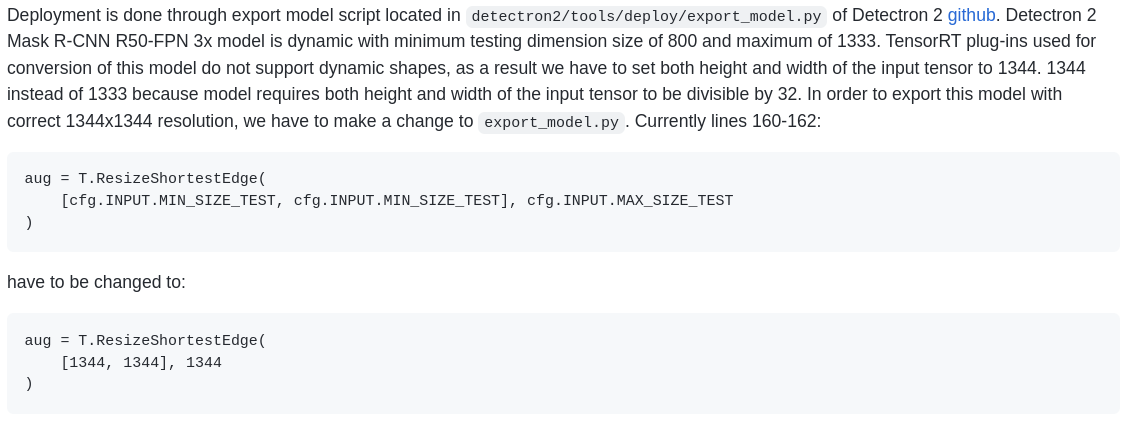

Yes, I did, and I still get the same error, have you tried my script at all @azhurkevich ? It might help in identifying because I'm getting the same output as before INFO:ModelHelper:ONNX graph loaded successfully INFO:ModelHelper:Number of FPN output channels is 256 INFO:ModelHelper:Number of classes is 80 INFO:ModelHelper:First NMS max proposals is 1000 INFO:ModelHelper:First NMS iou threshold is 0.7 INFO:ModelHelper:First NMS score threshold is 0.01 INFO:ModelHelper:First ROIAlign type is ROIAlignV2 INFO:ModelHelper:First ROIAlign pooled size is 7 INFO:ModelHelper:First ROIAlign sampling ratio is 0 INFO:ModelHelper:Second NMS max proposals is 100 INFO:ModelHelper:Second NMS iou threshold is 0.5 INFO:ModelHelper:Second NMS score threshold is 0.05 INFO:ModelHelper:Second ROIAlign type is ROIAlignV2 INFO:ModelHelper:Second ROIAlign pooled size is 14 INFO:ModelHelper:Second ROIAlign sampling ratio is 0 INFO:ModelHelper:Individual mask output resolution is 28x28 Traceback (most recent call last): File "create_onnx.py", line 659, in main(args) File "create_onnx.py", line 638, in main det2_gs.update_preprocessor(args.batch_size) File "create_onnx.py", line 209, in update_preprocessor del self.graph.inputs[1] IndexError: list assignment index out of range
Nope, I am not touching collab. However, I've looked at our steps. Attach ONNX that results from export step.
Ok, just give me a second to get that ready for you- is google drive link ok or is there some other way you want it shared?
@azhurkevich Its saying it doesnt support that file type? shall I zip it first?
Its to large to be posted here as a zip Here's the link if you want it - It's google drive but with time I can change it to whichever you'd like https://drive.google.com/file/d/1mHsH42eofSKMxfDWn5UbWGSxSXaDyyLM/view?usp=sharing @azhurkevich
At first I was surprised that you were able to export the model. Because det2 exporter was broken for about a month.
Considering there were changes added to export script 18 days ago. It looks like they've changed export completely. Now it is purely ONNX, no Caffe2. Model graph doesn't even look close to what it has been before. This obviously breaks converter because NN graph is completely different. Try to install couple months old detectron2 and do this again. Otherwise, the solution is to rewrite converter completely which will take months based on my current workload.
I can give you converted ONNX for the time being. Unzip it and use it as --exported_onnx for create_onnx.py.
You can visualize both graphs and see for yourself, the one that you have and the one I've attached with netron and see the difference. If you want converter working asap, you can also do that but it'll require some know how that you can obtain by reading comments and code. Side by side visualizations of both graphs helps a lot, they are key in understanding what goes where.
Yeah i've been looking at netron. I'll be sure to do that, thanks again though. Would you like me to close?
Sure, if you have any questions in the future, don't hesitate - reach out, we are always happy to help!
@azhurkevich to come back to this, you said earlier in the conversation that it would be pretty easy to adjust for other similar models-how would one go about doing that? Like what files would I need to edit/add onto and what would I need to add
Edit: With that I mean for create_onnx.py, or is it only possible for the build_engine.py?
@frankvp11 create ONNX has to be modified. Please refer to code and comments
So to my understanding, when I get errors like the AliasWithName like I did at the start, I have to create a plugin using self.graph.plugin? Or am I incorrect?
Edit: Does pruning the model make it go faster? As i'm currently experiencing 1800ms average inference speed on Jetson TX2 so I want to know if pruning will help - Thanks again @azhurkevich
No, please look at graph before and after conversion and see how I deal with AliasWithName (I delete it) and rest of the nodes in graph. Before playing around with graph you need to be very comfortable with my code and you have to understand what is going on. I won't be able to explain code in details due to time constraints and work projects, so you have to dig deeper yourself. I made sure comments are as crystal clear as possible. I also suggest reading this.
You can do whatever you want really, if you want it to go faster I suggest starting with backbone. Try to simplify it. Remember, when you get to INT8 and you are still not happy with perf (Is 1800ms with INT8?), there is only one way really - simplify the model itself. This will eat your mAP values, you will loose accuracy, but it is a trade-off you must be willing to make and where you would like to strike balance between speed and accuracy is up to you. Meaningful simplification of the model will take some know how and some trial and error.
Ok thank you. I will look into how I can delete things from the graph that cause problems, and I appreciate the time you take out of your busy schedule to help. And no the perf wasnt with INT8, i'm trying that as we speak. Ill also be sure to read more in depth of the situation
@azhurkevich do you know if there are any good scripts out there that can infer without needing detectron2 installed, as i'm running into issues installing detectron2 on python3.6 and the script that you put out needs it in the ImageBatcher class
@azhurkevich Sorry to bother you - Just wanted to inform you - I found this https://github.com/Tencent/TPAT I have yet to test it but supposedly it would work. I'll come back here on probably monday or so to let you know how it goes but if it works it might be a suggestion for other people with similar problems.