

 NVIDIA-Merlin
Getting error while connecting to merlin through docker container
Getting error while connecting to merlin through docker container by using this command: docker run --gpus all --rm -it -p 8888:8888 -p 8797:8787 -p 8796:8786 --ipc=host --cap-add SYS_NICE nvcr.io/nvidia/merlin/merlin-training:22.03 /bin/bash
Error: docker: Error response from daemon: OCI runtime create failed: container_linux.go:370: starting container process caused: process_linux.go:459: container init caused: Running hook #0:: error running hook: exit status 1, stdout: , stderr: nvidia-container-cli: initialization error: nvml error: driver/library version mismatch: unknown.

@sejal9507 can you provide more detail about your HW and your driver version? can you share the print outs from the commands below by executing them in your terminal:
nvidia-smi
nvcc --version
thanks.

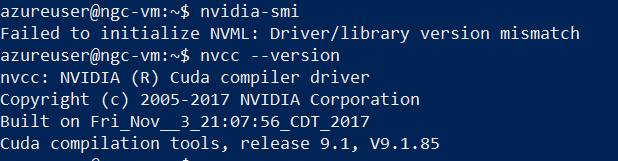
@sejal9507 thanks. What's your GPU (which GPU you have) and linux version specs? did you run nvidia-smi on your host machine terminal, I assume?
Can you reboot first? and check nvidia-smi again? Then can you also try to pull our latest container:
docker pull nvcr.io/nvidia/merlin/merlin-tensorflow-training:22.05
This issue also might help you if you have older drivers: https://github.com/NVIDIA-Merlin/Merlin/issues/88#issuecomment-1024708381
Hope that helps.
@sejal9507 did rebooting and pulling the latest container help? My understanding you are not able to see your GPUs on your Azure Virtual Machine instance when you do nvidia-smi on your host terminal? If yes, that's not related to Merlin. That issue is most likely due to your drivers and cuda toolkit version. you can try to reinstall drivers and cuda toolkit.
Yes,exactly I was not able to see the GPU when executing this command nvidia-smi. azureuser@ngc-vm:~$ nvidia-smi Failed to initialize NVML: Driver/library version mismatch
Can you give me the commands?
@sejal9507 Can you try a more updated container. It seems your not able to load in the cuda version on the docker container. So it tries to rely on the bare metal cuda, which might not be updated... If you can try the 22.05 container set and let us know if you hit same problem that might help verify if that is the issue.

(merlin) root@ngc-vm:~# docker run --gpus all --rm -it -p 8888:8888 -p 8797:8787 -p 8796:8786 --ipc=host --cap-add SYS_NICE nvcr.io/nvidia/merlin/merlin-training:22.05 /bin/bash
docker: Error response from daemon: OCI runtime create failed: container_linux.go:370: starting container process caused: process_linux.go:459: container init caused: Running hook #0:: error running hook: exit status 1, stdout: , stderr: nvidia-container-cli: initialization error: nvml error: driver/library version mismatch: unknown.
@sejal9507 OK so based on the information you gave, I think your main issue is that your version of CUDA is too old. You need to be on CUDA 10.1 or higher. You have reported 9.1, The drivers and cuda version on the docker image cannot be activated. Please refer to: https://docs.nvidia.com/deploy/cuda-compatibility/index.html#forward-compatible-upgrade
@sejal9507 closing this issue since we did not hear back from you. Please reopen in case you still have an issue.