

 MustardChef
[BUG] WSA starts loading, but then closes without an error.
Describe the bug | 描述一下这个错误
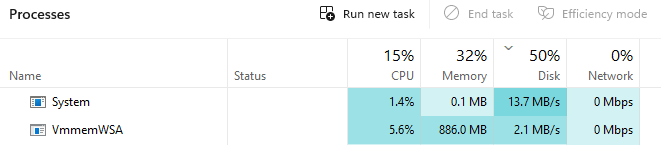
Hey there, I was just installed " WSA_2305.40000.2.0_x64_Release-Nightly-MindTheGapps-13.0-RemovedAmazon " version its installed without no error and icon of WSA is appeared in start tab too but when I'm trying to open any software, file explorer , ... or anything about WSA , it showing me " Starting WSA " Tab, buy after some time it close automatically , without any error at all and it space is increasing from 280mb to 680mb now and it increases more
Steps to reproduce the issue | 重现该问题的步骤
- Open WSA
- Starting Windows subsystem for Android Tab
- Crash without any error
Expected behaviour | 预期的行为
it should be open normally, but ...
Downloaded Build Of WSA | 已下载的WSA版本
WSA_2305.40000.2.0_x64_Release-Nightly-MindTheGapps-13.0-RemovedAmazon
Windows build number | Windows构建号
OS Build 22631.1835
PC Specification | 个人电脑规格
OS Name Microsoft Windows 11 Pro Version 10.0.22631 Build 22631 Other OS Description Not Available OS Manufacturer Microsoft Corporation System Name SHAYAN System Manufacturer System manufacturer System Model System Product Name System Type x64-based PC System SKU SKU Processor Intel(R) Core(TM) i3-9100F CPU @ 3.60GHz, 3600 Mhz, 4 Core(s), 4 Logical Processor(s) BIOS Version/Date American Megatrends Inc. 2208, 7/16/2021 SMBIOS Version 3.1 Embedded Controller Version 255.255 BIOS Mode UEFI BaseBoard Manufacturer ASUSTeK COMPUTER INC. BaseBoard Product ROG STRIX B365-G GAMING BaseBoard Version Rev X.0x Platform Role Desktop Secure Boot State On PCR7 Configuration Elevation Required to View Windows Directory C:\Windows System Directory C:\Windows\system32 Boot Device \Device\HarddiskVolume1 Locale United States Hardware Abstraction Layer Version = "10.0.22621.891" User Name SHAYAN\Shayan Time Zone United States Installed Physical Memory (RAM) 24.0 GB Total Physical Memory 23.9 GB Available Physical Memory 15.5 GB Total Virtual Memory 47.9 GB Available Virtual Memory 37.2 GB Page File Space 24.0 GB Page File C:\pagefile.sys Kernel DMA Protection Off Virtualization-based security Running Virtualization-based security Required Security Properties Virtualization-based security Available Security Properties Base Virtualization Support, Secure Boot, Mode Based Execution Control Virtualization-based security Services Configured Virtualization-based security Services Running Credential Guard Windows Defender Application Control policy Enforced Windows Defender Application Control user mode policy Audit Device Encryption Support Elevation Required to View A hypervisor has been detected. Features required for Hyper-V will not be displayed.
Additional context | 额外的背景
No response

@MrShayanX Does this issue occur with the latest build of WSA ---> 2305.40000.4.0?

@MrShayanX Does this issue occur with the latest build of WSA ---> 2305.40000.4.0?
I wasn't tried last version of WSA with play store, but I hadn't any problem with official versions until now
win11 25387 同样的问题。也是从2305.40000.2.0开始的,以前安装将结束时会打开google play和magisk,现在这俩都没了。

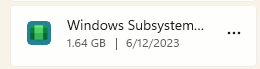
I don't know why the space of the program is increasing slowly
In the beginning, its size was 280 MB, but now it has reached 1640 MB!!!
I don't know why the space of the program is increasing slowly In the beginning, its size was 280 MB, but now it has reached 1640 MB!!!
@MrShayanX What version of WSA are you running? Are you using the latest version? Is WSA still not starting?
I don't know why the space of the program is increasing slowly In the beginning, its size was 280 MB, but now it has reached 1640 MB!!!
@MrShayanX What version of WSA are you running? Are you using the latest version?
Version 2305.40000.2.0
I don't know why the space of the program is increasing slowly In the beginning, its size was 280 MB, but now it has reached 1640 MB!!!
@MrShayanX What version of WSA are you running? Are you using the latest version?
Version 2305.40000.2.0
Please try 2305.40000.4.0 and confirm if it has the same issue of loading and closing.
I don't know why the space of the program is increasing slowly In the beginning, its size was 280 MB, but now it has reached 1640 MB!!!
@MrShayanX What version of WSA are you running? Are you using the latest version?
Version 2305.40000.2.0
Please try 2305.40000.4.0 and confirm if it has the same issue of loading and closing.
I have to say its to risky kinda !!! because already play store was installed after spent many time of pc worked on it ( and its not working even now lol ) Are you sure its the best way to test it ? because after that all of this process will be gone sad
I don't know why the space of the program is increasing slowly In the beginning, its size was 280 MB, but now it has reached 1640 MB!!!
@MrShayanX What version of WSA are you running? Are you using the latest version?
Version 2305.40000.2.0
Please try 2305.40000.4.0 and confirm if it has the same issue of loading and closing.
I have to say its to risky kinda !!! because already play store was installed after spent many time of pc worked on it ( and its not working even now lol ) Are you sure its the best way to test it ? because after that all of this process will be gone sad
So WSA with Play Store was working before?
I don't know why the space of the program is increasing slowly In the beginning, its size was 280 MB, but now it has reached 1640 MB!!!
@MrShayanX What version of WSA are you running? Are you using the latest version?
Version 2305.40000.2.0
Please try 2305.40000.4.0 and confirm if it has the same issue of loading and closing.
I have to say its to risky kinda !!! because already play store was installed after spent many time of pc worked on it ( and its not working even now lol ) Are you sure its the best way to test it ? because after that all of this process will be gone sad
So WSA with Play Store was working before?
Let me tell you completely ! at the first none of them was not installed , and space of WSA was 280 mb , after spand around 2 or 3 hours of wake up pc ( and worked very slowly because hdd is works ) it reached 1600 mb and after that play store was installed just once play store had opened and i loged in into it , and after restart play store want launch anymore and space again started to increasing by time ( without works any app on it )
i was installed the new version of WSA, but problem is still going on
I need you to try the following steps:
-
Remove WSA using the Uninstallation guide in the README.md
-
Go to "Turn Windows features on and off" and disable foll0wing, if enabled: Hyper-V, Virtual Machine Platform, Windows Hypervisor Platform, and Windows Subsystem for Linux, then restart.
-
Reenable the features (Windows Hypervisor Platform and Virtual Machine Platform) and restart a second time.
-
In registry editor (regedit), go to “\HKEY_LOCAL_MACHINE\SYSTEM\CurrentControlSet\Services\FsDepends":
Change the value of “Start” from “3” to “0”
- Then in CMD (Run as Adminstrator), paste:
bcdedit /set hypervisorlaunchtype auto
-
Restart the Computer
-
Reinstall WSA by running
Run.bat
I'm using the same version, I've just installed for the first time and as soon as I type in my password, WSA quits and reopens. Have followed the steps below but they didn't work for me. Running Windows_11_2305.40000.4.0_arm64.
I need you to try the following steps:
- Remove WSA using the Uninstallation guide in the README.md
- Go to "Turn Windows features on and off" and disable foll0wing, if enabled: Hyper-V, Virtual Machine Platform, Windows Hypervisor Platform, and Windows Subsystem for Linux, then restart.
- Reenable the features (Windows Hypervisor Platform and Virtual Machine Platform) and restart a second time.
- In registry editor (regedit), go to “\HKEY_LOCAL_MACHINE\SYSTEM\CurrentControlSet\Services\FsDepends":
Change the value of “Start” from “3” to “0”
- Then in CMD (Run as Adminstrator), paste:
bcdedit /set hypervisorlaunchtype auto
- Restart the Computer
- Reinstall WSA by running
Run.bat

I'm using the same version, I've just installed for the first time and as soon as I type in my password, WSA quits and reopens. Have followed the steps below but they didn't work for me. Running
Windows_11_2305.40000.4.0_arm64.I need you to try the following steps:
- Remove WSA using the Uninstallation guide in the README.md
- Go to "Turn Windows features on and off" and disable foll0wing, if enabled: Hyper-V, Virtual Machine Platform, Windows Hypervisor Platform, and Windows Subsystem for Linux, then restart.
- Reenable the features (Windows Hypervisor Platform and Virtual Machine Platform) and restart a second time.
- In registry editor (regedit), go to “\HKEY_LOCAL_MACHINE\SYSTEM\CurrentControlSet\Services\FsDepends":
Change the value of “Start” from “3” to “0”
- Then in CMD (Run as Adminstrator), paste:
bcdedit /set hypervisorlaunchtype auto
- Restart the Computer
- Reinstall WSA by running
Run.bat
@r1chjames Is the Official version working? Please can you check and confirm, please.
I'm using the same version, I've just installed for the first time and as soon as I type in my password, WSA quits and reopens. Have followed the steps below but they didn't work for me. Running
Windows_11_2305.40000.4.0_arm64.I need you to try the following steps:
- Remove WSA using the Uninstallation guide in the README.md
- Go to "Turn Windows features on and off" and disable foll0wing, if enabled: Hyper-V, Virtual Machine Platform, Windows Hypervisor Platform, and Windows Subsystem for Linux, then restart.
- Reenable the features (Windows Hypervisor Platform and Virtual Machine Platform) and restart a second time.
- In registry editor (regedit), go to “\HKEY_LOCAL_MACHINE\SYSTEM\CurrentControlSet\Services\FsDepends":
Change the value of “Start” from “3” to “0”
- Then in CMD (Run as Adminstrator), paste:
bcdedit /set hypervisorlaunchtype auto
- Restart the Computer
- Reinstall WSA by running
Run.bat@r1chjames Is the Official version working? Please can you check and confirm, please.
Have just installed the Amazon Appstore from the Microsoft Store and it works fine, just signed in and installed some apps to check.
My first time using WSA_2303. 40000.5.0 _x64_Release - the Nightly - with - magisk - d0c93842 (26101) - canary - MindTheGapps - 13.0 - RemovedAmazon_Windows_10. Zip During the installation, a memory overflow error is displayed and the WSA fails to be installed.
Later, I changed to WSA_2303.40000.5.0_x64_Release-Nightly- with-kernelsu-v0.0.4-mindtheGapps-13.0-Removedamazon_windows_10.zip. The installation is successful, and the start menu appears the Play Store, Google, WSA; No magisk, but that doesn't matter, does it?
There were some other problems during the launch of WSA, which I have since solved one by one, a very interesting experiment.

My first time using WSA_2303. 40000.5.0 _x64_Release - the Nightly - with - magisk - d0c93842 (26101) - canary - MindTheGapps - 13.0 - RemovedAmazon_Windows_10. Zip During the installation, a memory overflow error is displayed and the WSA fails to be installed.
Later, I changed to WSA_2303.40000.5.0_x64_Release-Nightly- with-kernelsu-v0.0.4-mindtheGapps-13.0-Removedamazon_windows_10.zip. The installation is successful, and the start menu appears the Play Store, Google, WSA; No magisk, but that doesn't matter, does it?
There were some other problems during the launch of WSA, which I have since solved one by one, a very interesting experiment.


@PixelMonkeyPro What are your PC Specs. Also, if the Magisk Manager app does not appear, you will need to download it and sideload it using WSAPacman or WSA-Sideloader.
我第一次使用WSA_2303。40000.5.0 _x64_Release - 夜间 - 与 - Magisk - d0c93842 (26101) - 金丝雀 - MindTheGapps - 13.0 - RemovedAmazon_Windows_10。Zip 在安装过程中,将显示内存溢出错误,并且无法安装 WSA。 后来,我更改为WSA_2303.40000.5.0_x64_Release-Nightly- with-kernelsu-v0.0.4-mindtheGapps-13.0-Removedamazon_windows_10.zip。安装成功,开始菜单出现Play商店,谷歌,WSA;没有魔法师,但这并不重要,不是吗? 在WSA启动期间还有其他一些问题,我已经一一解决了,这是一个非常有趣的实验。
您的电脑规格是什么。此外,如果未显示 Magisk Manager 应用程序,则需要下载它并使用 WSAPacman 或 WSA 旁加载器旁加载它。
Thanks MustardChef, here are my computer specs: The minimum system requirements for running windows 11 are not met
谢谢MustardChef,这是我的计算机规格:未满足运行Windows 11的最低系统要求
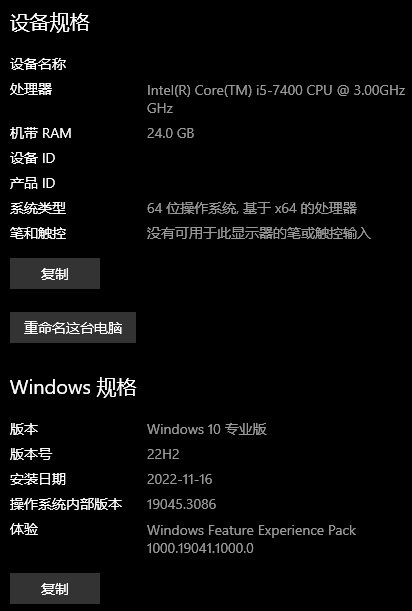
In another case, if there is a system overflow risk pop-up when starting WSA, I can wait for a certain amount of time for WSA to load and then click the confirm button, and then restart WSA, which allows me to use the APP instead of quitting because of an error.
System in this application is detected based on the stack buffer overflow. Overflow may allow evilThe user has won the application control.
Same thing happens to me. After installing, "Starting WSA" appears, it takes a long time and after a while it closes by itself, without any error message.

I need you to try the following steps:
- Remove WSA using the Uninstallation guide in the README.md
- Go to "Turn Windows features on and off" and disable foll0wing, if enabled: Hyper-V, Virtual Machine Platform, Windows Hypervisor Platform, and Windows Subsystem for Linux, then restart.
- Reenable the features (Windows Hypervisor Platform and Virtual Machine Platform) and restart a second time.
- In registry editor (regedit), go to “\HKEY_LOCAL_MACHINE\SYSTEM\CurrentControlSet\Services\FsDepends":
Change the value of “Start” from “3” to “0”
- Then in CMD (Run as Adminstrator), paste:
bcdedit /set hypervisorlaunchtype auto
- Restart the Computer
- Reinstall WSA by running
Run.bat
The same thing happens to the author of the topic with me. After installing WSA Builds (any version) "Starting WSA" appears, it takes a long time and after a while it closes by itself, without any error message.
I've already tried to follow this step-by-step, but restarting after disabling everything asked in step 2, a message appears during boot "It was not possible to make the changes, we are reverting to the previous configurations". And after restarting, all the options that I had deactivated in Windows resources, became active again by themselves.
Funny thing is, WSA has worked before on my notebook. I don't know what else to do, I think I'll just reinstall Windows.
If you have System detected an overrun of a stack-based buffer in this application, I think you should reinstall your Windows or try another build.
Can you test all the build from my repos:
https://github.com/YT-Advanced/WSA-Script/releases/latest
And also the Insider Build:
https://github.com/YT-Advanced/WSA-Script/releases/tag/WSA-Insider-Version

If you have
System detected an overrun of a stack-based buffer in this application, I think you should reinstall your Windows or try another build. Can you test all the build from my repos: https://github.com/YT-Advanced/WSA-Script/releases/latest And also theInsider Build: https://github.com/YT-Advanced/WSA-Script/releases/tag/WSA-Insider-Version
Switching builds or reinstalling Windows 10 may not fix this issue, although it is worth a try I guess as there is no real solution to this.
This is usually a hardware based issue (they are using unsupported hardware) and may not necessarily be caused by Windows or a corrupted build of WSA.
Same thing happens to me. After installing, "Starting WSA" appears, it takes a long time and after a while it closes by itself, without any error message.
@carvalhojonathan Please provide me with your will PC Specifications.
Same thing happens to me. After installing, "Starting WSA" appears, it takes a long time and after a while it closes by itself, without any error message.
@carvalhojonathan Please provide me with your will PC Specifications.
Operating System: Windows 11 Pro 64-bit (10.0, Build 22621) (22621.ni_release.220506-1250) Language: Portuguese (Regional Setting: Portuguese) System Manufacturer: LENOVO System Model: 81V7 BIOS: BUCN31WW (type: UEFI) Processor: AMD Ryzen 5 3500U with Radeon Vega Mobile Gfx (8 CPUs), ~2.1GHz Memory: 8192MB RAM Disk 1: SSSTC CL1-4D256 256,0 GB NVM Express 1.3 Disk 2: WDC WD3200BEVT-11ZCT0 320,0 GB Serial ATA
If you have
System detected an overrun of a stack-based buffer in this application, I think you should reinstall your Windows or try another build. Can you test all the build from my repos: https://github.com/YT-Advanced/WSA-Script/releases/latest And also theInsider Build: https://github.com/YT-Advanced/WSA-Script/releases/tag/WSA-Insider-VersionSwitching builds or reinstalling Windows 10 may not fix this issue, although it is worth a try I guess as there is no real solution to this.
This is usually a hardware based issue (they are using unsupported hardware) and may not necessarily be caused by Windows or a corrupted build of WSA.
But on that same PC, WSA and several apps have already worked several times. But I stopped using it for a few months and when I came back nothing was working.
I reinstalled everything again and nothing.
I suspect that I believe I must have tinkered (or some program) in Windows with something that caused any WSA to stop working. So I think reinstalling Windows will fix it.
I'm out of time this week, but next week I'll do a clean install of Windows and I'll report back here if it works.
@carvalhojonathan Do you have any emulator like Vmware or VituralBox ? If you have please uninstall it. And also please take a screenshot of Windows Feature menu (find it with search button)
@carvalhojonathan Do you have any emulator like Vmware or VituralBox ? If you have please uninstall it. And also please take a screenshot of Windows Feature menu (find it with search button)
I currently don't have Vmware or VituralBox, but in the meantime that I stopped using WSA, I used them. But they are already uninstalled. I also checked Hyper-V and it had some servers, I turned it off and will try it now.
I'll send the screenshot.
@carvalhojonathan Do you have any emulator like Vmware or VituralBox ? If you have please uninstall it. And also please take a screenshot of Windows Feature menu (find it with search button)
I managed to disable Hyper-V, but it still didn't work. It's in Portuguese, but I think it's understandable.

Try to disable Windows Hypervisor Platform, restart your PC and test again