

 MonitorControl
LG HDR 4K monitor Contrast-control slider stopped working (no change in hardware or MonitorControl.app)
Before opening the issue, have you...?
- [X] Searched for existing issues
- [X] Read through the Monitor-Troubleshooting Wiki
- [X] Updated MonitorControl to the latest version (if applicable)
Describe the issue
LG HDR 4K monitor (LG 32UL500, full specs: https://i.imgur.com/uPQ2wFC.png; advanced settings: https://i.imgur.com/sj4ZV8X.png) Contrast-control slider stopped working after no other, apparent change in hardware or MonitorControl.app v4.1.0 app. Downgrade to MonitorControl.app v3.1.1 (Build 3096) has same symptom.
Everything worked prior to 2022-005 Catalina security-patch upgrade and Safari 13.x --upgrade_to--> 15.x. Constrast-slider stopped working after. Brightness and Volume controls work. Everything on AOC U3277WB monitor (same MacBook) works.
Another user reports similar behavior when upgrading macOS 12.5.4 -> 12.6.
Expected behavior
Contrast-changing slider should work.
Anything else?
No response
Environment Information (please complete the following information)
MonitorControl.app v4.1.0
system version (edited 2022-09-21 after 2022-005 Catalina security-patch upgrade):
$ sw_vers
ProductName:	Mac OS X
ProductVersion:	10.15.7
BuildVersion:	19H2026
$

Noteworthy, between MonitorControl.app contrast-control (this issue, #1182) working and not working:
- I upgaded from Safari 13.x to 15.x.
- I UNsuccessfully ran the 2022-005 Catalina security-patch upgrade. (It hung in the process of upgrading, and I hard-power-cycled my MacBook, and the resulting bootup seems fine--outside of this contrast-no-longer-working issue--and SoftwareUpdate still says 2022-005 is not installed. Finishing this install is my best bet for potentially solving this MonitorControl.app issue.)
Additionally: I just uninstalled, downloaded, and reinstalled MonitorControl.app v4.1.0 and contrast-control is still broken.
- Does brightness and volume control work over DDC?
- Does contrast control with older versions of the app?

- Does brightness and volume control work over DDC?
Yes.
- Does contrast control with older versions of the app?
Unkown. I'll try this later.
I'll also test to see if the monitor's hardware control can adjust it's contrast.
(I'm away from the monitor right now)

- MonitorControl.app v3.1.1 (Build 3096) has same problem in all above and below scenarios.
- I successfully finished the 2022-005 Catalina security-patch upgrade install... but have same (problematic) no-constrast-control symptom.
- LG monitor contrast control works when not plugged into MacBook. After plugging into MacBook the hardware-based contrast-control widget/slider "greys out"/becomes_disabled.
Anything else to check?
Current system state (after above upgrade):
$ sw_vers
ProductName:	Mac OS X
ProductVersion:	10.15.7
BuildVersion:	19H2026
$
Additionally:
- I (re)restarted macOS (after 2022-005 Catalina security-patch upgrade successful install), same problem.
- I (re)upgrade to MonitorControl.app v4.1.0, same problem.
Brightness and Volume sliders work; Constrast (slider) does not.
Contrast slider (and Brightness slider, fwiw; I didn't test if the Volume slider affects behavior because I don't care about it right now) does work on above MacBook (macOS v10.15.7, build 19H2026) with an AOC U3277WB monitor.
Thus far only the LG HDR 4K monitor has a constrast-slider-failure symptom.
ALSO... I recall (before the 2022-005 Catalina security-patch upgrade) said LG monitor being listed as some specific model ID/number other than a generic "LG HDR 4K" ID. Hmmmm.
Update: the AOC U3277WB Volume slider (as well as Brightness and Contrast slider) does work, just now tested it (with and audio sample).
The problematic monitor is (apparently) an LG 32UL500. Here's photo of the back of said monitor with all the specs: https://i.imgur.com/uPQ2wFC.png
This also happened to me when I upgraded from macOS 12.5.4 -> 12.6.
@mjnohai - for which monitor(s) did you have a Contrast-control-slider-not-working problem?
The problematic monitor is (apparently) an LG 32UL500. Here's photo of the back of said monitor with all the specs: https://i.imgur.com/uPQ2wFC.png
- The LG 32UL500 display advanced settings: https://i.imgur.com/sj4ZV8X.png
- the checkboxes in (1.) (above) previously had a blue background, now they have a white background (in just the checkboxes... as shown in the above screenshot). That's a little weird and I thought it worth noting.
More updates:
- the checkboxes in (1.) (above) previously had a blue background, now they have a white background (in just the checkboxes... as shown in the above screenshot). That's a little weird and I thought it worth noting.
a. The blue-background checkmarks are back (in v4.1.0 after I downgraded to v3.1.1 re-upgraded bac tl v4.1.0).
b. I have edited the first post in this issue thread to include all the pertinent (I hope) info from the successive replies.
Please note: I plan to be away from the the above, problematic monitor (and therefore not able to test it) for about 8 days (reconnecting with it FriSep30), starting in about 1.5 hours. If anyone would like me to perform additional tests, pls reach me in (at least) the next 90 mins. :-)
Sorry for the late reply, I have two LG 32BL95-U-W 4K monitors. I didn't see the issue you saw where the checkboxes became grayed out though.
Update: change in plans: I will have the problematic monitor available to me until approx 1pm EDT tomorrow (FriSep23).
Please note: I plan to be away from the the above, problematic monitor (and therefore not able to test it) for about 8 days (reconnecting with it FriSep30), starting in about 1.5 hours. If anyone would like me to perform additional tests, pls reach me in (at least) the next 90 mins. :-)
Is there any other exploration (info gathering, debugging, etc) that I/we can do on this besides testing other monitors?
Hey @johnnyutahh - can you try BetterDisplay as a test and see if contrast control works with that app or not. As an alternative you can try m1ddc as well.
Hey @johnnyutahh - can you try BetterDisplay as a test and see if contrast control works with that app or not. As an alternative you can try m1ddc as well.
Thanks @waydabber. Unfortunately...
- BetterDisplay does.not.run/is.not.supported on my Catalina OS (according to my first install try).
-
m1ddcbuild fails (not sure this is the correct way to install it...? I did not spend much time looking) possibly for similar/same core obstacle/reason(s) as BetterDisplay (this is only speculation of course), details below.
$ gitinfo
  Fetch URL: https://github.com/waydabber/m1ddc.git
  Push  URL: https://github.com/waydabber/m1ddc.git
7d6760a6175311f81a1940e30f5763f08a4b160a
$ make
clang -fmodules -o m1ddc m1ddc.m
m1ddc.m:84:63: error: use of undeclared identifier 'kIOMainPortDefault'
            io_registry_entry_t root = IORegistryGetRootEntry(kIOMainPortDefault);
                                                              ^
1 error generated.
make: *** [all] Error 1
$ date
Tue Oct  4 11:28:15 EDT 2022
$ sw_vers
ProductName:	Mac OS X
ProductVersion:	10.15.7
BuildVersion:	19H2026
$
$ alias gitinfo
alias gitinfo='giturls ; gitcurrentsha'
$ alias giturls
alias giturls='git remote show origin | grep URL'
$ alias gitcurrentsha
alias gitcurrentsha='git rev-parse HEAD'
$
ps. I'm also noticing... you (@waydabber) appear to be the sponsor/author of the above things -- thank you!
Misc update:
- Above LG monitor continues to be Contrast-control-broken problematic.
- U3277WB monitors DO work okay, details in screenshot below.
- A separate and different LG monitor (from the one describted above that's Contrast-control broken) does seem to fully function (inlucing Contrast control), but I do not have said LG monitor immediately available, I'm only going from memory, and I'll try to get the details later (but won't have access to the working LG monitor for at least a week).
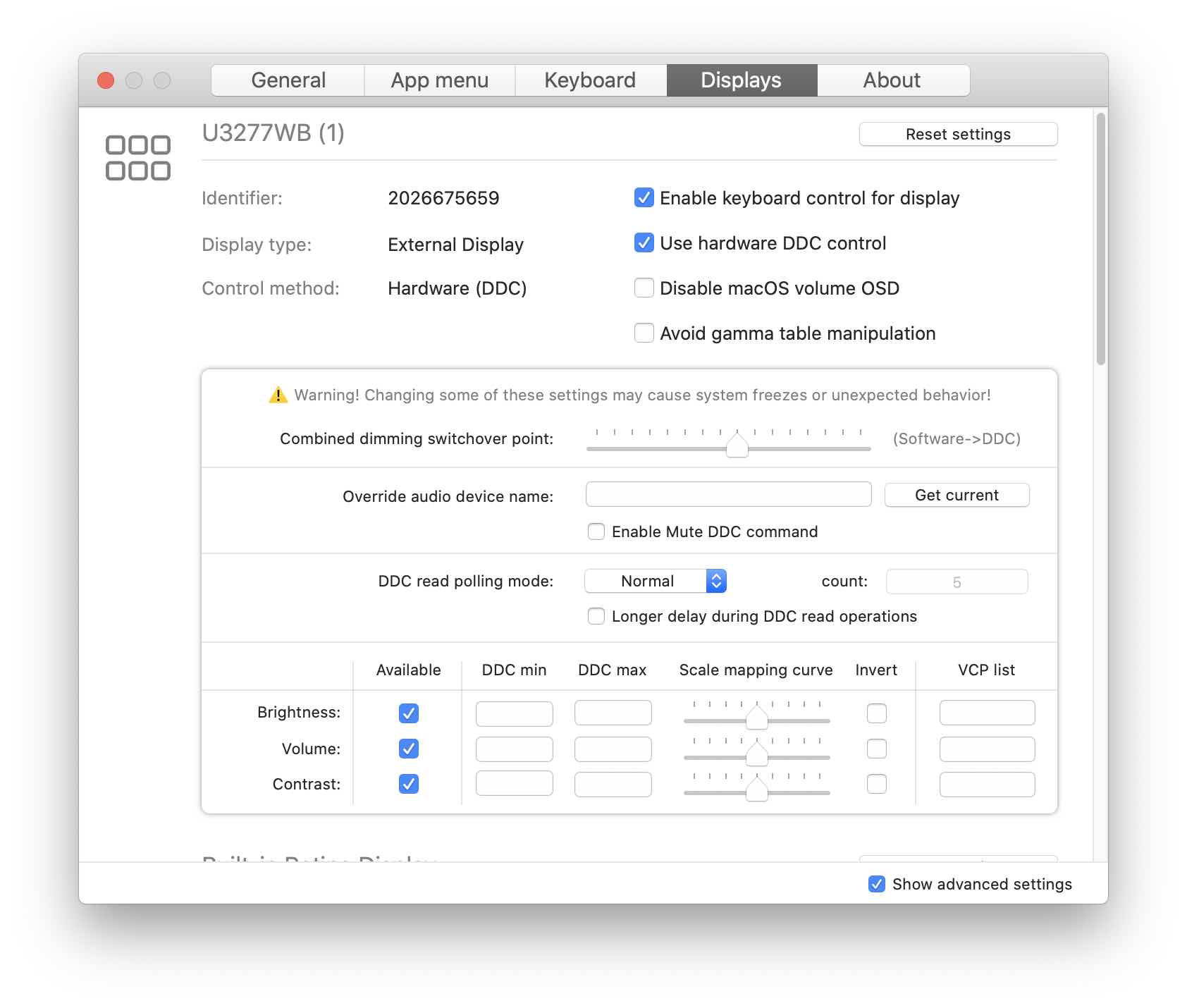
Update: I returned the problematic monitor, and can no longer perform tests on said united/model/hardware.
All right, thanks @johnnyutahh for the info and sorry about the lackluster handling of the problem on our part!