

 MicrosoftEdge
Sort styles alphabetically
It'd be really nice if there is an option for sorting alphabetically the CSS rules in the Elements tab.
AB#38517024

Hi @rdlf0, thanks for filing this feature request.
Just double-checking my understanding: you do mean the CSS styles displayed in the Styles pane, as shown below, right?
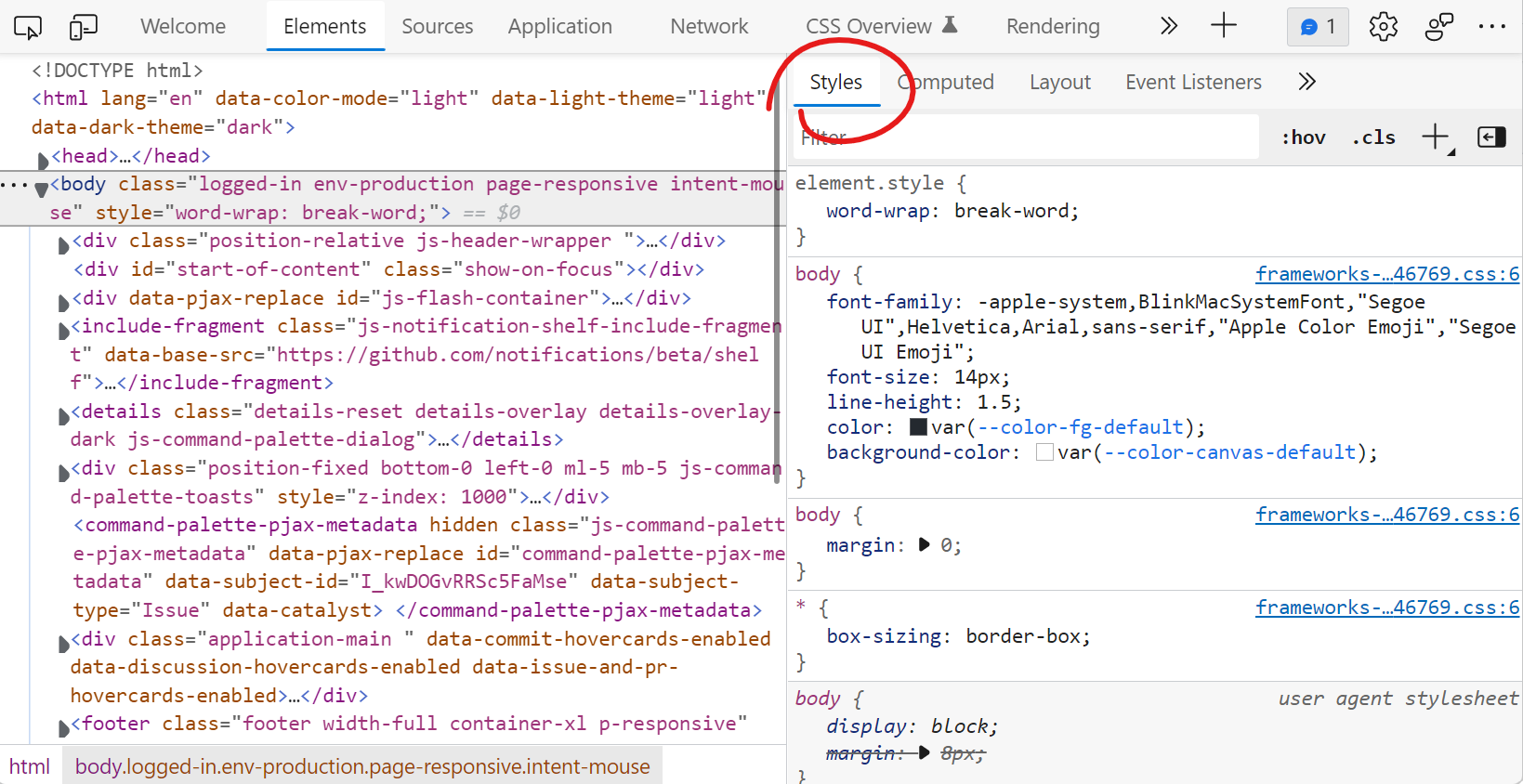
If that's correct, then I'd like to understand the use case better, because changing the sorting order might be problematic. Right now the CSS rules are sorted by how they appear in the CSS cascade, which is important because that's how the browser resolves which CSS property wins in the end, when several are defined.
Also, CSS declarations inside rules (the font-size:14px and so on) can't really be sorted any other way. They appear in the order that the author wrote them in, and this order is also important to determine which declaration wins if the author added several times the same one within one rule (or mixed short-hand and long-hand properties).
What problem are you trying to solve exactly by sorting CSS styles?

Hey @captainbrosset, thanks for the quick response! Yes, the Styles pane. And yeah, I meant the CSS declarations, sorry for using the wrong term above saying rules. My idea was that sometimes there are rules with a lot of declarations and when these declarations are sorted it'd be much easier to find what you are looking for rather than having to go through all of them. I understand the "last one wins" logic, but I think it could be preserved even if they are sorted alphabetically. For example:
#someElement {
    background-color: #ff0000;
    color: #000000;
    cursor: pointer;
    display: block;
    font-size: 18px;
    float: left;
    line-height: 20px;
    margin-left: 5px;
    margin-top: 20px;
    max-width: 300px;
    min-width: 100px;
    overflow: hidden;
    text-transform: none;
    width: 200px;
    width: 130px;
}
Here the first width declaration would have a strikethrough and the second one would actually be applied. For comparison, here is how this rule could be displayed now:
#someElement {
    color: #000000;
    text-transform: none;
    display: block;
    cursor: pointer;
    overflow: hidden;
    width: 200px;
    font-size: 18px;
    float: left;
    margin-left: 5px;
    margin-top: 20px;
    max-width: 300px;
    background-color: #ff0000;
    min-width: 100px;
    width: 130px;
    line-height: 20px;
}
In my opinion the latter is much harder to read, so having an option to get it transformed somehow on the go to the former would be really nice and convenient.
Thanks for providing more information. I understand the need now: some CSS rules are so long that finding the right declarations within them takes a long time, and having them sorted would help.
This reminds me of a similar request that was made to Firefox DevTools a few years ago here: https://discourse.mozilla.org/t/request-sort-css-rules-alphabetically/21208 Interestingly, it mentions that Firebug had the same feature before, so there is some precedent here.
I'm still a bit concerned with some confusion around how long-hand properties would override short-hand properties. Your example with having twice the width property can indeed be solved as you said, but what about cases where some long-hand properties are named completely different than the short-hands they're part of?
Consider this example:
#element {
  line-height: 2;
  font: small-caps bold 24px/1 sans-serif;
}
The font short-hand property can be used to set line-height. In this case it's set to 1 and in this rule it's easy to understand why, because it appears after the first line-height declaration.
If I were to sort this alphabetically:
#element {
  font: small-caps bold 24px/1 sans-serif;
  line-height: 2;
}
then it may look as if the line-height should be 2, because it appears after the initial font short-hand.
I'm not saying that's enough of a reason not to implement the feature. I still think your described problem makes a lot of sense. But I'd be careful around how it is presented to users so they don't get confused with cases like this one.
Looking at the Firefox conversation again, I realize that Firebug had a way to display all properties as short-hands too. Maybe that's how this could be solved:
- collapse all properties to their short-hand equivalents
- and then sort alphabetically.
Yeah, that's a rally good point. Property collapsing might be the best way to get around it. I imagine it as a setting like "Sort CSS declarations alphabetically" with a note that this will cause collapsing into short-hand equivalents. Or there might be a separate setting for collapsing, which gets turned on automatically, when the sorting is enabled.
Another catch might be where to put the -webkit/-moz declarations - should they be at the end/start of the list, or right before/after their equivalent, for example:
#element {
    align-items: normal;
    appearance: none;
    -moz-appearance: none;
    -webkit-appearance: none;
    color: #ff0000;
    width: 200px;
}
or:
#element {
    align-items: normal;
    -moz-appearance: none;
    -webkit-appearance: none;
    appearance: none;
    color: #ff0000;
    width: 200px;
}
or:
#element {
    -moz-appearance: none;
    -webkit-appearance: none;
    align-items: normal;
    appearance: none;
    color: #ff0000;
    width: 200px;
}
or:
#element {
    align-items: normal;
    appearance: none;
    color: #ff0000;
    width: 200px;
    -moz-appearance: none;
    -webkit-appearance: none;
}
Good point about the vendor prefixed properties. I imagine grouping them with the un-prefixed equivalents would make sense.