

 MichaIng
Error running dietpi-update
On two separate DietPi installs, I'm having the same problem:
Details:
- Date | Tue Aug 16 23:52:10 PDT 2022
- DietPi version | v8.7.1 (MichaIng/master)
- Image creator | DietPi Core Team
- Pre-image | from scratch
- Hardware | RPi 4 Model B (aarch64) (ID=4)
- Kernel version |
Linux DietPi-2 5.15.32-v8+ #1538 SMP PREEMPT Thu Mar 31 19:40:39 BST 2022 aarch64 GNU/Linux - Distro | bullseye (ID=6,RASPBIAN=0)
- Command |
ping -6nc 1 -W 10 2620:fe::fe - Exit code | 1
- Software title | DietPi-Update
Steps to reproduce:
- run
dietpi-update
Expected behaviour:
- command should run, listing any available updates
Actual behaviour:
- Configuration screen opens, offering
Retry,Double timeout,Disable IPv6,Network settings,Open subshell,Send report, andChange commandoptions (screenshot attached)
Extra details:
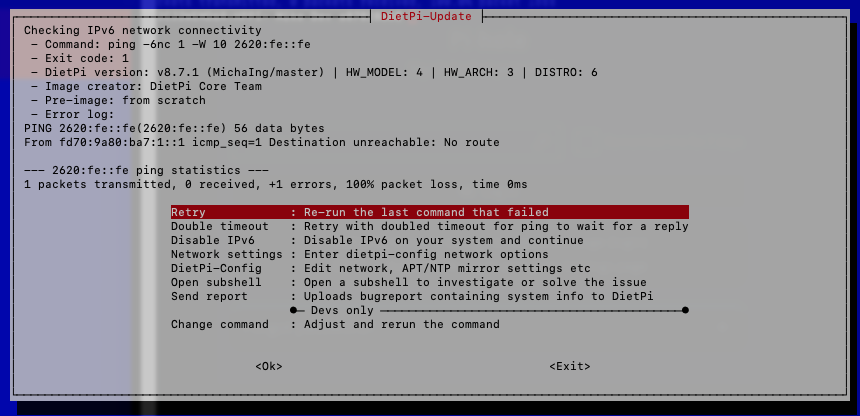
Additional logs:
PING 2620:fe::fe(2620:fe::fe) 56 data bytes
From fd70:9a80:ba7:1::1 icmp_seq=1 Destination unreachable: No route

--- 2620:fe::fe ping statistics ---
1 packets transmitted, 0 received, +1 errors, 100% packet loss, time 0ms


It feels like more users are running into this than before v8.7, but I wonder why: "No route" clearly states that there is no default route set for IPv6, as if the router wouldn't do any router advertisements. ip -6 r should verify that (as long as IPv6 is still enabled on the system).

I disabled IPv6 on the install that is also running PiHole, and immediately brought down all internet access for my network. I had to do a bunch of poking at PiHole to get things resolved. I could get away with disabling IPv6 on the other install since it is effectively just sitting waiting for me to put it to work.
I did try doing dietpi-update with PiHole not in charge of DNS and ran into the same issue, so I'm fairly certain PiHole isn't the culprit.
PiHole is not your issue. It's the failing IPv6 connection. You would need to check why your device is not able to use IPv6. Probably not configured correctly in your network.
Interesting would be, when IPv6 is enabled (aside of the ip -6 r output), whether router advertisements are received at all or not:
apt install tcpdump
tcpdump -n -i eth0 icmp6 and ip6[40] == 134
I'm running Eeros on my network and IPv6 is enabled there.
I installed tcpdump and then let the command run for a few minutes. Here is the output:
tcpdump: verbose output suppressed, use -v[v]... for full protocol decode
listening on eth0, link-type EN10MB (Ethernet), snapshot length 262144 bytes
12:55:34.257833 IP6 fe80::4e01:43ff:fe5b:d8a2 > ff02::1: ICMP6, router advertisement, length 32
12:56:01.282752 IP6 fe80::4e01:43ff:fe0f:6c0b > ff02::1: ICMP6, router advertisement, length 32
12:57:44.825656 IP6 fe80::4e01:43ff:fe5b:d8a2 > ff02::1: ICMP6, router advertisement, length 56
12:58:07.008399 IP6 fe80::82da:13ff:fe55:4f92 > ff02::1: ICMP6, router advertisement, length 32
12:59:08.153552 IP6 fe80::4e01:43ff:fe5b:d8a2 > ff02::1: ICMP6, router advertisement, length 32
12:59:42.821491 IP6 fe80::4e01:43ff:fe19:1ecb > ff02::1: ICMP6, router advertisement, length 32
13:00:16.156791 IP6 fe80::4e01:43ff:fe0f:6c0b > ff02::1: ICMP6, router advertisement, length 32
13:00:25.006663 IP6 fe80::82da:13ff:fe13:c64b > ff02::1: ICMP6, router advertisement, length 32
13:02:27.879337 IP6 fe80::82da:13ff:fe55:4f92 > ff02::1: ICMP6, router advertisement, length 32
^C
9 packets captured
9 packets received by filter
0 packets dropped by kernel
Output of ip -6 r
::1 dev lo proto kernel metric 256 pref medium
fd70:9a80:ba7:1::/64 dev eth0 proto kernel metric 256 expires 2591990sec pref medium
fe80::/64 dev eth0 proto kernel metric 256 pref medium
default via fe80::4e01:43ff:fe5b:d8a2 dev eth0 proto ra metric 1024 expires 1790sec hoplimit 64 pref medium
So there is a default route now, set as a result of the RA. But trying to ping an IPv6 IP still gives the same error?
ip -6 r
ping -6nc 1 -W 10 2620:fe::fe
ping -6nc 1 -W 10 2620:fe::fe output:
PING 2620:fe::fe(2620:fe::fe) 56 data bytes

--- 2620:fe::fe ping statistics ---
1 packets transmitted, 0 received, 100% packet loss, time 0ms
Okay the default route is there now and works, but an answer is still not coming (on first attempt).
This could be tested further debugged e.g. with traceroute. There must be an issue somewhere along the route from your system to the other, and that the router at least was not reliably getting an IPv6 default route is another issue. Reminds me of an issue we had on our VPS: https://superuser.com/questions/1557088/debugging-unreliable-ipv6-connection
The router advertisements were fixed quickly by the VPS provider but the slow IPv6 connections remained until months later I retried when reading that network hardware was exchanged.