

 MichaIng
DietPi-Config | Add option for rotating screen in X session
Creating a bug report/issue
Required Information
-
DietPi version G_DIETPI_VERSION_CORE=8 G_DIETPI_VERSION_SUB=5 G_DIETPI_VERSION_RC=1 G_GITBRANCH='master' G_GITOWNER='MichaIng'
-
Distro version bullseye 0
-
Kernel version
Linux MagicMirror 5.15.32-v7+ #1538 SMP Thu Mar 31 19:38:48 BST 2022 armv7l GNU/Linux -
SBC model RPi 3 Model B+ (armv7l)
-
Power supply used 5V 7A
-
SD card used SanDisk Ultra 32GB
Additional Information (if applicable)
-
Software title Chromium
-
Was the software title installed freshly or updated/migrated? Installed freshly
-
Can this issue be replicated on a fresh installation of DietPi? Yes
Steps to reproduce
- Start new DietPi installation
- Install Chromium with
sudo dietpi-software install 113 - Run sudo dietpi-config and go to Display Options > Rotation (HDMI) > 90 degrees
- Open sudo nano /boot/dietpi.txt
- Locate section for Chromium and set as
RES_X=800andRES_Y=1280(these are the specs of my screen) - Close and save the file
- Run
sudo dietpi-autostart - Choose Chromium and set the page you want to load. Choose "root" or "dietpi" (produces the same result anyway)
- Reboot
Expected behaviour
- The screen should load Chromium in portrait, Chromium should cover the whole screen and should show the page instructed.
Actual behaviour
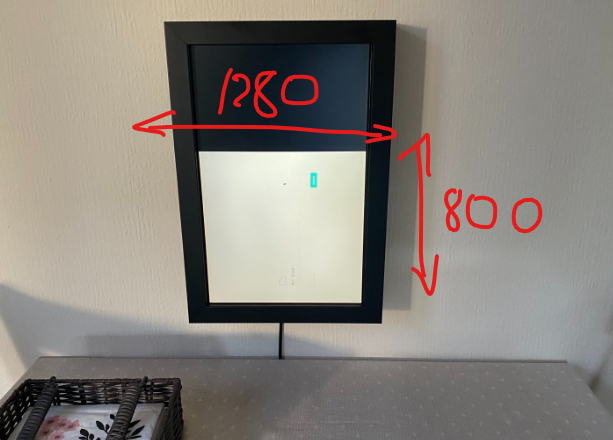
- This The image is not rotating as expected, appears only in half the screen, and the "Aw Snap" message appears again, same as it did here.
Extra details
- This is a brand new installation, with the DietPi image downloaded two hours before posting.
- The page I am trying to load is from a MagicMirror server on a different machine in my LAN.
- The problem appears with any website I may try to load.
- I understand these may be 2 separate issues, but at the moment I would like to address the rotation problem only, and I will create a different report for the "Aw Snap" problem.
- The rotation isn't working when the machine is booting either (so, the console is also showing the wrong way).

I would suggest that you have resolution as shown below.
For network issues can you ping other devices or have access to internet from your device? Maybe nameservers issue.

Thank you, I will try changing the resolution later today. I can ping other LAN devices, have full internet access, and able to do updates.
Full reinstall.
Tried it with RES_X=1280 and RES_Y=800 (and Rotation (HDMI) > 90 degrees). Same result, the image doesn't rotate.
The page is now loading though, full screen, but wrong orientation (landscape instead of portrait).
So, one part solved (no idea how), one left to go.
No idea what I am doing wrong.
I just run sudo dietpi-config, changed the rotation to 0 and rebooted.
Same result as with 90 degrees rotation.
Does this mean that the rotation setting is completely ignored then?
Can you add into your config.txt next lines? hdmi_group=2 hdmi_mode=27 display_hdmi_rotate=2 Also if that doesn't help check out this links to have detailed information about each of options.
https://www.raspberrypi.com/documentation/computers/config_txt.html#hdmi_mode https://www.raspberrypi.com/documentation/computers/config_txt.html#display_hdmi_rotate https://www.raspberrypi.com/documentation/computers/config_txt.html#custom-mode
Same issue, wrong orientation. Also tried display_hdmi_rotate=1. Didn't work.
Then I'd recommend to factory reboot dietpi and change display. And then keep changing line by line. To know what exactly is the issue.
Please try one of these:
xrandr --output HDMI-1 --rotate left
xrandr --output HDMI-1 --rotate right
The display_hdmi_rotate setting works with legacy display driver only, not KMS.

Ah and here is another issue where a solution for X (Chromium) via X11 config file has been found: https://github.com/MichaIng/DietPi/issues/3406#issuecomment-594872449
Looks like we need to include such a config to our dietpi-config rotation option, if KMS is used. And for the console (probably as well for other KMS applications not using X, like Kodi) there are /boot/cmdline.txt parameters, but not sure whether they do the rotation nicely so that the whole monitor is still filled: https://www.raspberrypi.com/documentation/computers/configuration.html#the-kernel-command-line
Please try one of these:
xrandr --output HDMI-1 --rotate left
xrandr --output HDMI-1 --rotate right
The
display_hdmi_rotatesetting works with legacy display driver only, not KMS.
Added xrandr --output HDMI-1 --rotate right to the config.txt and removed all previous settings from here.
Set Chromium as RES_X=1280 and RES_Y=800, Display Options > Rotation (HDMI) > 90 degrees
Didn't work.
Set Chromium as RES_X=800 and RES_Y=1280, Display Options > Rotation (HDMI) > 90 degrees
Didn't work.
Set Chromium as RES_X=1280 and RES_Y=800, Display Options > Rotation (HDMI) > 0 degrees
Didn't work.
Set Chromium as RES_X=800 and RES_Y=1280, Display Options > Rotation (HDMI) > 0 degrees
Didn't work.
Then I:
- removed all the above (so I set HDMI Rotate to 0 and removed xrandr)
- Changed Chromium to
RES_X=800andRES_Y=1280in dietpi.txt and - tried the suggestions from #3406 (comment):
sudo nano /etc/X11/xorg.conf.d/99-dietpi-dpms_off.conf
Set the following in the file:
Section "Monitor"
        Identifier "Monitor0"
        Option "Rotate" "right"
EndSection

Section "Screen"
        Identifier "Screen0"
        Device "Card0"
        Monitor "Monitor0"
EndSection
Rebooted. And it worked.
Will this survive future updates as is? Or do I need to do something to ensure it does?
xrandr --output HDMI-1 --rotate right is a console command, no config.txt setting. But the xorg.conf setting makes more sense anyway. But use a different file to have it persistent. The one you used is to disable DPMS (automatic screen blanking/energy saving) and overwritten on DietPi updates. Use e.g. /etc/X11/xorg.conf.d/99-rotate_screen.conf
Thanks for this thread.
I can report that adding the conf file has also worked for an Odroid C4.
sudo nano /etc/X11/xorg.conf.d/99-rotate_screen.conf
Set the following in the file:
Section "Monitor"
        Identifier "Monitor0"
        Option "Rotate" "right"
EndSection

Section "Screen"
        Identifier "Screen0"
        Device "Card0"
        Monitor "Monitor0"
EndSection
When used with a Xinit command to load Chromium, with the correct Res settings.
For example
sudo xinit /usr/bin/chromium ---kiosk --test-type --window-size=1080,1920 --start-fullscreen --start-maximized --window-position=0,0 --no-user-gesture-required --app=http://www.bbc.co.uk-- -nocursor
(used in a kiosk / chromakey overlay situation, where a cursor is not required)

Using the Section "Monitor" and Section "Screen" settings on an orange pi zero 3 works, but it absolutely murders performance, things drop to 2 frames per second. Soon as you put the configuration back to landscape / default it works flawlessly?
