

 MichaIng
Unable to install Nginx and/or LEMP software offering
Details:
- Date | Tue Feb 8 10:40:04 GMT 2022
- Bug report | f3ed91e6-9014-4023-818d-4a3dbca04278
- DietPi version | v8.1.2 (MichaIng/master)
- Image creator | DietPi Core Team
- Pre-image | Meveric
- Hardware | Odroid XU3/XU4/MC1/HC1/HC2 (armv7l) (ID=11)
- Kernel version |
Linux Picard 5.4.167-238 #1 SMP PREEMPT Tue Jan 25 07:31:53 EST 2022 armv7l GNU/Linux - Distro | bullseye (ID=6)
- Command |
apt-get -qq --allow-change-held-packages install nginx-light python3-certbot-nginx - Exit code | 100
- Software title | DietPi-Software
Steps to reproduce:
- ... Using dietpi-software, select any Nginx install, e.g LEMP
- ... Run the installation
Expected behaviour:
- ... Software should install and start up.
Actual behaviour:
- ... Install fails, see logs below.
Extra details:
- ... I have tried and my head hurts
Additional logs:
debconf: delaying package configuration, since apt-utils is not installed
Selecting previously unselected package nginx-common.
(Reading database ... 53963 files and directories currently installed.)
Preparing to unpack .../nginx-common_1.18.0-6.1_all.deb ...
Unpacking nginx-common (1.18.0-6.1) ...
Selecting previously unselected package libnginx-mod-http-echo.
Preparing to unpack .../libnginx-mod-http-echo_1.18.0-6.1_armhf.deb ...
Unpacking libnginx-mod-http-echo (1.18.0-6.1) ...
Selecting previously unselected package nginx-light.
Preparing to unpack .../nginx-light_1.18.0-6.1_armhf.deb ...
Unpacking nginx-light (1.18.0-6.1) ...
Selecting previously unselected package python3-pyparsing.
Preparing to unpack .../python3-pyparsing_2.4.7-1_all.deb ...
Unpacking python3-pyparsing (2.4.7-1) ...
Selecting previously unselected package python3-certbot-nginx.
Preparing to unpack .../python3-certbot-nginx_1.10.1-1_all.deb ...
Unpacking python3-certbot-nginx (1.10.1-1) ...
Setting up nginx-common (1.18.0-6.1) ...
Job for nginx.service failed because the control process exited with error code.
See "systemctl status nginx.service" and "journalctl -xe" for details.
Setting up python3-pyparsing (2.4.7-1) ...
Setting up libnginx-mod-http-echo (1.18.0-6.1) ...
Setting up nginx-light (1.18.0-6.1) ...
Job for nginx.service failed because the control process exited with error code.
See "systemctl status nginx.service" and "journalctl -xe" for details.
invoke-rc.d: initscript nginx, action "start" failed.


What is the output of following
journalctl -u nginx.service
It is empty because I purge the install as I didn't want any half installed packages / applications lying around. I will need to reinstall and then check for you.
It is empty because I purge the install
As long as you do not reboot, purging the package does not clear the system logs which have already been done before 😉. When you run into the error prompt again, you can select "Open shell" and run the commands from there. When we are sufficiently quick to reply and identify the issue, you can maybe resume the installation 🙂.

When you run into the error prompt again, you can select "Open shell" and run the commands from there. When we are sufficiently quick to reply and identify the issue, you can maybe resume the installation 🙂.
I will give another go in couple hours and use the open shell option.
BTW, thank you both for the speedy response! I wish it was like this everywhere...
Here is the output from journalctl -u nginx.service
root@Picard:/tmp/DietPi-Software# journalctl -u nginx.service
-- Journal begins at Tue 2022-02-08 16:11:25 GMT, ends at Tue 2022-02-08 17:03:22 GMT. --
Feb 08 17:03:21 Picard systemd[1]: Starting A high performance web server and a reverse proxy server...
Feb 08 17:03:21 Picard nginx[3589]: nginx: [emerg] socket() [::]:80 failed (97: Address family not supported by protocol)
Feb 08 17:03:21 Picard nginx[3589]: nginx: configuration file /etc/nginx/nginx.conf test failed
Feb 08 17:03:21 Picard systemd[1]: nginx.service: Control process exited, code=exited, status=1/FAILURE
Feb 08 17:03:21 Picard systemd[1]: nginx.service: Failed with result 'exit-code'.
Feb 08 17:03:21 Picard systemd[1]: Failed to start A high performance web server and a reverse proxy server.
Feb 08 17:03:22 Picard systemd[1]: Starting A high performance web server and a reverse proxy server...
Feb 08 17:03:22 Picard nginx[3627]: nginx: [emerg] socket() [::]:80 failed (97: Address family not supported by protocol)
Feb 08 17:03:22 Picard nginx[3627]: nginx: configuration file /etc/nginx/nginx.conf test failed
Feb 08 17:03:22 Picard systemd[1]: nginx.service: Control process exited, code=exited, status=1/FAILURE
Feb 08 17:03:22 Picard systemd[1]: nginx.service: Failed with result 'exit-code'.
Feb 08 17:03:22 Picard systemd[1]: Failed to start A high performance web server and a reverse proxy server.
root@Picard:/tmp/DietPi-Software#
I hope this helps. Haven't seen this before. I know I could mess with this myself, but best to have a working package.
It looks like IPv6 is not just disabled but the kernel module itself not loaded. Can you show the output of:
lsmod
modprobe ipv6
I'm wondering, whether when IPv6 is disabled via sysctl for all interfaces, whether the kernel module itself is then still loaded at boot. In theory, if not and a kernel upgrade is done, the module for the current boot session kernel is then not available anymore when needed for other things like Nginx here trying to bind explicitly to IPv6. Although this doesn't apply here since Odroid XU4 didn't receive a kernel upgrade for a long time.
EDIT: Ah, it may apply in your case since you use a different kernel v5.4 compared to v4.14 shipped with our image.
Ouput as requested ...
root@Picard:~# lsmod
Module                  Size  Used by
hid_logitech_hidpp     36864  0
hid_logitech_dj        24576  0
spidev                 20480  0
spi_s3c64xx            20480  0
usbhid                 45056  1 hid_logitech_dj
gpio_keys              20480  0
aes_arm_bs             24576  0
crypto_simd            16384  1 aes_arm_bs
cryptd                 20480  1 crypto_simd
root@Picard:~# modprobe ipv6
modprobe: FATAL: Module ipv6 not found in directory /lib/modules/5.4.167-238
root@Picard:~#
The module is missing, I guess something for the appropriate maintainer?
There was a kernel update the other day, came through on dietpi-config firmware update.
root@Picard:~# uname -a
Linux Picard 5.4.167-238 #1 SMP PREEMPT Tue Jan 25 07:31:53 EST 2022 armv7l GNU/Linux
Please try a reboot then.
Where did you install this kernel from? It is not shipped with Meveric's repository which we use for our images.
It also doesn't look like it's from Armbian, but not sure.
It appeared in dietpi-config --> Advanced --> Update Firmware (see attached capture).
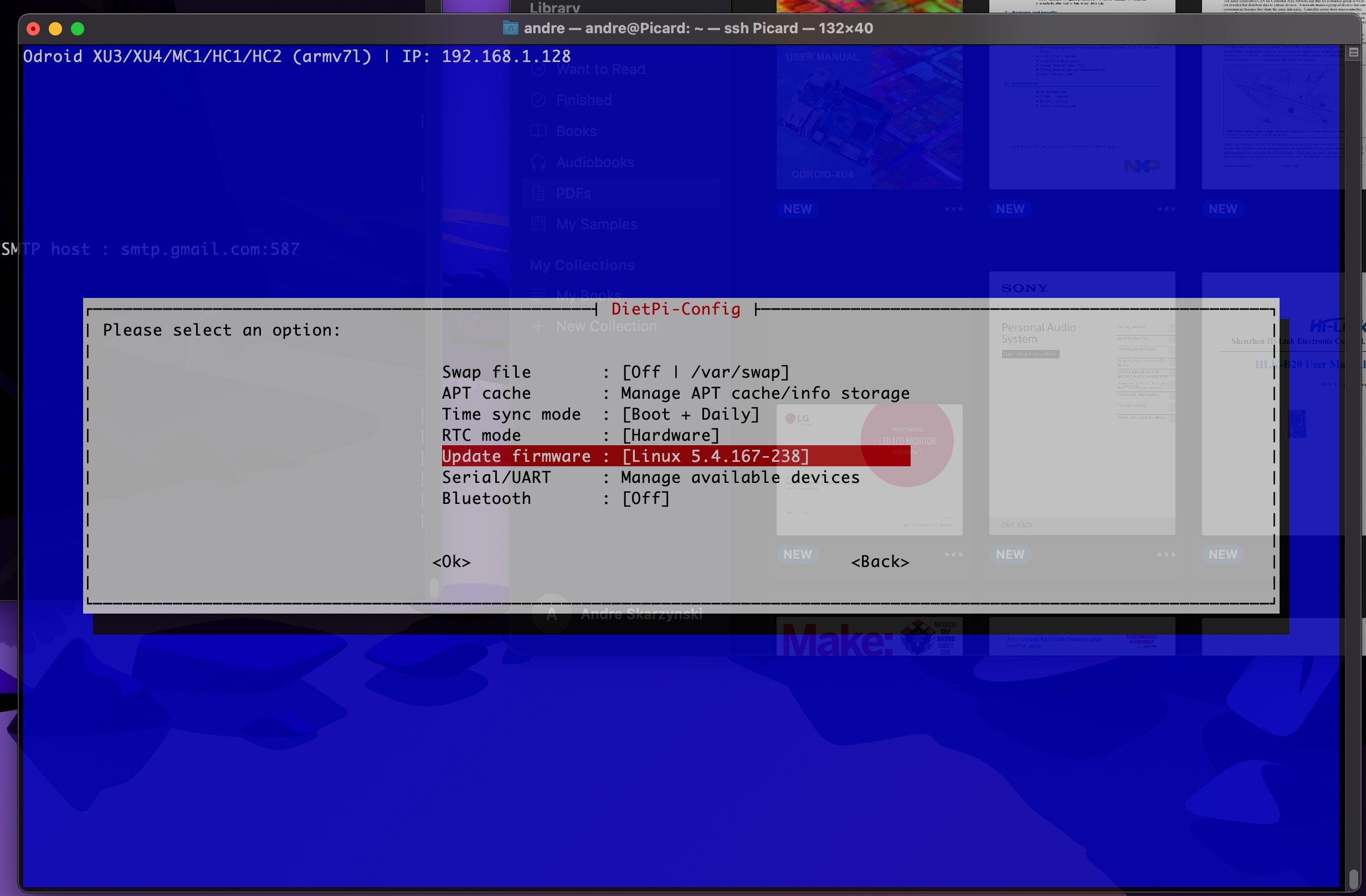
I was quite pleased as it was about time XU4 had an update as Hardkernel already has 5.4.x available. I am capable of building my own, but I am trying to keep this system "pure".
Armbian do have a later kernels according to their site; Armbian 21.08 Bullseye Kernel 5.4.y, Size: 327Mb, Updated: Nov 22, 2021
Hmm, I'll try with our XU4 image, but we explicitly install the latest v4.14 kernel, actually, so v5.4 shouldn't be upgraded to via apt full-upgrade, what dietpi-config does.
Yes Hardkernel offers v5.4 already, but we likely need to adjust our boot config for this. I aim to base new images on Armbian where a config and U-Boot as well as newer v5.4 patch versions are shipped. I hopefully get an XU4 soon for finishing that task.
Can you show:
dpkg -l | grep 'linux-image-'
urgh ...
ii  linux-image-4.14-armhf-odroid-xu4 4.14.241-1                     armhf        Linux Image/Headers Meta Package for ODROIDs
ii  linux-image-4.14.241+             4.14.241-20210728-xu4          armhf        Linux kernel, version 4.14.241+
Right so something really weird! I will bung a serial console on once I get the cable, uses Molex connecters ...
I have a another XU4 soon here that can be used for dev work. I can help if you need any.
I guess we can close this issue and call it a misadventure. Thanks for being there. Once I have the cable I can then see what u-Boot is actually booting from.
I guess @MichaIng would like to continue on this issue to find out what happen with your kernel version 😃
Yeah somehow. It looks like a custom installed kernel, but as you observed a kernel upgrade via dietpi-config/apt full-upgrade there seems to be a kernel package aside of those two. Can you show:
for i in /lib/modules/*; do dpkg -S "$i"; done
ls -l /boot
Just tested our Odroid XU4 image and it does not install any other kernel.
There is no package, however, something happened on the 5 February. I did a strings on the /boot/uInitrd and lo, there is the linux kernel ver 5.4.167-238, modules and overlays.
And this is the killer, just for the hell of it I did a grep for ubuntu;
root@Picard:/boot# strings uInitrd |grep ubuntu
#<https://bugs.launchpad.net/ubuntu/+source/glibc/+)
.16-3~ubuntu1-U
9.11.16-3~ubuntu1-U
pubuntu-#
245.4-4ubuntu3.158Q
245.4-4ubuntu3.15D
.ubuntu.com/C
kubuntut
usr/share/fonts/truetype/ubuntu/U
root@Picard:/boot#
And now I know what happened. I was working late on Saturday night, moving a production database to another server. There was a lot of waiting going on, and so I was messing about trying different builds on the XU4. DietPi is installed on the eMMC. I inserted a SdCard with ARM Ubuntu just see what a newer Kernel would do, and I think it installed U-boot et' al on the eMMC ... hence the confusion!
Apologies, it was my messing about and then forgetting what I did. At least mystery is solved.
Also, except for the missing modules, it actually works very well. I think we really need to upgrade to a new kernel.
The listing of /boot showing the updated files and folders. Just look at the time ... :-)
root@Picard:/boot# ls -lrt /boot
total 45668
-rwxr-xr-x 1 root root  2728720 Jul 28  2021 System.map-4.14.241+
-rwxr-xr-x 1 root root   151341 Jul 28  2021 config-4.14.241+
-rwxr-xr-x 1 root root  5764120 Jul 28  2021 vmlinuz-4.14.241+
-rwxr-xr-x 1 root root    63662 Jul 28  2021 exynos5422-odroidxu4-kvm.dtb
-rwxr-xr-x 1 root root  7260440 Oct 19 13:09 uInitrd-4.14.241+
-rwxr-xr-x 1 root root  7229053 Oct 25 13:21 initrd.img-4.14.241+
-rwxr-xr-x 1 root root    14517 Dec 14 14:04 dietpi-README.md
-rwxr-xr-x 1 root root    18092 Dec 14 14:04 dietpi-LICENSE.txt
-rwxr-xr-x 1 root root     2955 Dec 17 02:59 dietpi-wifi.txt
-rwxr-xr-x 1 root root     6911 Feb  5 21:51 config.ini
-rwxr-xr-x 1 root root     3899 Feb  5 21:51 boot.ini.old
-rwxr-xr-x 1 root root     2365 Feb  5 21:51 boot.ini
-rwxr-xr-x 1 root root  6516360 Feb  5 22:25 zImage
drwxr-xr-x 2 root root     4096 Feb  5 22:25 overlays
-rwxr-xr-x 1 root root    87141 Feb  5 22:25 exynos5422-odroidxu4.dtb
-rwxr-xr-x 1 root root    87474 Feb  5 22:25 exynos5422-odroidxu3-lite.dtb
-rwxr-xr-x 1 root root    87965 Feb  5 22:25 exynos5422-odroidxu3.dtb
-rwxr-xr-x 1 root root    81864 Feb  5 22:25 exynos5422-odroidhc1.dtb
-rwxr-xr-x 1 root root 16602512 Feb  5 22:25 uInitrd
-rwxr-xr-x 1 root root    15035 Feb  7 10:39 dietpi.txt
drwxr-xr-x 4 root root     4096 Feb  8 16:12 dietpi
Ahh okay, mystery solved 😄. Yes I see a new kernel image, overlays and aso a new boot.ini has been installed. So basically you could leave it like that and copy the /lib/modules/5.4.167-238 as well from the Ubuntu image, or probably they are there already and effective after a reboot?
Out of interest, could you show:
cat /boot/boot.ini
This and in combination with the one from Armbian we should be pretty sure what content/kernel command-line options are supported to update ours. Probably it is even only device tree overlay support which doesn't need to be added but would be nice of course for toggling features.
Will a look in the morning and let you know.Cheers On 8 Feb 2022 22:49, MichaIng @.***> wrote:
Ahh okay, mystery solved 😄. Yes I see a new kernel image, overlays and aso a new boot.ini has been installed. So basically you could leave it like that and copy the /lib/modules/5.4.167-238 as well from the Ubuntu image, or probably they are there already and effective after a reboot?
Out of interest, could you show:
cat /boot/boot.ini
This and in combination with the one from Armbian we should be pretty sure what content/kernel command-line options are supported to update ours. Probably it is even only device tree overlay support which doesn't need to be added but would be nice of course for toggling features.
—Reply to this email directly, view it on GitHub, or unsubscribe.You are receiving this because you authored the thread.Message ID: @.***>
Here is the boot.ini as requested.
::::::::::::::
/boot/boot.ini
::::::::::::::
ODROIDXU-UBOOT-CONFIG

setenv initrd_high "0xffffffff"
setenv fdt_high "0xffffffff"
setenv macaddr "00:1e:06:61:7a:39"
setenv vout "hdmi"
setenv HPD "true"
setenv cecenable "false"
setenv disable_vu7 "false"
setenv ddr_freq 825
setenv external_watchdog "false"
setenv external_watchdog_debounce "3"

# Set load addresses
setenv dtb_loadaddr " 0x44000000"
setenv dtbo_addr_r "0x48000000"
setenv k_addr "0x40008000"
setenv initrd_loadaddr "0x42000000"
setenv config_addr_r "0x4B000000"
load mmc 0:1 ${config_addr_r} config.ini \
    && ini generic ${config_addr_r}

setenv hdmi_phy_control "HPD=${HPD} vout=${vout}"
if test "${cecenable}" = "false"; then fdt rm /soc/cec@101B0000; fi
if test "${disable_vu7}" = "false"; then setenv hid_quirks "usbhid.quirks=0x0eef:0x0005:0x0004"; fi
if test "${external_watchdog}" = "true"; then setenv external_watchdog "external_watchdog=${external_watchdog} external_watchdog_deb
ounce=${external_watchdog_debounce}"; fi

# Boot Args
setenv bootargs "console=tty1 console=ttySAC2,115200n8 root=UUID=e139ce78-9841-40fe-8823-96a304a09859 rootwait ro fsck.repair=yes ne
t.ifnames=0 ${videoconfig} ${hdmi_phy_control} ${hid_quirks} smsc95xx.macaddr=${macaddr} ${external_watchdog}"

# Load kernel, initrd and dtb in that sequence
fatload mmc 0:1 ${k_addr} zImage
fatload mmc 0:1 ${initrd_loadaddr} uInitrd

setenv fdtloaded "false"
if test "x${board_name}" = "x"; then setenv board_name "xu4"; fi
if test "${board_name}" = "xu4"; then fatload mmc 0:1 ${dtb_loadaddr} exynos5422-odroidxu4.dtb; setenv fdtloaded "true"; fi
if test "${board_name}" = "xu3"; then fatload mmc 0:1 ${dtb_loadaddr} exynos5422-odroidxu3.dtb; setenv fdtloaded "true"; fi
if test "${board_name}" = "xu3l"; then fatload mmc 0:1 ${dtb_loadaddr} exynos5422-odroidxu3-lite.dtb; setenv fdtloaded "true"; fi
if test "${fdtloaded}" = "false"; then fatload mmc 0:1 ${dtb_loadaddr} exynos5422-odroidxu4.dtb; setenv fdtloaded "true"; fi

fdt addr ${dtb_loadaddr}

if test "x${overlay_profile}" != "x"; then
    ini overlay_${overlay_profile} ${config_addr_r}
fi

if test "x{overlays}" != "x"; then
    fdt resize ${overlay_resize}
    for overlay in ${overlays}; do
        load mmc 0:1 ${dtbo_addr_r} overlays/${overlay}.dtbo \
            && fdt apply ${dtbo_addr_r}
    done
fi

# DDR frequency
dmc ${ddr_freq}

# boot
bootz ${k_addr} ${initrd_loadaddr} ${dtb_loadaddr}
Nice, I didn't know that it supports RAM overclocking. Otherwise, aside of overlays, it looks pretty compatible with ours and the other way round: https://github.com/MichaIng/DietPi/blob/master/boot_xu4.ini
So we could use ours, add RAM overclocking and overlays, and then see which other parameters are pass as environment to the init, which are hence not understood by the kernel.
Hi @MichaIng
Just wanted to mention that I'm now using latest Armbian Odroid XU4 to create updated DietPi build instead of using Mervic. Early testing seems to be working OK. I have spare Odroid XU4 for dev work ...
───────────────────────────────────────────────────── DietPi v8.1.2 : 09:02 - Wed 02/03/22 ─────────────────────────────────────────────────────
- Device model : Odroid XU3/XU4/MC1/HC1/HC2 (armv7l)
- CPU temp : 41 °C / 105 °F : Optimal temperature
- LAN IP : 192.168.1.235 (eth0)
- MOTD : Please help testing and hardening DietPi v8.2 Beta: https://github.com/MichaIng/DietPi/issues/5319 ─────────────────────────────────────────────────────
DietPi Team : https://github.com/MichaIng/DietPi#the-dietpi-project-team Image by : Andre Skarzynski (pre-image: Armbian) Patreon Legends : Camry2731, Chris Gelatt Website : https://dietpi.com/ | https://twitter.com/DietPi_ Contribute : https://dietpi.com/contribute.html Web Hosting by : https://myvirtualserver.com
Linux Janeway 5.15.18-odroidxu4 #trunk.0023 SMP PREEMPT Sat Jan 29 15:57:31 UTC 2022 armv7l GNU/Linux
Whoot, they finally switched to mainline Linux? That it awesome, and quite a reason to switch. Until just recently it was still the Hardkernel Linux v5.4, so not soo much benefit over v4.14 (regarding the raising issues with these older kernels in general). Let me have a look, probably I can implement it with our own configs into DietPi-Build to be debootstraped from scratch and built by GitHub actions.
Do you use it as server only, or do you also run a desktop on it? Would be good to know whether the X server works without issues, probably Kodi, and also whether there are board specific X11 configs required until now:
for i in /etc/X11/xorg.conf{,.d/*.conf}
do
[[ -f $i ]] || continue
echo "$i"
cat "$i"
done
I am testing with X11 as well, surprisingly not much in the results, here the out put from the above;
/etc/X11/xorg.conf.d/98-dietpi-disable_dpms.conf
Section "Extensions"
    Option "DPMS" "Disable"
EndSection

Section "ServerFlags"
    Option "BlankTime" "0"
EndSection
For completeness I'm attaching the out put of xdpyinfo incase there is a little more useful info maybe.
xdpyinfo_out.txt
I can give a Kodi install a try too
Okay, not too uncommon as with KMS/DRM support X11 defaults work just well. Ah, actually I should have asked for this on the Armbian image. E.g. on Odroid C2, some specific X11 config is required to make it work, which is shipped by the Armbian system overlay package, hence needed to be added to DietPi before it worked. It might be similar on XU4, at least testing it makes sense.
I just had a look into Armbian's overlay package for XU4 and there is no additional X11 config, so indeed it should work OOTB. Kodi should then work just the same, using KMS/DRM via GBM, hence without any X server. So you can run kodi or kodi --standalone (I'm still not 100% sure what the effect of this flag is) from console.
Ah I see it is still the "edge" kernel, while "current" is still v5.4. However, makes sense to switch to mainline kernel directly when we already do the change, like done with the other Odroids already. Which image did you use, Bullseye Linux 5.4 and then upgrading to "edge" kernel etc? Does it still use boot.ini or boot.scr then?
Yes, I think the "edge" was installed when I run update on the Armbian image after install. I can't recall if I explicitly choose "edge" for kernels ... but it has been running well so far.
The other Odroid XU4 is running as a server, but using that "bastardized" DietPi with Ubuntu 5.4.167 kernel ... I need to fix that one, however, I am in no hurry. It is running as an IoT data gather and cruncher for my house boat. It replaced an ageing RasPi 1 B+ that really couldn't cope any more.
Which image did you use, Bullseye Linux 5.4 and then upgrading to "edge" kernel etc? Does it still use
boot.iniorboot.scrthen?
Yes, the Bullseye. I will do a clean install with the Armbain and then see which update takes it too edge. Maybe I explicitly set it, just can't remember!
w.r.t boot.ini or boot.scr, well I only see a boot.ini ...
Interesting, probably it's still the "current" U-Boot flashed, makes sense when you only upgraded the packages. We'd like to have a consistent image with "edge" U-Boot then as well, but I bet it requires a boot.scr. I'll have a look at the Ubuntu Jammy image, which uses the edge kernel + Armbian build sources, shouldn't be hard to find the required boot configuration, probably even the same as boot.ini only with some Hardkernel specifics removed, like setenv vout, setenv HPD, setenv cecenable, setenv disable_vu7, setenv ddr_freq which won't work with mainline kernel anyway.
This may be unrelated, but I'm running Armbian 22.08.0-trunk.0004 Jammy with bleeding edge Linux 5.17.12-odroidxu4 and I was about to move to something else since the new kernels they ship are very unstable, even 5.4 which they marked stable.

We use the "current" kernel v5.4 for our Odroid XU4 images since a while. I'm not aware of any urgent issues with it, at least we got no reports. Our recent images can be found here: https://dietpi.com/downloads/images/ Still not mainline kernel, but unless there are strong arguments, I rather ship our images with "current" instead of "edge".
However, I mark this issue as closed now, as it is related to the Linux v4.14 image based on Meveric's kernel builds.