

 MerginMaps
Jump to the next field once user presses Enter
Hi Lutra team I was wondering if its possible to automatically move the cursor to the next field once the user fills in and presses "enter" on the previous field. use case example: We make use of a bluetooth measurement tool to make a series of measurements when capturing a feature in the field, the bluetooth device works in the Input app, but the user has to click on each field before making a measurement, the extra click makes a big difference when you have to make 20+ measurements per feature being captured. Is this currently possible?

Hi @HugoP27 How would you treat MultiLine text edit? Pressing Enter will create a new line.

Good morning. The field would be set up as a single line Double Numeric Field type. The Bluetooth Caliper works as an external keyboard: As a measure is sent to the receiving app, it registers the number and "enter". Thus in Excel for example it is not needed to move to the next row for a measurement but only to measure. I hope this helps clarify the need. Regards Mico

Hi Mico,
Correct. But, how should we handle the Enter key, when user is editing a multiline text? We can change the behaviour of the Enter key to move to the next field for the following field type:
- single line text
- numeric
- QR code
Understood. A Multiline field seems like the only time that an enter would require a next row response. Your proposed field types make sense. This would reduce number of clicks which is a big win.
I suspect the measurement being sent from BT caliper is also sending a carriage return (if it advances automatically to the next cell in Excel). Going back to WCE we used to use an app called CEWedge where could setup the preamble keystroke ie enter, TAB etc
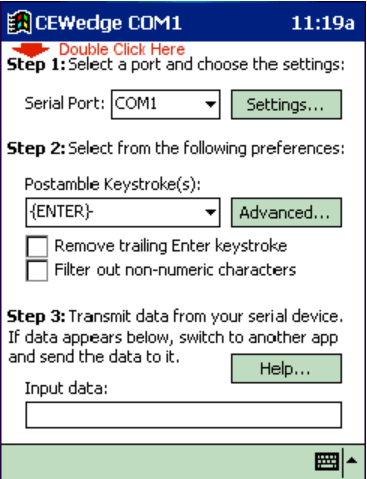
Another issue that comes up with BT calipers, RFID wands is having techs inadvertently sending data to the wrong field & then spraying the data all over the form

Cannot we use tab instead? I think tab is commonly used in Web forms etc?

Agreed this would be useful, and it is a common behavior in other apps that after typing a value in a form using virtual keyboard and pressing enter, the focus shifts to the next edit box in the form.
In Input forms we can probably do it using KeyNavigation as shown here https://stackoverflow.com/questions/19048328/how-to-shift-focus-from-one-text-box-to-another-in-qtquick or maybe (more hacky way?) like this https://forum.qt.io/topic/31654/solved-qtquick-controls-change-focus-on-enter-key/2

Hi all,
Any update on the possibility of implementing this functionality?


Brilliant Thank you Tomas
MICO STANDER Director | Soil Scientist | Horticulturist Pr. Sci. Nat. 400271/16 MSc Soil Science +27 72 763 3883tel:+277633883 @.@.> www.agrimotion.nethttp://www.agrimotion.net We use IMPI Farm: www.impifarm.comhttp://www.impifarm.com @.***
From: Tomas Mizera @.> Sent: Friday, May 3, 2024 9:36 AM To: MerginMaps/mobile @.> Cc: Mico Stander @.>; Comment @.> Subject: Re: [MerginMaps/mobile] Jump to the next field once user presses Enter (#1406)
Closed #1406https://github.com/MerginMaps/mobile/issues/1406 as completed.
— Reply to this email directly, view it on GitHubhttps://github.com/MerginMaps/mobile/issues/1406#event-12692921841, or unsubscribehttps://github.com/notifications/unsubscribe-auth/AT4VHWVWWQZHGJUF3SPUK43ZAM46VAVCNFSM447CEA2KU5DIOJSWCZC7NNSXTWQAEJEXG43VMVCXMZLOORHG65DJMZUWGYLUNFXW4OZRGI3DSMRZGIYTQNBR. You are receiving this because you commented.Message ID: @.@.>>
Sounds good - how do we implement this?
Well done ! - I figured it out / works how it should - just make sure the field isn't multi edit
We are going to see more touchscreen devices being able to be controlled from a physical keyboard. This is one of two keyboard devices for touchscreen that I'm aware of https://www.youtube.com/watch?v=a09wtVAXnvE