
BiliExper
 BiliExper copied to clipboard
 MaxSecurity

https://t.bilibili.com/663421384683159554?spm_id_from=444.42.0.0 有大佬能做新的出来替换之前的小心心获取获取吗?

获取账户经验信息异常,原因为0, message='Attempt to decode JSON with unexpected mimetype: text/html', url=URL('https://account.bilibili.com/home/reward'),跳过投币

B站更新了粉丝勋章接口,返回数据格式也换了 https://github.com/andywang425/BLTH/pull/203/commits/5948ba93d34a9eabfd6a468984ce24b0efb33e87 这是我找到的脚本的修复方式,有人能更新下这边的代码吗
START RequestId: a96231e3-4718-4243-9d21-7573fa6f5412 Init Report RequestId: a96231e3-4718-4243-9d21-7573fa6f5412 Coldstart: 2886ms (PullCode: 810ms InitRuntime: 25ms InitFunction: 2051ms) Memory: 128MB MemUsage: 25.17MB 配置加载异常,原因为:4 Unexpected """ at column 5,退出程序 ERROR RequestId:a96231e3-4718-4243-9d21-7573fa6f5412 Result:{"errorCode":-1,"errorMessage":"User process exit...

似乎是查看B币钱包的API失效了。 [ERROR***: Task exception was never retrieved future: Traceback (most recent call last): File "/home/runner/work/BILIBILI/BILIBILI/tasks/vip_task.py", line 22, in vip_task await bpCharge(biliapi, task_config["BpCharge"***) File "/home/runner/work/BILIBILI/BILIBILI/tasks/vip_task.py", line 92, in bpCharge if ret["code"***...

原作者的release中有一个版本是通过bat部署在本地,但是源码中不包含该文件。链接如下。 https://raw.githubusercontent.com/QiYueYiya/BiliExpExplain/main/Windows/setup_for_windows.bat 内容如下 `@echo off color 72 title setup_for_windows mode con cols=60 lines=24 echo.============================================================ echo.请以管理员身份运行,否则将无法创建任务 echo.输入项目文件夹路径后回车,例如: D:\文档\BiliExper-master echo.============================================================ set /p file=请输入: echo python ./BiliExp.py > %file%\BiliExp.bat :1 echo.============================================================ echo.1.定时启动 echo.2.开机启动...


1. 下载zip包 2. 解压修改BiliExp.py文件的主函数为main_handler(event, context)如图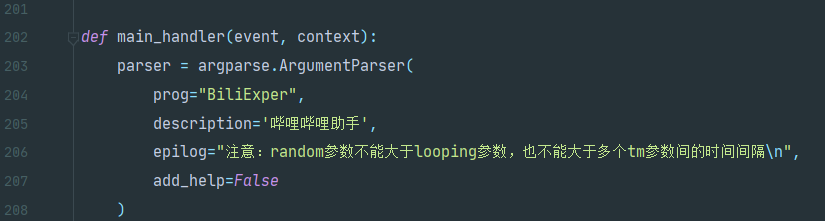 3. 修改config/config.json文件里的配置比如用户cookies,SendKey之类的看着改就行(参考README) 4. 改完之后去腾讯云函数创建函数并上传你改好的文件夹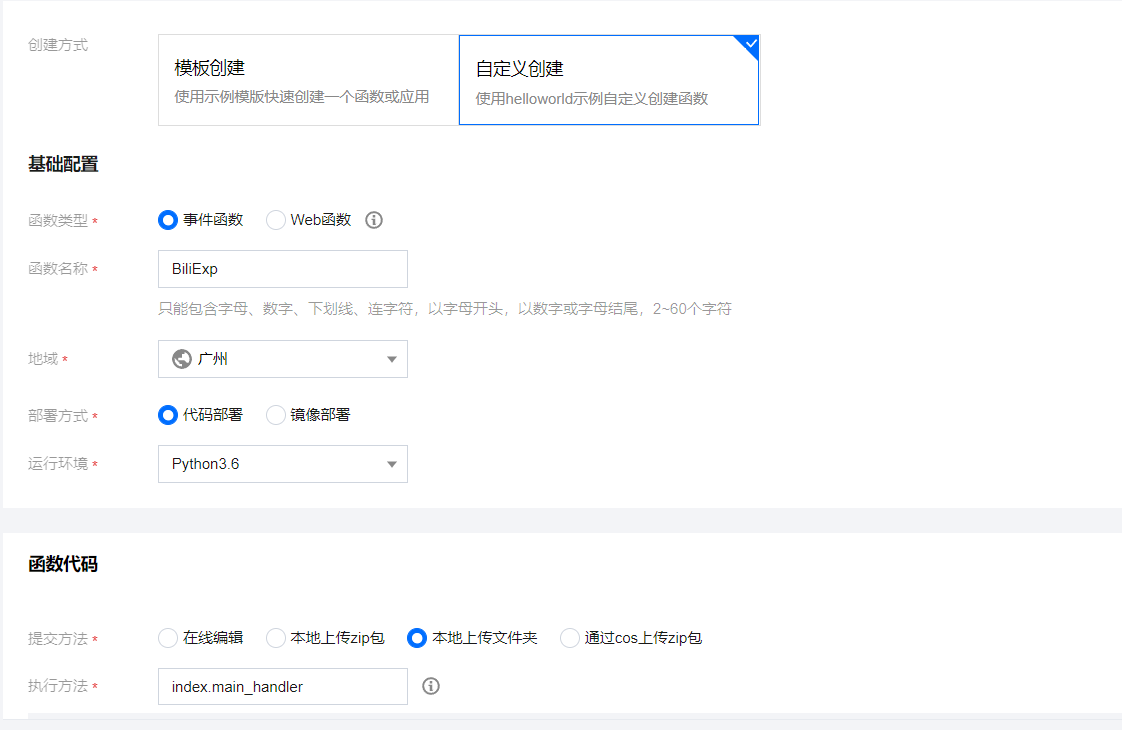 5. 修改执行方法为BiliExp.main_handler 6. 高级配置里执行超时时间改到900秒(900秒还是会超时,建议关闭直播间心跳) 7. 自定义一个触发器 8. 上传好之后先安装依赖,终端`cd src`然后`pip3 install -r requirements.txt -t ./`,这样的话依赖全和源码混在一起,有时间的可以试试腾讯云的层管理...依赖可能一次安装不成功,多试几次 9. 之后先部署(包全在一起,时间有点长)再测试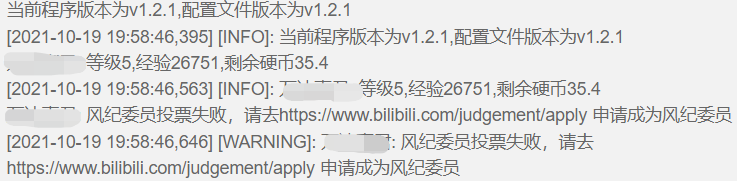

[Wecom酱配置方法及使用说明](https://github.com/easychen/wecomchan) "Wecom": "xxxxxxxxxxxx", // Wecom酱api地址 "Wecomkey": "xxxxxxxxxxxx", // Wecom酱的SendKey "PushPlus": "xxxxxxxxxxxx", // PushPlus token 下面的hooks部分 { "enable": true, "name": "Wecom酱推送", "msg_separ": "\n", "method": 3, "url": "{Wecom}", "params": { "sendkey": "{Wecomkey}",...
