

 MaterialDesignInXAML
DialogHost Graphic artifacts
I used DialogHost and added "MaterialDesignEmbeddedDialogHost", but the result surprised me!
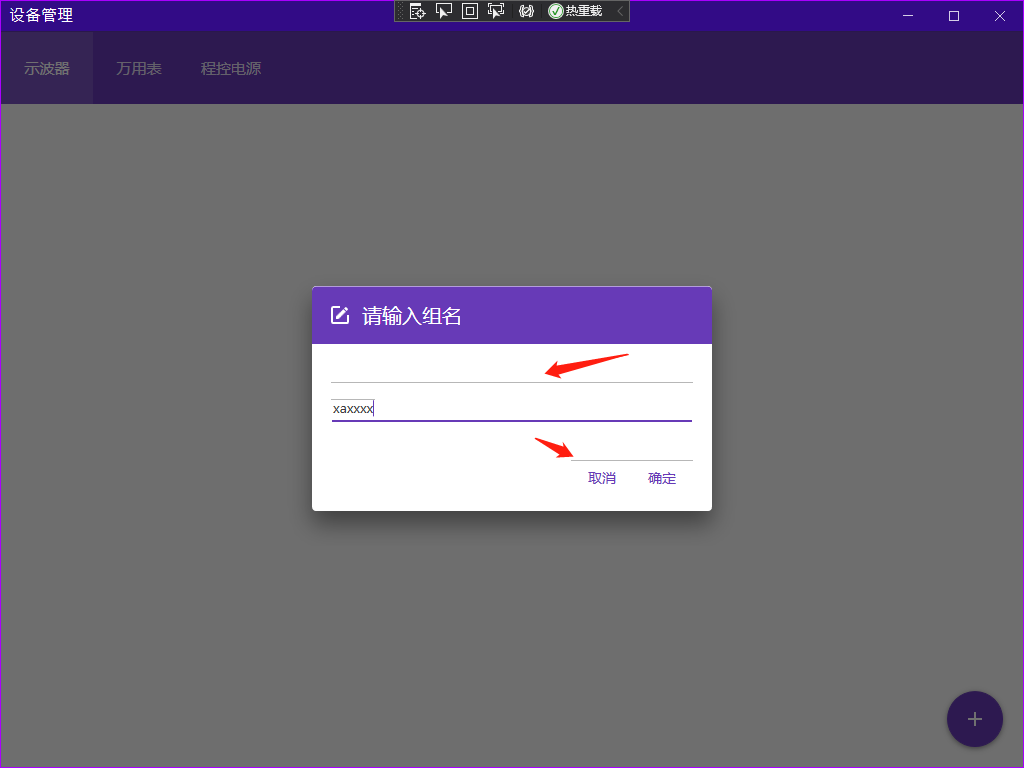 If you can’t find a clue, I will provide a minimal demo again, thank you


Looks like graphic artifacts, right?
When you type or when the mouse passes over, these lines will flicker and appear
Ok so yes it's graphic artifacts. It's a known problem.
To fix that problem, try to add UseLayoutRounding="True" on your UserControl/Window.
If it doesn't fix the problem, you can bypass it.
Try to wrap your control in a Grid/Border and put a BackGround color on it.
This issue can help you to bypass the problem : https://github.com/MaterialDesignInXAML/MaterialDesignInXamlToolkit/issues/2308
@Xaalek Thank you very much for your reply, I used UseLayoutRounding="True", but it didn’t solve the problem. Changing the background color worked for me, and the lines disappeared. I don’t know whether to close this issue, your issue is similar to this one
Keep the issue open. I think you should change the title. A title like 'Graphic artifacts in DialogHost' would be more appropriate.
