MarkBind
Lower (white) navbar gets printed on mobile
Please confirm that you have searched existing issues in the repo
Yes, I have searched the existing issues
Any related issues?
No response
Tell us about your environment
Safari / iOS 16.2
MarkBind version
4.0
What did you do? Describe the bug
Try to print a page on mobile. The white navbar gets printed, but it should not get printed.
Steps to reproduce
- Try to print a page on mobile
- (Optional) Scroll down The white navbar will be printed on wherever you scroll down to
Expected behavior
The white navbar should not be printed:
Actual behavior
The white navbar appears:
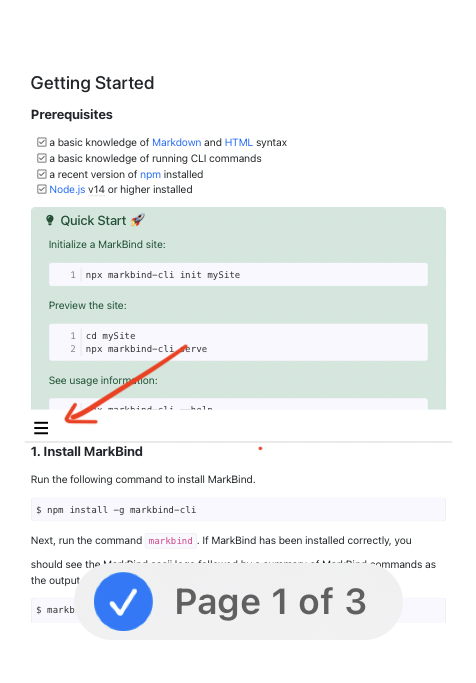
Suggested solution
Adding a d-print-none class to the lower navbar should exclude this from printing

Hey @jovyntls I cant see such issue. can you provide a screen recording of the issue you are facing?

Hi @shyamtawli , check out this video:
https://user-images.githubusercontent.com/61113575/214844568-305e4c7d-de0d-4623-912f-fef03962825a.mov
You can see the white bar obstructing the print PDF. The same applies for mobile. Let me know if you have any trouble reproducing!
@jovyntls I am not getting such issue. Maybe it is related to something else.
@jovyntls I am not getting such issue. Maybe it is related to something else.
Perhaps provide a recording showing how you tested it out so that it's clear if there's any issue with the reproduction. Note that the page has to have site navigation, and the browser width should be reduced so that the hamburger menu appears