

 MarkBind
Deployment url logging not respecting CNAME
Just found this while manually updating the release site:
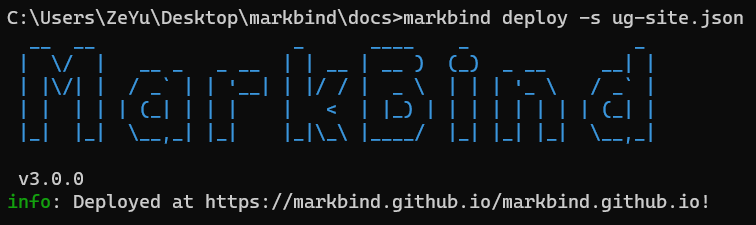
The format also seems a little off (markbind.github.io repeated twice)

@ang-zeyu the effect is only cosmetic, right? The deployed site works correctly?

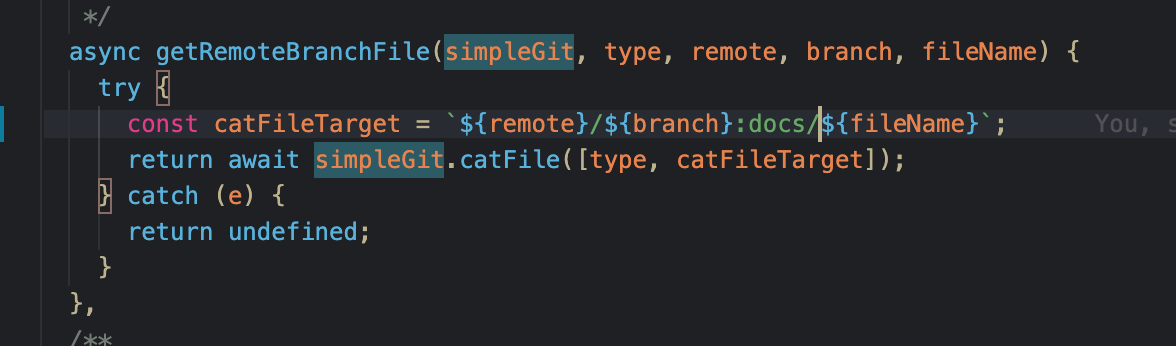
Hi, I did some investigation and it seems to be due to getRemoteBranchFile method throwing an error, which result in the remote url being logged instead as cname returns undefined here. Hence, the formatting should be correct according to how remote urls are formatted.
Error in getting remote branch file:
GitError: fatal: Not a valid object name origin/master:CNAME
For MarkBind, I think it is due to the CNAME file being nested in the docs folder and hence the remote file could not be found? This seems to work as expected
Not very sure whats the best way to handle this type of errors, maybe the deploy options can take in an additional field? E.g.
  "deploy": {
    "message": "Site Update.",
    "repo": ...
    "branch": "master"
	"cname":...
  }

Thanks for investigating this @kimberlyohq 👍
Error in getting remote branch file:
GitError: fatal: Not a valid object name origin/master:CNAME
Noticed another potential issue here. Seems like options.remote is always origin which may explain why it's calling origin/master:CNAME. In fact, if you look at the deploy option for ug-site.json, it correctly links to the right repo and there is a CNAME file to reference there. Perhaps we can use repo instead of remote here if it exists or update remote accordingly so that it is consistent with what is declared in the site config file?

@jonahtanjz
I tried a few approaches based on your what you mentioned to point to the repo to fetch the CNAME file but I'm still encountering some errors, tested at https://github.com/kimberlyohq/test
Approach 1
Perhaps we can use
repoinstead ofremotehere if it exists
Doing so results in the not a valid object name error
GitError: fatal: Not a valid object name https://github.com/kimberlyohq/test.git/gh-pages:CNAME
Approach 2
I tried adding remote url to point to the repo declared in the site config file set the cat file target to remotes/remote:... and remote/gh-pages:... but im also still getting the "Not a valid object name error"😅

Hmm seems like this is an issue with git's cat-file command itself. The command doesn't seem to be able to 'cat' a file from a remote repo using the url. Perhaps we can explore using git archive or simply curling the file (should be supported by most git platform)? Can also look for better alternatives if those don't work out. @ang-zeyu @kimberlyohq any thoughts on this?