

 MIT-SPARK
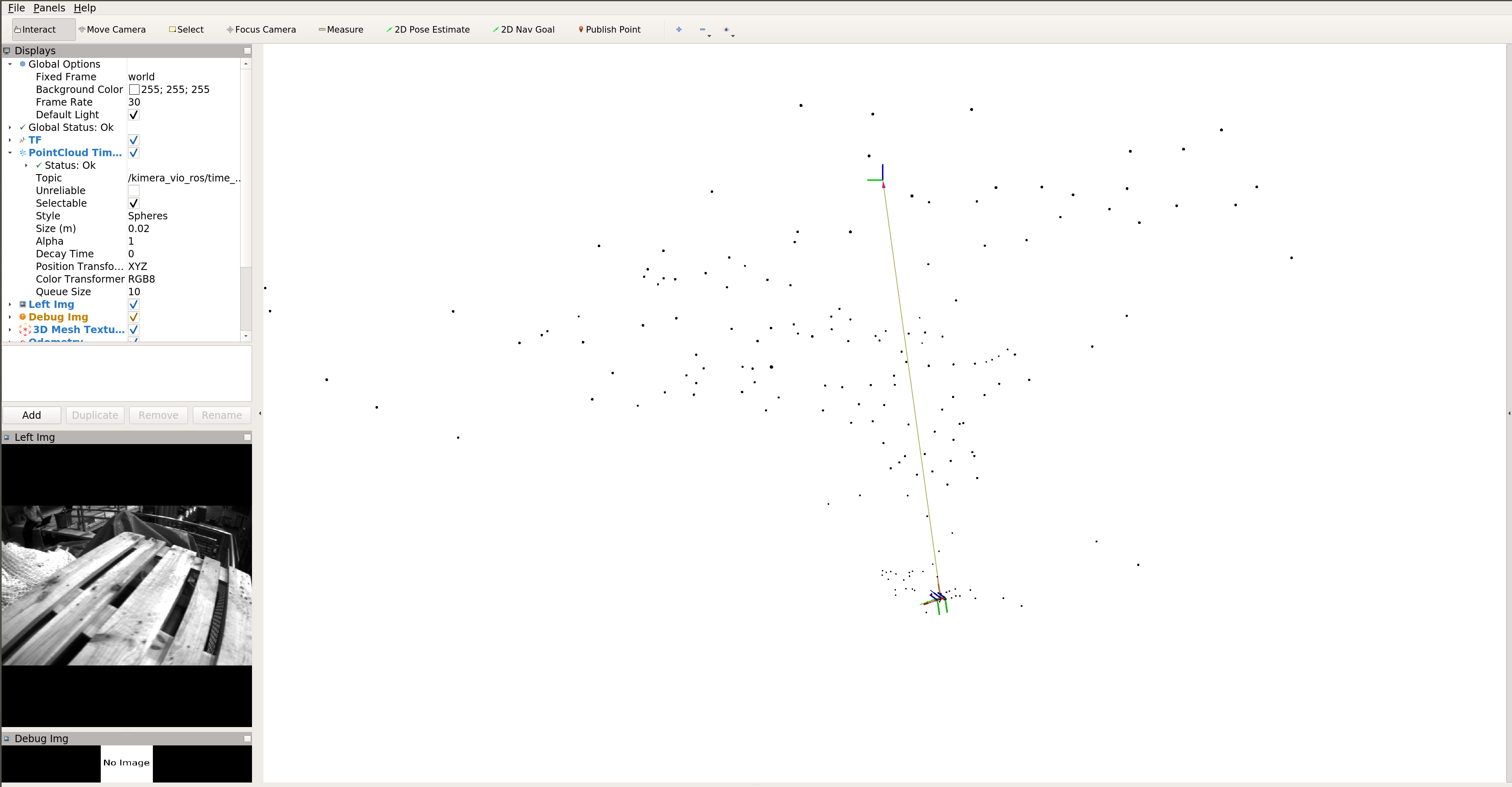
No mesh in rviz showing
Description: Install kimera in ubuntu18 without errors. Run the basic commands for running euroc data in the README. The whole bag can run till the end without any errors but no mesh is showing.
Command:
roslaunch kimera_vio_ros kimera_vio_ros_euroc.launch
rviz -d $(rospack find kimera_vio_ros)/rviz/kimera_vio_euroc.rviz
rosbag play --clock MH_01_easy.bag
Console output:
I0519 14:51:33.387197   379 RegularVioBackEnd.cpp:114] Using Regular VIO backend.
I0519 14:51:33.387293   379 PipelineModule.h:450] MISO Pipeline Module: Display has no output queue registered.
I0519 14:51:33.387828   379 RosOnlineDataProvider.cpp:45] Waiting for ROS time to be valid...
(Sim Time is enabled; run rosbag with --clock argument)
process[kimera_vio_ros/posegraph_viewer-2]: started with pid [380]
[ INFO] [1589921493.726398268]: Initializing pose graph visualizer
I0519 14:53:37.476522   379 RosOnlineDataProvider.cpp:56] Requested initialization from ground-truth. Initializing ground-truth odometry one-shot subscriber.
W0519 14:53:37.478446   379 RosOnlineDataProvider.cpp:65] Waiting for ground-truth pose to initialize VIO on ros topic: /kimera_vio_ros/gt_odom
E0519 14:53:40.550179   379 RosOnlineDataProvider.cpp:82] Missing ground-truth pose while trying for 3.00386 seconds.
Enabling autoInitialize and continuing without ground-truth pose.
I0519 14:53:40.562574   379 KimeraVioRos.cpp:114] Statistics
-----------                                  #	Log Hz	{avg     +- std    }	[min,max]
Display [ms]                            	    0
backend_input_queue Size [#]            	    0
data_provider_left_frame_queue Size [#] 	    0
data_provider_right_frame_queue Size [#]	    0
display_input_queue Size [#]            	    0
mesher_backend Size [#]                 	    0
mesher_frontend Size [#]                	    0
stereo_frontend_input_queue Size [#]    	    0
visualizer_backend_queue Size [#]       	    0
visualizer_frontend_queue Size [#]      	    0
visualizer_mesher_queue Size [#]        	    0
I0519 14:53:40.562610   483 Pipeline.h:184] Spinning Kimera-VIO.
I0519 14:53:40.818538   483 Pipeline.cpp:785] Frontend launched (parallel_run set to 1).
I0519 14:53:40.818589   483 Pipeline.cpp:600] ------------------- Initialize Pipeline with frame k = 1--------------------
W0519 14:53:40.818609   483 InitializationFromImu.cpp:26] InitializationFromImu: assumes that the vehicle is stationary and upright along some axis,and gravity vector is along a single axis!
I0519 14:53:40.871023   483 Pipeline.cpp:309] Before launching threads.
I0519 14:53:40.871157   483 Pipeline.cpp:814] Backend, mesher and visualizer launched (parallel_run set to 1).
I0519 14:53:40.871165   483 Pipeline.cpp:311]  launching threads.
W0519 14:53:41.066159   486 Mesher.cpp:1377] Missing landmark information to build 3D Mesh.
I0519 14:53:41.067255   379 KimeraVioRos.cpp:114] Statistics
-----------                                  #	Log Hz	{avg     +- std    }	[min,max]
Data Provider [ms]                      	    0
Display [ms]                            	    0
Mesher [ms]                             	    1	5.10853	{0.00000 +- 0.00000}	[0,0]
VioBackEnd [ms]                         	    1	5.12833	{0.00000 +- 0.00000}	[0,0]
VioFrontEnd Frame Rate [ms]             	    3	25.4317	{8.33333 +- 5.77350}	[5,15]
VioFrontEnd Keyframe Rate [ms]          	    1	5.20294	{43.0000 +- 0.00000}	[43,43]
VioFrontEnd [ms]                        	    4	16.2115	{17.0000 +- 17.9629}	[5,43]
Visualizer [ms]                         	    1	5.10477	{0.00000 +- 0.00000}	[0,0]
backend_input_queue Size [#]            	    1	0.00783201	{1.00000 +- 0.00000}	[1,1]
data_provider_left_frame_queue Size [#] 	    7	0.0548275	{1.00000 +- 0.00000}	[1,1]
data_provider_right_frame_queue Size [#]	    7	0.0548274	{1.00000 +- 0.00000}	[1,1]
display_input_queue Size [#]            	    2	0.0156638	{1.00000 +- 0.00000}	[1,1]
mesher_backend Size [#]                 	    1	0.00783215	{1.00000 +- 0.00000}	[1,1]
mesher_frontend Size [#]                	    4	0.0313288	{2.50000 +- 1.29099}	[1,4]
stereo_frontend_input_queue Size [#]    	    5	0.0391610	{1.00000 +- 0.00000}	[1,1]
visualizer_backend_queue Size [#]       	    1	0.00783215	{1.00000 +- 0.00000}	[1,1]
visualizer_frontend_queue Size [#]      	    4	0.0313288	{2.50000 +- 1.29099}	[1,4]
visualizer_mesher_queue Size [#]        	    1	0.00783210	{1.00000 +- 0.00000}	[1,1]
W0519 14:53:41.248561   484 Tracker.cpp:578] 1-point RANSAC (voting) could not find a solution.
W0519 14:53:41.280649   486 Mesher.cpp:1377] Missing landmark information to build 3D Mesh.
W0519 14:53:41.477052   486 Mesher.cpp:1377] Missing landmark information to build 3D Mesh.
I0519 14:53:41.563220   379 KimeraVioRos.cpp:114] Statistics
-----------                                  #	Log Hz	{avg     +- std    }	[min,max]
Data Provider [ms]                      	    0
Display [ms]                            	    6	6.55172	{4.00000 +- 9.79796}	[0,24]
Mesher [ms]                             	    3	4.94113	{0.666667 +- 0.577350}	[0,1]
VioBackEnd [ms]                         	    3	4.95144	{0.00000 +- 0.00000}	[0,0]
VioFrontEnd Frame Rate [ms]             	   11	17.1288	{6.36364 +- 4.98543}	[3,15]
VioFrontEnd Keyframe Rate [ms]          	    3	4.97439	{54.0000 +- 9.64365}	[43,61]
VioFrontEnd [ms]                        	   14	20.0818	{16.6429 +- 21.0443}	[3,61]
Visualizer [ms]                         	    3	4.94079	{0.00000 +- 0.00000}	[0,0]
backend_input_queue Size [#]            	    3	0.0234207	{1.00000 +- 0.00000}	[1,1]
data_provider_left_frame_queue Size [#] 	   17	0.132633	{1.00000 +- 0.00000}	[1,1]
data_provider_right_frame_queue Size [#]	   17	0.132633	{1.00000 +- 0.00000}	[1,1]
display_input_queue Size [#]            	    6	0.0468406	{1.00000 +- 0.00000}	[1,1]
mesher_backend Size [#]                 	    3	0.0234211	{1.00000 +- 0.00000}	[1,1]
mesher_frontend Size [#]                	   14	0.109265	{2.35714 +- 1.15073}	[1,4]
stereo_frontend_input_queue Size [#]    	   14	0.109266	{1.00000 +- 0.00000}	[1,1]
visualizer_backend_queue Size [#]       	    3	0.0234211	{1.00000 +- 0.00000}	[1,1]
visualizer_frontend_queue Size [#]      	   14	0.109265	{2.35714 +- 1.15073}	[1,4]
visualizer_mesher_queue Size [#]        	    3	0.0234208	{1.00000 +- 0.00000}	[1,1]
W0519 14:53:41.709491   483 DataProviderModule.cpp:103] Waiting for IMU data...
I0519 14:53:42.067512   379 KimeraVioRos.cpp:114] Statistics
-----------                                  #	Log Hz	{avg     +- std    }	[min,max]
Data Provider [ms]                      	    0
Display [ms]                            	   10	7.59147	{2.40000 +- 7.58947}	[0,24]
Mesher [ms]                             	    5	4.95752	{0.800000 +- 0.447214}	[0,1]
VioBackEnd [ms]                         	    5	4.96579	{0.400000 +- 0.547723}	[0,1]
VioFrontEnd Frame Rate [ms]             	   18	16.2319	{5.61111 +- 4.27219}	[2,15]
VioFrontEnd Keyframe Rate [ms]          	    5	4.98267	{56.6000 +- 7.89303}	[43,63]
VioFrontEnd [ms]                        	   23	19.7679	{16.7391 +- 22.0603}	[2,63]
Visualizer [ms]                         	    5	4.95717	{0.00000 +- 0.00000}	[0,0]
backend_input_queue Size [#]            	    5	0.0389128	{1.00000 +- 0.00000}	[1,1]
data_provider_left_frame_queue Size [#] 	   27	0.209827	{1.00000 +- 0.00000}	[1,1]
data_provider_right_frame_queue Size [#]	   27	0.209827	{1.00000 +- 0.00000}	[1,1]
display_input_queue Size [#]            	   10	0.0778237	{1.00000 +- 0.00000}	[1,1]
mesher_backend Size [#]                 	    5	0.0389133	{1.00000 +- 0.00000}	[1,1]
mesher_frontend Size [#]                	   23	0.178856	{2.43478 +- 1.12112}	[1,4]
stereo_frontend_input_queue Size [#]    	   25	0.194277	{1.00000 +- 0.00000}	[1,1]
visualizer_backend_queue Size [#]       	    5	0.0389133	{1.00000 +- 0.00000}	[1,1]
visualizer_frontend_queue Size [#]      	   23	0.178856	{2.43478 +- 1.12112}	[1,4]
visualizer_mesher_queue Size [#]        	    5	0.0389128	{1.00000 +- 0.00000}	[1,1]
The pose seems being updated. I checked if there is mesh topic by
rostopic echo /kimera_vio_ros/mesh
I got
WARNING: no messages received and simulated time is active.
Is /clock being published?
Then I checked /clock
rostopic echo /clock
I got
...
clock:
  secs: 1403636601
  nsecs: 287217368
---
clock:
  secs: 1403636601
  nsecs: 297334446
---
clock:
  secs: 1403636601
  nsecs: 307413524
---
clock:
  secs: 1403636601
  nsecs: 317497013
---
clock:
  secs: 1403636601
  nsecs: 327580458
---
...
Seems /clock is being published correctly.
Additional files:
Please attach all the files needed to reproduce the error.
Please give also the following information:
- SparkVio branch, tag or commit used:
- GTSAM version used: develop
- OpenGV version used: master
- OpenCV version used: 3.4
- Operating system and version (e.g. Ubuntu 16.04 or Windows 10): ubuntu18 in docker
- Did you change the source code? (yes / no): no

Hi @zhaozhongch, can you check the params/Euroc/flags/stereoVIOEuroc.flags file, there should be this param:
**# Type of 3D Visualization:
# 0: mesh 3d
# 1: pointcloud
# 2: none
--viz_type=1**
Set --viz_type=0
I might have broken something with the last PR though.

I modified that number to 0 but it seems it doesn't work. Still no mesh.
I downgrade to ubunu16, reinstall everything, and got the same result. Still no mesh. Pretty confusing because the system can run.
I might have made some silly operations during the installation but I double-checked the mesh_rviz_markers package is installed with no errors...
Seems like I can see it either in the current master, thank you for raising the issue! I'll try to look at it tomorrow, in the meantime, please use a commit previous to the last merge.
This one should do the trick: cbb37ec8624604aad26e382dc2cd887e37e477b4
cbb37ec8624604aad26e382dc2cd887e37e477b4
I'm experiencing the same issue. I have done the flag change and switched Kimera-VIO-ROS to that mentioned commit. As well as switch Kimera-VIO to 79174b191496653380dc185c85356c5b9ace2e50. Nothing gets published on /kimera_vio_ros/mesh

@ToniRV I am experiencing the same issue. When I just checked the code, I found that it's not the problem with publishing mesh and mesh rviz plugin, There is no mesh creation happening. If there is any mesh and if there is any subscriber, then the only mesh will publish.

Thanks for the feedback! I'm on a tight schedule right now, but will give it a try tomorrow :+1:
I'm experiencing the same issue. I have done the flag change and switched Kimera-VIO-ROS to that mentioned commit. As well as switch Kimera-VIO to 79174b191496653380dc185c85356c5b9ace2e50. Nothing gets published on /kimera_vio_ros/mesh
I did the same you`ve described but nothing helped. Did you solve this issue with no mesh created somehow ?

Was experiencing the same issue and switching Kimera-VIO-ROS to the mentioned commit did not help. Also, I have tried the commit from Apr 15 (considering the commits from the Dockerfile from goseek-challenge), mesh visualization was also not working there. But these commits worked for me:
Kimera-VIO-ROS: c535109a5e8490be9fd5226a02faee509e878eb9 from Mar 13 Kimera-VIO: a5109c7157482bb1203918512ef6593e226507f7 from Mar 11 Gtsam: master branch
PS I added Dockerfile and edited the kimera_vio_ros_https.rosinstall with workable commits for installation using wstool to my fork. Maybe someone will find this helpful

I managed to get a visible mesh in RVIZ with the EUROC dataset, although without textures. Here's how I did it:
- In Kimera-VIO set
return_mesh_2d=trueinparams/Euroc/flags/Mesher.flags. Mesh data should now be published on the/kimera_vio_ros/meshtopic. - In RVIZ, after opening the
kimera_vio_euroc.rvizfile, go to the 3D Mesh Textured settings. Remove the value for the Texture topic (it is set to/kimera_vio_ros/debug_mesh_img/image_rawwhich has no publishers, removing this value enables drawing without texture). Set the Polygon Mode to WIREFRAME or SOLID and set the Shader Program to something else than TEXTURE. - Lastly, I had a problem on one machine with the wireframe being drawn in white on a white background. I changed the background color of RVIZ to see the mesh. On a different machine it was fine though.
I hope this issue gets a fix of some sorts, as it seems the texture topic was removed with no replacement.

@pherbers thanks for the information, I managed to display the meshes as well and I need to changed to background color as well (the meshes are displayed in white) Fabrice

How to visualize multi-frame mesh in the rviz-windows? I try to modify the file Mesher.flags ----reduce_mesh_to_time_horizon=false, but it dosen't change.

@tftangming I haven't added the time-horizon visualization to ROS (Rviz), but you can visualize it if you run the OpenCV visualizer without ROS.
With https://github.com/MIT-SPARK/Kimera-VIO/pull/113 and https://github.com/MIT-SPARK/Kimera-VIO-ROS/pull/109 The mesh viz in Rviz and OpenCV visualizer should be all visible by default, at least on the Euroc Dataset.