

 MCCTeam
Android App
Prerequisites
- [X] I have read and understood the user manual
- [X] I made sure I am running the latest development build
- [X] I tried to look for similar feature requests before opening a new one
Console Client Version
new
Describe your problem
Can you make it into an app? Because usually we don't take the computer with us when we are out
Suggest a possible solution
No response
Attach screenshot here (If applicable)
No response
Minecraft Version
No response
Device
Desktop
Operating System
Windows


I just happen to have tried setting up MCC on Android using Termux and Andronix, but the problem is with .NET 6 compilation not working on older distros on ARM64, since they're all outdated in Andronix. I'll try once more, but with pre-built versions. My plan was to try it out, figure the easiest/best/quickest way and then write a page in the documentation. Porting this into an app would be really complicated, but there will be a solution soon, I'm working on it, for people who do not want to mess with Termux. We're going to use a WebSocket Chat Bot, I'm currently developing it: https://github.com/MCCTeam/Minecraft-Console-Client/pull/2126 Since WebSocket can be used in a web browser, I can make an app for Android and iOS using JavaScript.

Huh. never thought about this. Making this work could leave free more of my potato APU to render the game. XD

I just happen to have tried setting up MCC on Android using Termux and Andronix, but the problem is with .NET 6 compilation not working on older distros on ARM64, since they're all outdated in Andronix. I'll try once more, but with pre-built versions. My plan was to try it out, figure the easiest/best/quickest way and then write a page in the documentation. Porting this into an app would be really complicated, but there will be a solution soon, I'm working on it, for people who do not want to mess with Termux. We're going to use a WebSocket Chat Bot, I'm currently developing it: #2126 Since WebSocket can be used in a web browser, I can make an app for Android and iOS using JavaScript.
I found this on a quick search on google https://dotnet.microsoft.com/en-us/apps/xamarin
I just happen to have tried setting up MCC on Android using Termux and Andronix, but the problem is with .NET 6 compilation not working on older distros on ARM64, since they're all outdated in Andronix. I'll try once more, but with pre-built versions. My plan was to try it out, figure the easiest/best/quickest way and then write a page in the documentation. Porting this into an app would be really complicated, but there will be a solution soon, I'm working on it, for people who do not want to mess with Termux. We're going to use a WebSocket Chat Bot, I'm currently developing it: #2126 Since WebSocket can be used in a web browser, I can make an app for Android and iOS using JavaScript.
I found this on a quick search on google https://dotnet.microsoft.com/en-us/apps/xamarin
I know about it already, it is doable, but it will require a lot of code, the whole console part would have to be abstracted away, as well as configuration part, the GUI project here uses C# process API to start a process and get an output from it, on Android apps function differently. Also, there is an issue of android being pretty strict with apps running in the background, you need to allow additional permissions like disable battery optimizations, etc.. I think none of us here from the maintainer/contributor team is familiar with Xamarin. If someone is, feel free to give it a try.
Edit: The best solution might be simply booting up MCC on a VPS and then controlling it over a phone via a web browser, also then making an APP would be really simple using Websockets. Tho, this is not as powerful as having it as a real app, since over Websockets you won't be able to reboot it or change it's settings, unless there is a script that boots up an external script which kills the running process, modify the settings and fires it up again.
On our part, we could do the abstraction part, that would enable for MCC to be embedded, which would open a lot of possibilities. Then afterwards someone who has time and will could make an app.
Yoooo, finally got it working on Termux. I'll update the documentation tomorrow.
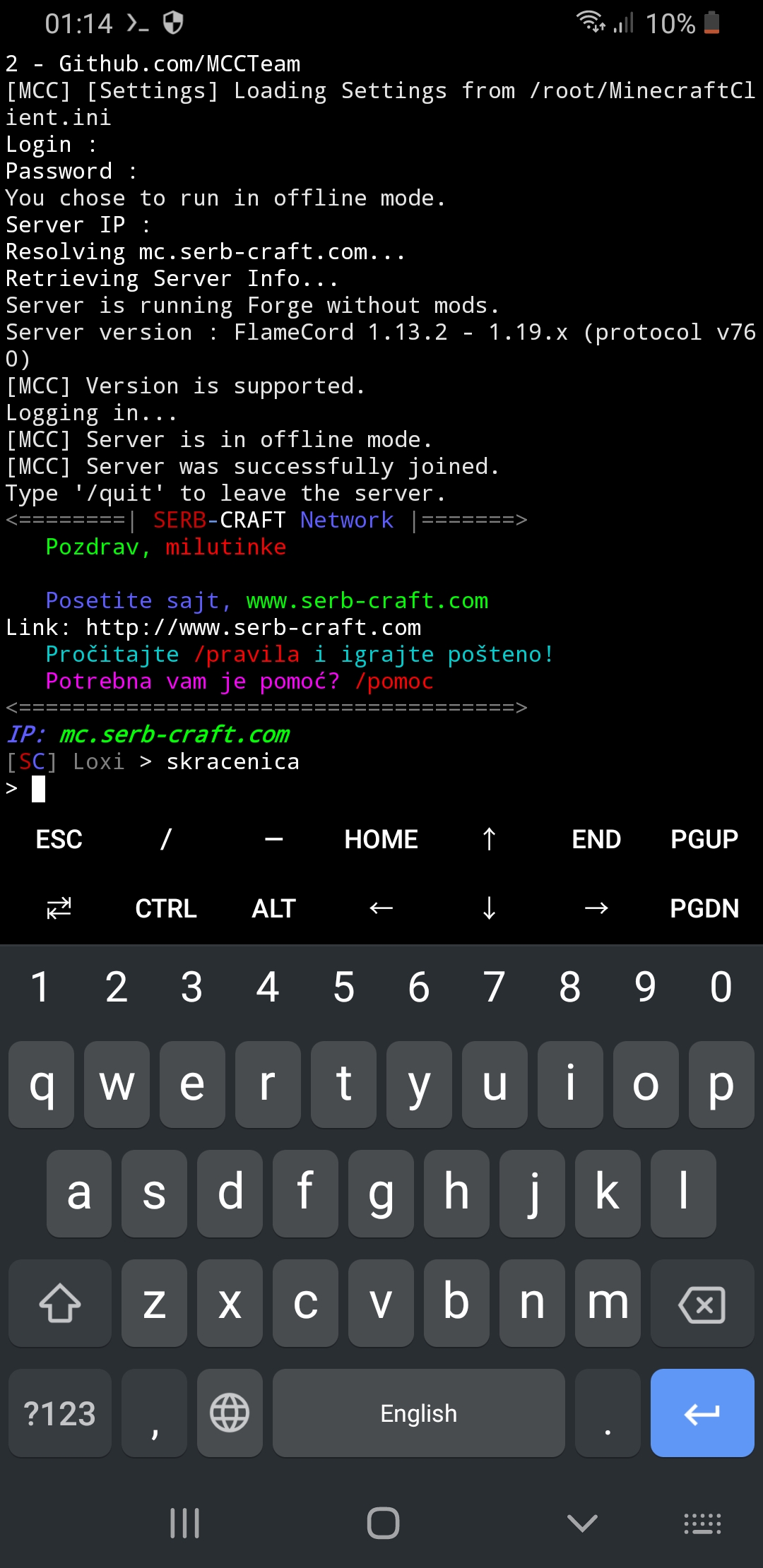
The documentation section is finished https://mccteam.github.io/docs/guide/installation.html#running-on-android
So for now this could be a solution. Tho we should work on getting those things I've mentioned abstracted away so we could make an app using Xamarin.
For iPhone/iOS users, there is iSH, sadly I do not own an iPhone so I can't test it out. If someone who has an iPhone and some time, let's figure out the process for it and make a documentation page. Installation of iSH with Alpine linux: https://www.youtube.com/watch?v=wIGVLM3Oaag On my part I'll be testing on Alpine on Android, I already got it working in Docker, tho I forgot how I installed .NET, there were some tweaks, can't remember. I'll report back here.
For iPhone/iOS users, there is iSH, sadly I do not own an iPhone so I can't test it out.
If someone who has an iPhone and some time, let's figure out the process for it and make a documentation page.
Installation of iSH with Alpine linux: https://www.youtube.com/watch?v=wIGVLM3Oaag
iSH is running on 32 bit system. I don't think it is possible to run MCC, or even install .NET on it.


For iPhone/iOS users, there is iSH, sadly I do not own an iPhone so I can't test it out. If someone who has an iPhone and some time, let's figure out the process for it and make a documentation page. Installation of iSH with Alpine linux: https://www.youtube.com/watch?v=wIGVLM3Oaag
iSH is running on 32 bit system. I don't think it is possible to run MCC, or even install .NET on it.
There is a 32 bit ARM build for Alpine: https://dotnet.microsoft.com/en-us/download/dotnet/thank-you/runtime-aspnetcore-6.0.8-linux-arm32-alpine-binaries If I am not mistaken, iPhones have ARM processors?
Yes, iPhone is using ARM CPU, but iSH is not. iSH is using x86 architecture.
The documentation section is finished https://mccteam.github.io/docs/guide/installation.html#running-on-android
ahhh yes. that's how a good doc is done. Excelent work!!!, i'm gonna follow it and share the results.
Ok, so i had problems with F-Droid install button was not there, pretty unreliable then, because some issue posts said F-Droid is very slow for updates and fixes, so it's just best to go to the original repository of the App. (Which is this one https://github.com/termux/termux-app#github ). And then with an image point or highlight the releases button inside on GitHub.
On the step when you run ubuntu there is a typo in the command, this one saying './startubunUT.sh' instead of './startubunTU.sh'
Other than that i seems to be running correctly. i'll test modifying the config file later for remote control and scripts.
Note: My device is a 'Samsung Galaxy S9'
Ok, so i had problems with F-Droid install button was not there, pretty unreliable then, because some issue posts said F-Droid is very slow for updates and fixes, so it's just best to go to the original repository of the App. (Which is this one https://github.com/termux/termux-app#github ). And then with an image point or highlight the releases button inside on GitHub.
On the step when you run ubuntu there is a typo in the command, this one saying './startubunUT.sh' instead of './startubunTU.sh'
Other than that i seems to be running correctly. i'll test modifying the config file later for remote control and scripts.
Note: My device is a 'Samsung Galaxy S9'
I'll update the documentation to use the git repo instead of F-Droid. For me it worked, sometimes the install button needs some time to appear, that might be the case on your phone. I'm using Samsung Galaxy A9 2018.
Edit: Fixed