

 MCCTeam
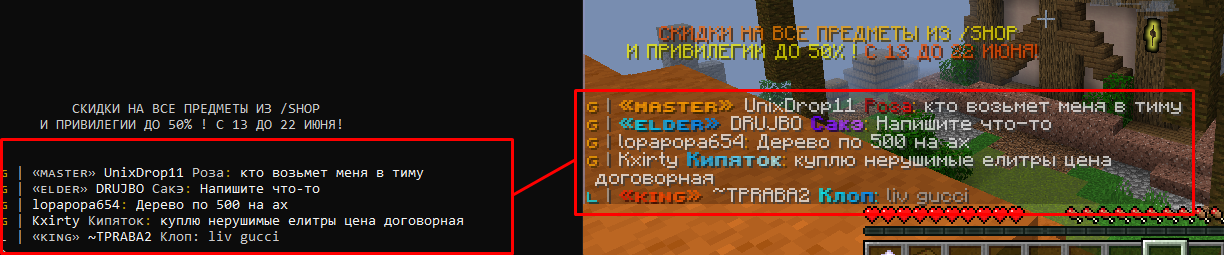
[BUG] Colors in chat do not work for me
Prerequisites
- [X] I made sure I am running the latest development build
- [X] I tried to look for similar issues before opening a new one
- [X] I have set
debugmessages=truein config to diagnose my issue - [X] I have redacted session tokens and passwords before attaching screenshots
Minecraft Version
1.16.5
Console Client Version
v1.18.2
Expected Behavior
To make colors work in chat
Actual Behavior
Colors not working in chat
Steps to Reproduce the bug
Attach screenshot here (If applicable)
Anythings that could help diagnosing the bug
No response
Device
Laptop
Operating System
Windows
Server Address (If applicable)
No response

[MCSettings]
# Settings below are sent to the server and only affect server-side things like your skin
enabled=true                       # If disabled, settings below are not sent to the server
locale=en_US                       # Use any language implemented in Minecraft
renderdistance=tiny              # Use tiny, short, medium, far, or chunk amount [0 - 255]
difficulty=normal                  # MC 1.7- difficulty. peaceful, easy, normal, difficult
chatmode=enabled                   # Use 'enabled', 'commands', or 'disabled'. Allows to mute yourself...
chatcolors=true                    # Allows disabling chat colors server-side
main_hand=left                     # MC 1.9+ main hand. left or right
skin_cape=true
skin_hat=true
skin_jacket=false
skin_sleeve_left=false
skin_sleeve_right=false
skin_pants_left=false
skin_pants_right=false
Which Windows version are you using? Note that on Windows 7 and 8 colors are not working in the default terminal. Use Alacritty

Doesn't seem related to #2122.
Colors don't seem to be working because they are using a completely different color scheme. The colors are gradiented in the picture, meaning they are using the new rgb color feature introduced in 20w17a (1.16).
An implementation must be made for this, in both MCC and the console handler.
(On the same vein as #2122, it might be nice to get a fallback color that is nearest to the specified RGB value if the terminal only supports basic color.)

The simplest solution would be to just use the dominant color, eg. convert the hex into rgb and then do manual checks for ranges, maybe there is an utility that could classify a color name based on hex.
This should do the job:
public static string getColorName(int[] myColor) {
	Dictionary<string, int[]> colors = new Dictionary<string, int[]>();

        colors.Add("red", new int[]{255,0,0});
        colors.Add("yellow", new int[]{255,255,0});
        colors.Add("green", new int[]{0,255,0});
        colors.Add("cyan", new int[]{0,255,255});
        colors.Add("blue", new int[]{0,0,255});
        colors.Add("magenta", new int[]{255,0,255});
        colors.Add("white", new int[]{255,255,255});
        colors.Add("grey", new int[]{127,127,127});
        colors.Add("black", new int[]{0,0,0});

	double temporaryDistance = double.MaxValue;
	string temporaryName = "";

	foreach(KeyValuePair<string, int[]> color in colors) {
		double rDistance = (double)myColor[0] - color.Value[0];
		double gDistance = (double)myColor[1] - color.Value[1];
		double bDistance = (double)myColor[2] - color.Value[2];

		double totalDistance = Math.Sqrt((rDistance * rDistance) +  (gDistance * gDistance) + (bDistance * bDistance));

		if(totalDistance < temporaryDistance) {
			temporaryName = color.Key;
			temporaryDistance = totalDistance;
		}
	}

	return temporaryName;
}
Eg. getColorName(new int[]{51, 153, 255})
Converting colors back to 16 colors on terminals that do not support other color codes seems a good idea 👍
