

 LycheeOrg
The number of files in the database and the local uploads/big folder does not match
Detailed description of the problem [REQUIRED]
Upload 633 pictures by Chrome
Skip duplicate "1"
4.2.1 does not have this issue.
I don't know if it's because of #907
The Database "photo" number is right, but the folder "big“ is less.
The log has no errors.
Browser and system
Chrome,windows 10

@ildyria @kamil4 I located this issue, I think it's because the skip duplicate was failed.
Steps to reproduce the issue make a copy of a photo and upload
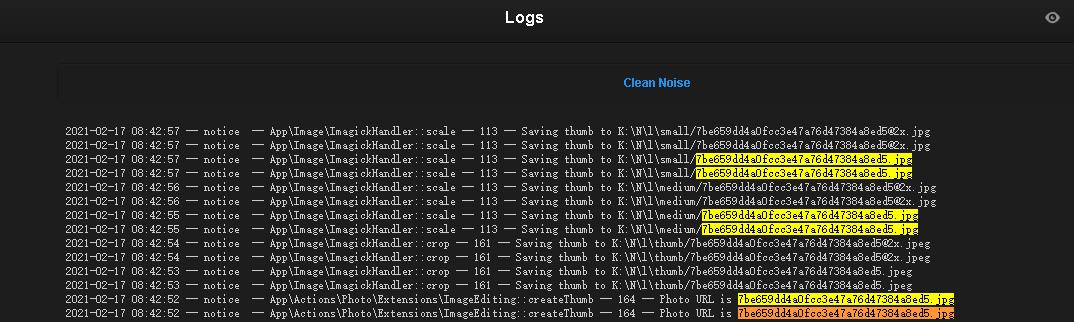

Can you try
php artisan lychee:ghostbuster? :)
I did try to copy an image and upload it with the original image together, and lychee didn't skip.
I have 52000 images php artisan lychee:ghostbuster it should take a while
52 000 images. 😱 Damn! You might be among our biggest user.
Browsing albums is much faster since lychee 4.2.1
Browsing albums is much faster since lychee 4.2.1
Yes. This is due to a large change in the back end. I'm happy that you notice the change though. :smiley:
Yes. This is due to a large change in the back end. I'm happy that you notice the change though. 😃
It used to take 16 seconds to open an album with many sub-albums. Thanks!
Can you try
php artisan lychee:ghostbuster? :)
It's taking too long, still not finished yet. Do you have the time to try it? just make a copy of an image and upload it together. Hope, not just me have this issue.
Can you try
php artisan lychee:ghostbuster? :)It's taking too long, still not finished yet. Do you have the time to try it? just make a copy of an image and upload it together. Hope, not just me have this issue.
I will give it a try when I have time. :(
the ghostbuster command is designed to figure out which files are still on your drive but no longer in your database (and vice versa). But I agree that it should be optimized because at the moment, it is slow as hell.
I will give it a try when I have time. :(
the
ghostbustercommand is designed to figure out which files are still on your drive but no longer in your database (and vice versa). But I agree that it should be optimized because at the moment, it is slow as hell.
ok, sure. and I agree that it should be optimized.😃
OK, I reread this report and I think I understand now what's going on here. We are dealing with a race condition here.
We normally avoid duplicates by checking if the photos table already contains an entry with the same checksum as what's being added. But what if the duplicates are being uploaded in one batch and are being processed simultaneously? The test for duplicates is being performed early on while the new photo entry is added to the table at the very end. So there is definitely a window when weird things can happen.
Now, 4.2.2 changed how Lychee names the files it stores on the file system. Before, we were naming them based on upload time, so even with duplicates the file names would've been unique. Now we name them based on their content, so the duplicates will use the same file names. That's in principle correct; however, as they are processed at the same time, clashes at the file system level can occur. Even if we get lucky, skip_duplicates still doesn't work as intended then.
The old behavior wasn't correct either, though; it's just that its brokenness was more hidden. We would end up with photo entries that Lychee considers to be duplicates (same checksum) but that each have uniquely named files on disk. That's not supposed to happen. If you delete such photos in Lychee, you will end up with orphaned files on the file system (that ghostbuster should then be able to find).
The correct way of fixing this is to eliminate the race window. @ildyria, am I correct in thinking that writing a partial photo entry to the database early on (before any files are written under uploads), followed by a check if there are any other entries with the same checksum (if so, bail out; remove the newly written partial entry though), eliminate it?

writing a partial photo entry to the database early on (before any files are written under
uploads), followed by a check if there are any other entries with the same checksum (if so, bail out; remove the newly written partial entry though), eliminate it?
Sounds plausible. My two thoughts are:
- Emphasis on other entries (it needs to not detect itself)
- There's still a risk of two processes adding the partial, detecting each other and both bailing.
Maybe we need a short DB lock of some sort for that check, if that's possible (I think it should be but it may be a PITA)

* There's still a risk of two processes adding the partial, detecting each other and both bailing.
Right...
I feel like we're reinventing a wheel here. Are there no atomic operations in SQL databases that we could take advantage of? :smiley:
That's what I was thinking. But whether there's one that exists for all our supported back ends.... Unless Laravel has an abstraction for it?
https://laravel.com/docs/8.x/database#database-transactions ? https://stackoverflow.com/questions/22906844/laravel-using-try-catch-with-dbtransaction ?
Maybe. There's also https://laravel.com/docs/5.2/queries#pessimistic-locking but it's getting complicated and I'm waiting for the edge cases. Though, on the other hand, nothing here should be mission critical.
This is making my head hurt :P
With the usual disclaimer that I know $#!^ about databases, it seems to me that neither option by itself is enough. What I believe we need is to be able to lock the whole photos table for a short period of time so that only one caller at a time can insert new rows. Transactions don't do that, and pessimistic locking (which, BTW, as I understand, should be used inside transactions) locks individual (existing) rows, not the whole tables.
As far as I can see, while Mysql at least can lock a table, Laravel doesn't seem to provide an abstraction for such operations. Which is a pity...
We could emulate it by designating a row in a table as a "mutex" of sorts for the whole table. E.g., insert a row into photos with id 0 and use pessimistic locking on that row to determine the caller who can add new rows to the table. Or, less disruptively perhaps, put that mutex row in a new locks table.
What I believe we need is to be able to lock the whole
photostable for a short period of time so that only one caller at a time can insert new rows
Agreed.
It's a difficult one to fix properly... I have an idea how to do it but it will require some experiments first and it probably won't be pretty.
It's a difficult one to fix properly... I have an idea how to do it but it will require some experiments first and it probably won't be pretty.
hello~, How is the situation with this issue?