

 Link-
Link-
adding action

Once we add the Dockerfile, action.yml, and likely a small .automation/run.sh, users should be able to call this as a full action to generate a PAT from their own GitHub Secrets, thus saving some of the setup work
@admiralAwkbar amazing, can we add details for how to use this in a workflow in the README?

Opps this is still a draft sorry! Thank you very much for your hard work 🙇♂️
@Link- I was able to get the image up and running using Ubuntu instead of Apline.. seems a missing lib or something
Now when I try to generate a token, I'm getting an odd failure... Can you try to reproduce?
docker build -t github/gh-token:latest -f Dockerfile .
After that, you can run:
docker run -it --entrypoint /bin/bash github/gh-token:latest
All you need to do now:
- copy a key.pem to the root folder
-
gh-token generate --key key.pem --app_id SOME_ID --duration 10 --hostname api.github.com
From there I'm getting a bad curl response...
@Link- I was able to get the image up and running using Ubuntu instead of Apline.. seems a missing lib or something
Now when I try to generate a token, I'm getting an odd failure... Can you try to reproduce?
docker build -t github/gh-token:latest -f Dockerfile .After that, you can run:
docker run -it --entrypoint /bin/bash github/gh-token:latestAll you need to do now:
- copy a key.pem to the root folder
gh-token generate --key key.pem --app_id SOME_ID --duration 10 --hostname api.github.comFrom there I'm getting a bad curl response...
@admiralAwkbar a few things:
Problem 1
There seems to be an issue with certificates on this container image! I'm really puzzled by this and I don't know what's happening yet. I replaced curl with wget and it only works if I use --no-check-certificate which is a big no no!
###################
# Install JWT-CLI #
###################
RUN wget -O jwt-linux.tar.gz --no-check-certificate https://github.com/mike-engel/jwt-cli/releases/download/4.0.0/jwt-linux.tar.gz \
    && tar xvfz jwt-linux.tar.gz \
    && rm -f jwt-linux.tar.gz \
    && mv jwt /usr/bin
=> CACHED [5/6] COPY .automation/run-gh-token.sh ./                                                        0.0s
 => ERROR [6/6] RUN curl -sL https://github.com/mike-engel/jwt-cli/releases/download/4.0.0/jwt-linux.tar.g  0.8s
------
 > [6/6] RUN curl -sL https://github.com/mike-engel/jwt-cli/releases/download/4.0.0/jwt-linux.tar.gz --output ./jwt-linux.tar.gz     && tar xvfz jwt-linux.tar.gz:
------
executor failed running [/bin/sh -c curl -sL https://github.com/mike-engel/jwt-cli/releases/download/4.0.0/jwt-linux.tar.gz --output ./jwt-linux.tar.gz     && tar xvfz jwt-linux.tar.gz]: exit code: 77
Problem 2
# From within the container
./gh-token generate -i 111111 -k ./private.pem
Aborting due to errexit on line 1130. Exit code: 77
Aborting due to errexit on line 1130. Exit code: 77
root@fbf9e27299cc:/app# curl -s https://api.github.com/meta
root@fbf9e27299cc:/app# curl https://api.github.com/meta
curl: (77) error setting certificate verify locations:
  CAfile: /etc/ssl/certs/ca-certificates.crt
  CApath: /etc/ssl/certs
Also a few of things that might make your life easier:
-
--hostname api.github.comis not really required if you're using .com it's only needed for GHES -
--durationis only for the JWT not for the installation access token
I have to troubleshoot this further but I don't have cycles for this now unfortunately.
Edit
Problem 1 and 2 were caused by the same issue. It's fixed now, the ca-certificates package was needed. Without any HTTPS request will fail as curl or wget will fail to verify the authenticity of the TLS certificate from GitHub.
You can generate a token from the container with:
/app/gh-token generate -i <app_id> -k <path to private key>
@Link- i think i got this done... now we just need to cut a release and validte then we should be golden...
@admiralAwkbar brilliant sir! I'll carve out some time this week to review and merge!
FYI - I found a bug.
build
link-/gh-token/action/action.yml (Line: 17, Col: 18): Unrecognized named-value: 'secrets'. Located at position 1 within expression: secrets.PRIVATE_KEY
It seems that if we use ${{ secrets.... }} in the action.yml actions will fail like this:

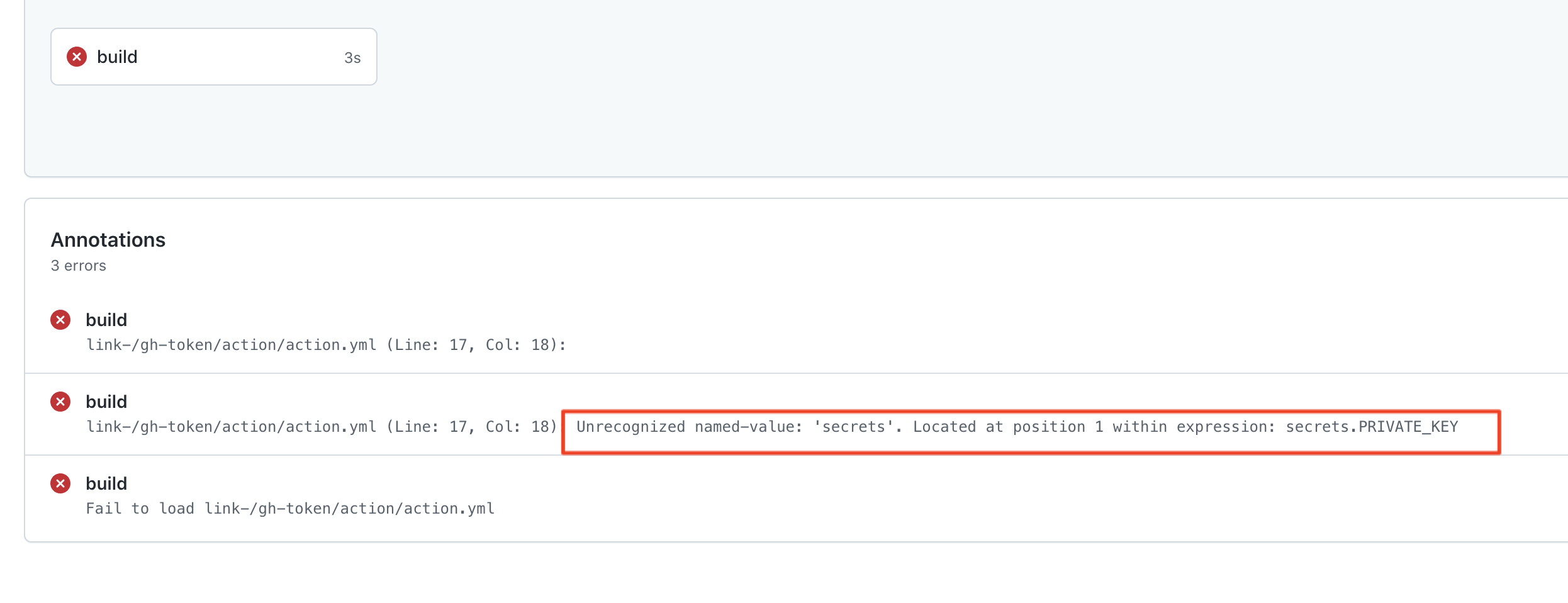
@admiralAwkbar I'm facing hurdles testing this, I guess we're not really ready to ship it yet:
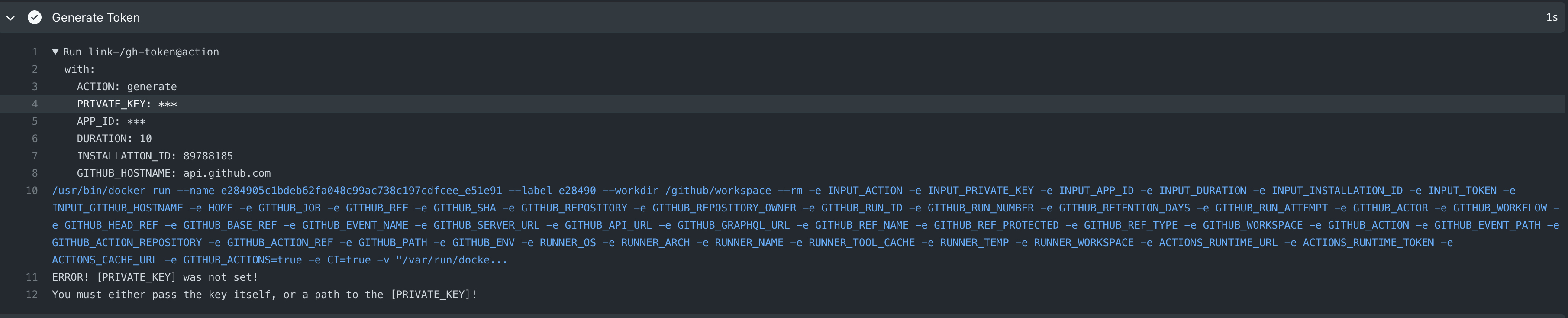
@admiralAwkbar I fixed all the issues (I identified), I think this definitely requires more testing and specifically:
- Installation IDs fetching
- Token revoke testing
I also made some changes to the README.
Lastly, if we're going to have this available as an action then we need to maintain a Docker image and releases. Do you happen to have a workflow that will generate those? Shall we add it to this PR?
I'm fine with merging this right away after testing and we can work on the releases leater.
Lastly, thank you for all the hard work here <3