

 LibrePDF
`shape-rendering="geometricPrecision"` leads to pixelated rendered text
Describe the bug
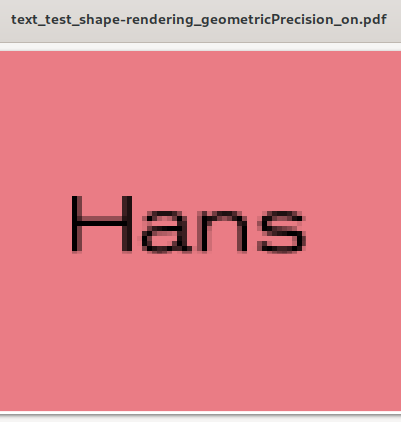
If the svg file contains text shape-rendering="geometricPrecision" the text in the rendered pdf file is pixelated. If remove shape-rendering="geometricPrecision" from the svg file the text in the pdf is sharp.
To Reproduce Code to reproduce the issue
  public void renderOpenPdf(SVGDocument document, float dpi, Color backgroundColor, OutputStream outputStream) {
    Document pdfDoc = new Document();
    pdfDoc.open();
    Dimension dim = SVGUtil.readDimension(document.getDocumentElement());
    Dimension mmDimension = dim.scaled(25.4f / dpi);
    Rectangle pageSize = new Rectangle(mmDimension.getWidth() / 25.4f * 72, mmDimension.getHeight() / 25.4f * 72);
    if (backgroundColor != null) {
      pageSize.setBackgroundColor(backgroundColor);
    }
    pdfDoc.setPageSize(pageSize);

    PdfWriter writer = PdfWriter.getInstance(pdfDoc, outputStream);
    pdfDoc.open();

    PdfContentByte cb = writer.getDirectContent();
    Graphics2D g2d = cb.createGraphics(pageSize.getWidth(), pageSize.getHeight());

    renderPdf(pdfDoc, g2d, document, pageSize);

    g2d.dispose();
    pdfDoc.close();
  }

  public void renderPdf(Document pdfDoc, Graphics2D g2, SVGDocument svgDoc, Rectangle pageSize) {
    pdfDoc.setPageSize(pageSize);

    TranscoderInput ti = new TranscoderInput(svgDoc);
    PrintTranscoder transcoder = new PrintTranscoder();
    transcoder.transcode(ti, null);

    PageFormat page = new PageFormat();
    Paper paper = new Paper();
    paper.setSize(pageSize.getWidth(), pageSize.getHeight());
    paper.setImageableArea(0, 0, pageSize.getWidth(), pageSize.getHeight());
    page.setPaper(paper);
    transcoder.print(g2, page, 0);
  }
- Remove
shape-rendering="geometricPrecision"from the svg file - Render to pdf
Expected behavior
A sharp rendered text, if shape-rendering="geometricPrecision" is "on".
Screenshots
shape-rendering="geometricPrecision" "on":
shape-rendering="geometricPrecision" "off":
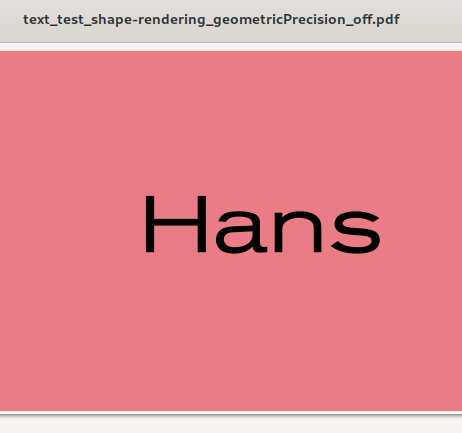
System (please complete the following information):
- OS: Arch Linux / EndeavourOS
- Used Font: Have a look in the attached zip file, which contains the svg file.
SVG file and resulting PDF files text_test_shape-rendering_geometricPrecision.zip


Hi. I am trying to reproduce the bug with the provided code. But I cannot find the SVGUtil class to compile the code. I wonder if you have added other dependencies for this code? @BuZZ-dEE

@macromogic that is just a function to read the dimension (width, height) from the element. do you really need that?
@BuZZ-dEE I am just suspecting if I have missed some of the dependencies that include this class. I have just cloned this repo and tried to use your code and file to reproduce the bug. However, I didn't find the class in either the project or the dependencies. I don't know what I have missed.
Also, I have no idea how to read the file as an SVGDocument. Could you give me some information?
@BuZZ-dEE this issue is not related to OpenPDF, it is cause by org.apache.batik.
when shape-rendering="geometricPrecision" is on. it will pass image to OpenPDF by the code
g2d.drawImage(bi, clipR.x, clipR.y, (ImageObserver)null) in line 185 of org.apache.batik.ext.awt.image.GraphicsUtil
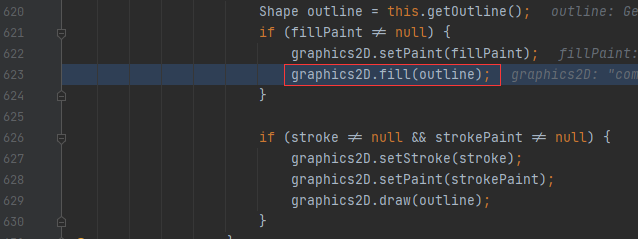
 when shape-rendering="geometricPrecision" is off. it will pass the shape to OpenPDF by the code
graphics2D.fill(outline); in line 623 of org.apache.batik.gvt.font.AWTGVTGlyphVector.

@Wugengxian Apache FOP has no problem to render the same SVG. I thought Apache FOP would also use Apache Batik. Doesn't it?
@BuZZ-dEE the way Apache FOP transform svg to pdf do not like the way that you used. it use the method org.apache.fop.svg.PDFTranscoder.transcode. In this method it pass a shape to graphics.