

 LORD-MicroStrain
USB / Serial / IP Connection Problem
We are working with WSDA 2000 devices and they are either connected via USB or via Ethernet.
How can we automatically detect what connection is used in similar ways like Sensorconnect (Automatic detection of a base station). How do we register the base station on the local machine automatically, once its plugged in or once the device is found on the network?
I read that the USB connection is using a virtual Ethernet connection. How do we obtain the IP address of that virtual Ethernet connection? we are aware that there is a sticker on the side of box but there must be a function exisiting to obtain that IP adddress or to generate the correct IP address from the serial number.
Does anyone has code samples how to do that?

Hi.
When you connect via USB the WSDA 2000 to SensorConnect, you have to go the option WSDA control panel. This opens the window in your web browser and then write user and pass, generally is wsda. After the page shows the WSDA information.

@civionic,
I think you wanted to do it programmatically, I could be wrong. You have probably already found a solution but I am new to LORD API and had a similar problem understanding how to connect via TCP/IP. I thought I would post what I came up with just in case it might help someone. It is a simple test Console App that prints out the Base Station information that it finds. It may not be the best solution but it works for me.
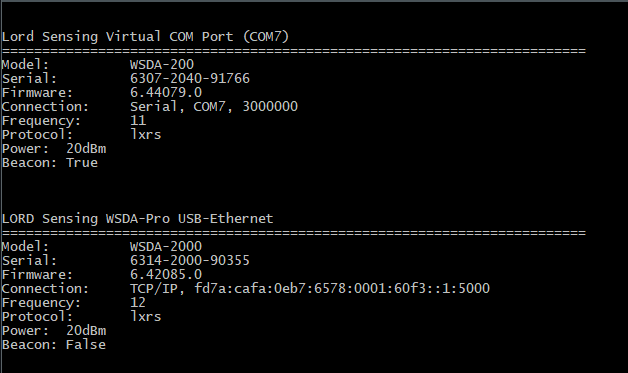
internal static class Program
{

    private static void Main(string[] args)
    {
        PrintBaseStationList();
        Console.ReadKey();
    }

    public static mscl.DeviceList FoundBaseStations { get; set; }
    public static mscl.BaseStation BaseStation { get; set; }
    public static mscl.Connection Connection { get; set; }

    private static bool Connect(KeyValuePair<string, mscl.DeviceInfo> info)
    {
        try
        {
            switch (info.Value.connectionType())
            {
                case mscl.DeviceInfo.ConnectionType.connectionType_serial:
                    Connection = mscl.Connection.Serial(info.Key);
                    break;

                case mscl.DeviceInfo.ConnectionType.connectionType_tcp:
                    Connection = mscl.Connection.TcpIp(info.Key, 5000);
                    break;

                default:
                    return false;
            }

            BaseStation = new mscl.BaseStation(Connection);
            return BaseStation.ping();
        }
        catch (Exception ex)
        {
            //Log the Exception --- App.Logger.LogException(ex, true);
            return false;
        }
    }

    private static string GetBaseStationInfo(KeyValuePair<string, DeviceInfo> info)
    {
        var sb = new StringBuilder();

        if (BaseStation != null)
        {
            sb.AppendLine("\n");
            sb.AppendLine(info.Value.description());
            sb.AppendLine("=========================================================================");
            sb.Append("Model:\t\t").AppendLine(BaseStation.model().ToString().Replace("base_", "").Replace("Base", "").Replace("_", "-").ToUpper());
            sb.Append("Serial:\t\t").AppendLine(BaseStation.serial());
            sb.Append("Firmware:\t").AppendLine(BaseStation.firmwareVersion().ToString());
            sb.Append("Connection:\t").AppendLine(BaseStation.connection().description());
            sb.Append("Frequency:\t").AppendLine(BaseStation.frequency().ToString().Replace("freq_", ""));
            sb.Append("Protocol:\t").AppendLine(BaseStation.communicationProtocol().ToString().Replace("commProtocol_", ""));
            sb.Append("Power:\t").AppendLine(BaseStation.getTransmitPower().ToString().Replace("power_", ""));
            sb.Append("Beacon:\t").AppendLine(BaseStation.beaconStatus().enabled().ToString());
        }

        return sb.ToString();
    }

    private static void GetBaseStationList()
    {
        FoundBaseStations = mscl.Devices.listBaseStations();
    }


    private static void PrintBaseStationInfo(KeyValuePair<string, DeviceInfo> info)
    {
        if (Connect(info))
        {
            Console.WriteLine(GetBaseStationInfo(info));
        }
    }

    private static void PrintBaseStationList()
    {
        GetBaseStationList();
        foreach (KeyValuePair<string, mscl.DeviceInfo> info in FoundBaseStations)
        {
            PrintBaseStationInfo(info);
        }
    }

}

My code above only finds USB devices. I am still looking for a way to find them over the Ethernet Network. I tried the WSDAFinder() but it returns 0 results but SensorConnect can see it. Using a WSDA-2000.
    private static void GetBaseStationList()
    {
        FoundBaseStations = mscl.Devices.listBaseStations(); //USB Connected Base Stations
        var finder = new WsdaFinder(); //? Network Base Stations??
        var found = finder.found(); //Return 0 results
    }
Hi all -
Sorry for the delayed response - it looks like a lot of the options have already been discussed, but just to summarize and elaborate a bit on a few of them. Hopefully one of these options works for you/resolves the issues you're running into, but if not let us know!
Detecting over USB
The sample code @Rob-Hamilton provided (thanks!) should work for automatically finding WSDA-2000s connected via USB (virtual Ethernet) - each DeviceInfo entry returned from Devices::listBaseStations() will indicate whether it's a USB or TCP/IP connection (DeviceInfo::connectionType()) and the string key will be the IP address to connect to.
Detecting over the network
If the WSDA is on the same local network as the pc running your application you may be able to use the MSCL WsdaFinder object to detect it automatically. The code snippet @Rob-Hamilton provided above is pretty much the same as what SensorConnect uses - included here too just to point out how to access the connection properties once found:
// automatically identifies already connected devices on instantiation
// will continue to look for devices as long as the object is in context
mscl::WsdaFinder wsdaFinder;
mscl::WsdaFinder::WsdaMap found = wsdaFinder.found(); // return all found
for (auto wsdaInfo : found)
{
    wsdaInfo.second.name(); // device name
    wsdaInfo.second.ipAddress(); // ip address
    wsdaInfo.second.port(); // port
}
Keep in mind this works over UPnP so the WSDA must be on a local network. If local but still not being found double check that
- the network you're connected to allows UPnP (have run into issues in the past, especially on corporate networks)
- the WSDA is connected on the same subnet as the machine running the application
If this is working in SensorConnect on the same machine, however, it shouldn't be a problem via MSCL. Maybe try checking found devices a few times at a second or two interval. Sometimes it can take a bit to actually find the devices - SensorConnect checks continuously the whole time the Add Device dialog is open.
Assigning a static IP If automatic detection over the network is not working you can define a static IP through the WSDA Control Panel (accessible via SensorConnect when connected via USB). Once the static IP is defined it is up to your network configuration to actually assign it properly (ensure it's not already in use, etc).

@mglord
Thank you for the explanation. I see my mistake. I assumed that is was a blocking call that would return with what it found. However, it is a constant discovery sweep and adding new base stations as it finds them. With that I have updated my example and attached it. Maybe it will help someone later as a starting point.
using mscl;
using System;
using System.Collections.Generic;
using System.Text;
using System.Threading.Tasks;

internal static class Program
{
    public static mscl.DeviceList FoundBaseStations { get; set; }

    public static Dictionary<string, WsdaInfo> FoundUPnPBaseStationList { get; set; } = new Dictionary<string, WsdaInfo>();

    public static bool IsClosing { get; set; }

    public static mscl.BaseStation BaseStation { get; set; }

    public static mscl.Connection Connection { get; set; }

    private static bool Connect(KeyValuePair<string, mscl.DeviceInfo> info)
    {
        try
        {
            switch (info.Value.connectionType())
            {
                case mscl.DeviceInfo.ConnectionType.connectionType_serial:
                    Connection = mscl.Connection.Serial(info.Key);
                    break;

                case mscl.DeviceInfo.ConnectionType.connectionType_tcp:
                    Connection = mscl.Connection.TcpIp(info.Key, 5000);
                    break;

                default:
                    return false;
            }

            BaseStation = new mscl.BaseStation(Connection);
            return BaseStation.ping();
        }
        catch (Exception ex)
        {
            //Log the Exception --- App.Logger.LogException(ex, true);
            return false;
        }
        finally
        {
        }
    }

    private static bool Connect(mscl.WsdaInfo info)
    {
        try
        {
            Connection = mscl.Connection.TcpIp(info.ipAddress(), info.port());
            BaseStation = new mscl.BaseStation(Connection);
            return BaseStation.ping();
        }
        catch (Exception ex)
        {
            //Log the Exception --- App.Logger.LogException(ex, true);
            return false;
        }
        finally
        {
        }
    }

    private static string GetBaseStationInfo(string title)
    {
        var sb = new StringBuilder();

        if (BaseStation != null)
        {
            sb.AppendLine("\n");
            sb.AppendLine(title);
            sb.AppendLine("=========================================================================");
            sb.Append("Model:\t\t").AppendLine(BaseStation.model().ToString().Replace("base_", "").Replace("Base", "").Replace("_", "-").ToUpper());
            sb.Append("Serial:\t\t").AppendLine(BaseStation.serial());
            sb.Append("Firmware:\t").AppendLine(BaseStation.firmwareVersion().ToString());
            sb.Append("Connection:\t").AppendLine(BaseStation.connection().description());
            sb.Append("Frequency:\t").AppendLine(BaseStation.frequency().ToString().Replace("freq_", ""));
            sb.Append("Protocol:\t").AppendLine(BaseStation.communicationProtocol().ToString().Replace("commProtocol_", ""));
            sb.Append("Power:\t").AppendLine(BaseStation.getTransmitPower().ToString().Replace("power_", ""));
            sb.Append("Beacon:\t").AppendLine(BaseStation.beaconStatus().enabled().ToString());
        }

        return sb.ToString();
    }

    private static void GetBaseStationList()
    {
        FoundBaseStations = mscl.Devices.listBaseStations();
    }

    private static void Main(string[] args)
    {
        PrintUPnPBaseStations();
        PrintBaseStationList();
        Console.ReadKey();
        IsClosing = true;
    }

    private static void PrintBaseStationInfo(KeyValuePair<string, DeviceInfo> info)
    {
        if (Connect(info))
        {
            Console.WriteLine(GetBaseStationInfo(info.Value.description()));
        }
    }

    private static void PrintBaseStationInfo(mscl.WsdaInfo info)
    {
        if (Connect(info))
        {
            Console.WriteLine(GetBaseStationInfo($"LORD Sensing Local Network {info.name()}"));
        }
    }

    private static void PrintBaseStationList()
    {
        GetBaseStationList();
        foreach (KeyValuePair<string, mscl.DeviceInfo> info in FoundBaseStations)
        {
            PrintBaseStationInfo(info);
        }
    }

    private static async void PrintUPnPBaseStations()
    {
        var tsk = Task.Run(async () =>
        {
            mscl.WsdaFinder finder = new WsdaFinder();
            mscl.WsdaMap found;

            while (!IsClosing)
            {
                await Task.Delay(10).ConfigureAwait(true);
                found = finder.found();
                if (found.Count > 0)
                {
                    foreach (var item in found.Keys)
                    {
                        if (!FoundUPnPBaseStationList.ContainsKey(item))
                        {
                            mscl.WsdaInfo info = found[item];
                            FoundUPnPBaseStationList.Add(item, info);
                            PrintBaseStationInfo(info);
                        }
                    }
                }
            }
        });

        await tsk.ConfigureAwait(true);
    }
}