

 LAION-AI
Collapse texts that are too long in tasks
From comment https://github.com/LAION-AI/Open-Assistant/issues/158#issuecomment-1367630126
When doing tasks on device with a small screen, it may happen that the text for one of the tasks is large enough to cover the entire screen, making interactions such as drag and drop much more difficult.
Proposed solution: Have maximum amount of characters that can be displayed in one field, and collapse the text if more is present.

Have maximum amount of characters that can be displayed in one field, and collapse the text if more is present.
would an alternative be to just specify a max-width? might be easier from a css perspective

Unfortunately, that won't solve the problem.
If we have a fixed width, the text will wrap into new lines, and with long enough text, there will be enough lines to cover the entire page.
Other solutions could be dynamic font-size or a pop up that shows the entire text.
Ok, I thought of something like overflow: hidden with text-overflow: ellipsis or something like that, but yea might be tricky. Character limit seems fine :)
Hey, I tried to take a look at this issue. My plan was to cut the string after maxLength and add an ellipsis which will be a clickable button that shows a chakra modal with the full text.
On big screen sizes it looks ok:
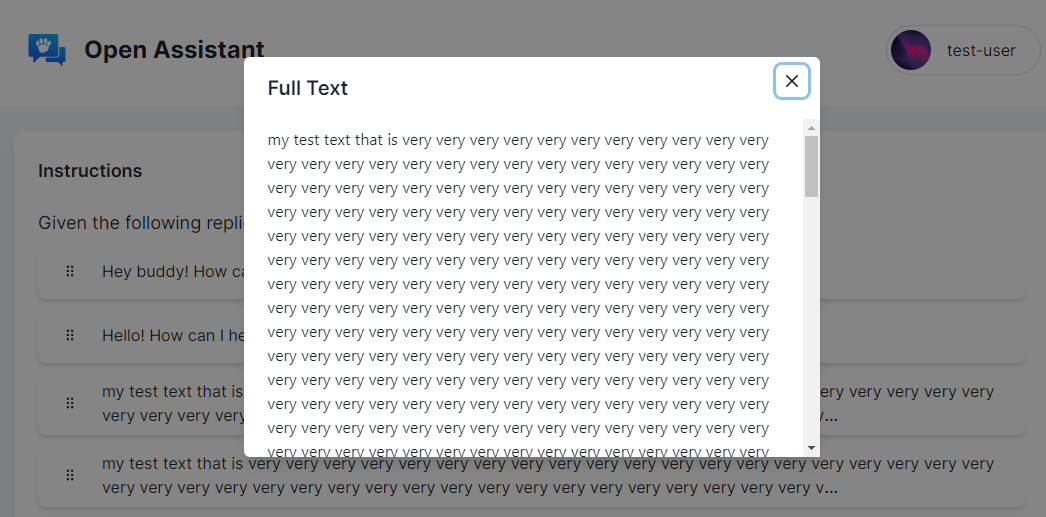
But when I try it on smaller sizes, for some reason the modal does not take up the full width/height of the screen:

I can probably fix it using style tags, but I feel I might be missing something simpler.

@kostiak I will assign this to you.
I don't know what the problem is, but the modal might need some position attributes?
Could you open a draft PR with your code and maybe we can look over it together?
@AbdBarho hey, my PR has been merged, let me know if anything else needs to be done here.