

 LAB02-Research
Feature: turn monitors off/on
Is your feature request related to a problem? Please describe. I'm always frustrated when my IoTLink service that I've been using for this feature for a while just stops working and has to be restarted!
Describe the solution you'd like An easy and reliable way to issue "turn monitor off" and "turn monitor on" from Home Assistant!
Describe alternatives you've considered I have only used IoTLink... MQTT Publish:
Topic: iotlink/brunt/windows-11/commands/displays/off
to turn the monitor off and
Topic: iotlink/brunt/windows-11/commands/displays/on
to turn the monitor on.
Additional context Thanks for reading!

Hey @danielbrunt57,
There's an open request for those commands: hassagent-11. There has been a lot of request for this specifically lately, so I'll add it to the next beta :)

If it's any help you can do that with powershell scripts which you can call from Hass now, but adding them as button sensors. displayon.txt displayoff.txt Just download and put them somewhere and change the extension to .ps1

Thank you Jane.
displaysoff.txt works fine but displayson.txt is not working for me, even after correcting a syntax error (an open paren is missing):
"Add-Type '[DllImport(\"user32.dll\")]public static extern int SendMessage(int hWnd,int hMsg,int wParam,int lParam);' -Name a -Pas)::SendMessage(-1,0x0112,0xF170, -1)"
But should be:
" (Add-Type '[DllImport("user32.dll")]public static extern int SendMessage(int hWnd,int hMsg,int wParam,int lParam);' -Name a -Pas)::SendMessage(-1,0x0112,0xF170, -1)”
What is does is take the monitor out of sleep mode but I then seeNo DVI-Dsignal and the monitor goes back to sleep. I believe it is only turning the video on momentarily. BTW, this variation on the above works for turning the monitor off:
" (Add-Type '[DllImport("user32.dll")]public static extern int SendMessage(int hWnd,int hMsg,int wParam,int lParam);' -Name a -Pas)::SendMessage(-1,0x0112,0xF170, 2)”
`
My test.bat:
powershell "(Add-Type '[DllImport(\"user32.dll\")]public static extern int SendMessage(int hWnd,int hMsg,int wParam,int lParam);' -Name a -Pas)::SendMessage(-1,0x0112,0xF170, 2)" timeout 3 powershell "(Add-Type '[DllImport(\"user32.dll\")]public static extern int SendMessage(int hWnd,int hMsg,int wParam,int lParam);' -Name a -Pas)::SendMessage(-1,0x0112,0xF170, -1)"
Your suggestion to use buttons + my research into in the issue gave me another solution to idea to the monitor back on:
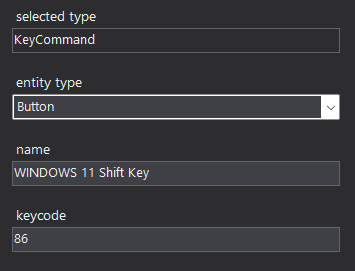 and it works!
Any updates on adding this? I'm also coming over from IOTLink, use case is Windows machine as a kiosk so I want to turn the screen on/off in HA automations (basically when someone walks into or leaves a room).
If you have trouble figuring out the screen on stuff lmk and I can check on the guidance. IOTLink did this with mouse movement APIs which fail to wake the device after the screen is turned off (unless you make a registry change to adjust the power mode). I think the original requestor of this issue probably hit the same problem. So don't do that 😉

Hey @jamescadd,
It's scheduled for the next beta, which will be published in a week or two. Thanks for the heads up!
Added in the latest beta:
https://github.com/LAB02-Research/HASS.Agent/releases/tag/2022.13.0-beta2
Awesome, looks like a nice update! Out of curiosity, how did you implement the Monitor sleep/wake features? Have you tested this alongside any other Windows settings that would be needed for a kiosk setup, like not showing the lock screen? This was always broken in IOTLink so it will be great to finally have something working :)
Monitor sleep is done with a Windows internal api call, wake is done by simulating key presses (instead of moving the mouse). It currently presses the 'arrow up' key.
Have you tested this alongside any other Windows settings that would be needed for a kiosk setup, like not showing the lock screen?
What exactly do you mean by this, how would not showing the lock screen impact this? Can you describe the usecase (so I can replicate it).
The things I usually do for setup are remove the requirement that the user sign in as follows (should disable lock screen):
o In Settings/Accounts/Sign-In options § Change require sign in to "never" o Run netplwiz § Uncheck "users must sign in to login to this computer"
Also I disable connected standby mode so the device never gets put to sleep:
HKEY_LOCAL_MACHINE\SYSTEM\CurrentControlSet\Control\Power\CsEnabled
Another option is to use power requests to get the display to turn on (newer API than most of the control injection ones):
https://docs.microsoft.com/en-us/windows/win32/api/winbase/nf-winbase-powersetrequest
Tbh I haven't looked in to Windows 11 options or APIs that could improve the experience so I should check the latest.
Use case is a Surface tablet on a wall that's always plugged in. A motion sensor triggers an HA automation that wakes the display when I enter the room. The motion sensor reporting "cleared" should trigger an automation to turn the screen off (this is the part that was broken in IOTLink as turning off display would put things in a state where it could never turn on again).
I'll test with these bits this week, thanks for the updates!
Edit: The tablet shows a browser with HA dashboard. Goal is to have it on when someone is in that room and off otherwise, no need to unlock PC.
Very nice!!! Works like a charm!! Thank you! I now have...
  - platform: template
    lights:
      pc_monitor:
        friendly_name: "PC Monitor"
        unique_id: pc_monitor
        availability_template: '{{ not is_state("binary_sensor.my_pc_is_active", "unknown") }}'
        icon_template: >-
          hass: monitor
        value_template: >-
          {{ is_state("sensor.windows_11_monitorpowerstate", "PowerOn") }}
        turn_on:
          service: button.press
          entity_id: button.windows_11_monitorwake
        turn_off:
          service: button.press
          entity_id: button.windows_11_monitorsleep
alias: Office Lights
description: ""
trigger:
  - platform: state
    entity_id:
      - binary_sensor.my_pc_is_active
    id: PC Active
    to: "on"
  - platform: state
    entity_id:
      - binary_sensor.office_motion
    id: Motion on
    to: "on"
  - platform: state
    entity_id:
      - binary_sensor.my_pc_is_active
    id: PC Idle
    to: "off"
    for:
      hours: 0
      minutes: 5
      seconds: 0
  - platform: state
    entity_id:
      - binary_sensor.office_motion
    to: "off"
    id: Motion off
    for:
      hours: 0
      minutes: "{{ states('input_number.office_lights_auto_off_time') }}"
      seconds: 0
condition: []
action:
  - choose:
      - conditions:
          - condition: or
            conditions:
              - condition: trigger
                id: PC Active
              - condition: trigger
                id: Motion on
        sequence:
          - if:
              - condition: state
                entity_id: sensor.windows_11_monitorpowerstate
                state: "PowerOff"
            then:
              - service: light.turn_on
                data: {}
                target:
                  entity_id: light.pc_monitor
          - if:
              - condition: state
                entity_id: light.office_lights
                state: "off"
            then:
              - service: light.turn_on
                data: {}
                target:
                  entity_id: light.office_lights
      - conditions:
          - condition: and
            conditions:
              - condition: state
                entity_id: binary_sensor.my_pc_is_active
                state: "off"
              - condition: state
                entity_id: binary_sensor.office_motion
                state: "off"
        sequence:
          - service: light.turn_off
            data: {}
            target:
              area_id: office
    default: []
mode: restart