

 Krypton-Suite
[Feature Request]: Alphablend selection in DataGridView
Its possible to Alphablend selection in DataGridView so colors in cells will be preserved when selected?
Currently use a helper class to do a semialphablend inside, but i plan to use multiple colors in one cell and this aproach wont work


Based on the following article, I solved it this way for now. (see attachment)
Helper contains Semi-Alphablending, Hide-Selection and Row-Numbering - this inside the grid with properties would be nice...
Preview:
KryptonDataGridViewHelper.zip (VB)
Solved with a helper class!
Can this be added to the "Extended Toolkits" version of the Data grid please ?
Solved with a helper class!
Can this be added to the "Extended Toolkits" version of the Data grid please ?
Needs to be converted from VB to C#

Helper based on following articles: Semi-Transparent Selection --> https://stackoverflow.com/questions/38337849/transparent-selectionbackcolor-for-datagridview-cell Hide-Selection the same, but using Cell Color as SelectionColor Auto-Rownumbers --> https://stackoverflow.com/questions/9581626/show-row-number-in-row-header-of-a-datagridview
articles uses c# so you can do some work, color calculating needs perhaps a little cleanup (calcualating darker backcolor) - forecolor always cellforecolor with fallbacks to row and col. (Instead of adding an additional event, perhaps you can redefine the events over a property)
using System; using System.Collections.Generic; using System.Diagnostics; using System.Globalization; using System.IO; using System.Linq; using System.Reflection; using System.Runtime.CompilerServices; using System.Security; using System.Text; using System.Threading.Tasks; using Microsoft.VisualBasic; using System.Drawing; using System.Windows.Forms; using Krypton.Toolkit;`
public class KryptonDataGridViewHelper { public static void EnableSemiTransparentSelection(KryptonDataGridView dataGridView) { dataGridView.RowPrePaint += GridSemiTransparentSelection_RowPrePaint; }
public static void DisableSemiTransparentSelection(KryptonDataGridView dataGridView)
{
    dataGridView.RowPrePaint -= GridSemiTransparentSelection_RowPrePaint;
}

public static void EnableHideSelection(KryptonDataGridView dataGridView)
{
    dataGridView.RowPrePaint += GridHideSelection_RowPrePaint;
}

public static void DisableHideSelection(KryptonDataGridView dataGridView)
{
    dataGridView.RowPrePaint -= GridHideSelection_RowPrePaint;
}

public static void EnableRowNumbers(KryptonDataGridView dataGridView)
{
    dataGridView.RowPostPaint += GridShowRowNumbers_RowPostPaint;
}

public static void DisableRowNumbers(KryptonDataGridView dataGridView)
{
    dataGridView.RowPostPaint -= GridShowRowNumbers_RowPostPaint;
}

private static void GridSemiTransparentSelection_RowPrePaint(object sender, DataGridViewRowPrePaintEventArgs e)
{
    KryptonDataGridView dataGridView = sender as KryptonDataGridView;

    foreach (DataGridViewCell cell in dataGridView.Rows(e.RowIndex).Cells)
    {
        if (cell.Selected == false)
            continue;

        Color bgColorCell = Color.Empty;
        Color fgColorCell = Color.Empty;

        if (dataGridView.Columns.Item(cell.ColumnIndex).DefaultCellStyle.BackColor != Color.Empty)
            bgColorCell = dataGridView.Columns.Item(cell.ColumnIndex).DefaultCellStyle.BackColor;
        if (dataGridView.Columns.Item(cell.ColumnIndex).DefaultCellStyle.BackColor != Color.Empty)
            bgColorCell = dataGridView.Columns.Item(cell.ColumnIndex).DefaultCellStyle.BackColor;
        if (cell.Style.BackColor != Color.Empty)
            bgColorCell = cell.Style.BackColor;

        if (dataGridView.Rows(e.RowIndex).DefaultCellStyle.ForeColor != Color.Empty)
            fgColorCell = dataGridView.Rows(e.RowIndex).DefaultCellStyle.ForeColor;
        if (dataGridView.Columns.Item(cell.ColumnIndex).DefaultCellStyle.ForeColor != Color.Empty)
            bgColorCell = dataGridView.Columns.Item(cell.ColumnIndex).DefaultCellStyle.ForeColor;
        if (cell.Style.ForeColor != Color.Empty)
            fgColorCell = cell.Style.ForeColor;

        if (bgColorCell == Color.Empty)
            cell.Style.SelectionBackColor = dataGridView.DefaultCellStyle.SelectionBackColor;
        else
            cell.Style.SelectionBackColor = ControlPaint.LightLight(ControlPaint.LightLight(ControlPaint.Dark(bgColorCell)));
        if (fgColorCell == Color.Empty)
            cell.Style.SelectionForeColor = dataGridView.DefaultCellStyle.SelectionForeColor;
        else
            cell.Style.SelectionForeColor = fgColorCell;
    }
}

private static void GridHideSelection_RowPrePaint(object sender, DataGridViewRowPrePaintEventArgs e)
{
    KryptonDataGridView dataGridView = sender as KryptonDataGridView;

    foreach (DataGridViewCell cell in dataGridView.Rows(e.RowIndex).Cells)
    {
        if (cell.Selected == false)
            continue;

        Color bgColorCell = Color.Empty;
        Color fgColorCell = Color.Empty;

        if (dataGridView.DefaultCellStyle.BackColor != Color.Empty)
            bgColorCell = dataGridView.DefaultCellStyle.BackColor;
        if (dataGridView.Columns.Item(cell.ColumnIndex).DefaultCellStyle.BackColor != Color.Empty)
            bgColorCell = dataGridView.Columns.Item(cell.ColumnIndex).DefaultCellStyle.BackColor;
        if (dataGridView.Columns.Item(cell.ColumnIndex).DefaultCellStyle.BackColor != Color.Empty)
            bgColorCell = dataGridView.Columns.Item(cell.ColumnIndex).DefaultCellStyle.BackColor;
        if (cell.Style.BackColor != Color.Empty)
            bgColorCell = cell.Style.BackColor;

        if (dataGridView.DefaultCellStyle.ForeColor != Color.Empty)
            fgColorCell = dataGridView.DefaultCellStyle.ForeColor;
        if (dataGridView.Rows(e.RowIndex).DefaultCellStyle.ForeColor != Color.Empty)
            fgColorCell = dataGridView.Rows(e.RowIndex).DefaultCellStyle.ForeColor;
        if (dataGridView.Columns.Item(cell.ColumnIndex).DefaultCellStyle.ForeColor != Color.Empty)
            bgColorCell = dataGridView.Columns.Item(cell.ColumnIndex).DefaultCellStyle.ForeColor;
        if (cell.Style.ForeColor != Color.Empty)
            fgColorCell = cell.Style.ForeColor;

        if (bgColorCell != Color.Empty)
            cell.Style.SelectionBackColor = bgColorCell;
        if (fgColorCell != Color.Empty)
            cell.Style.SelectionForeColor = fgColorCell;
    }
}

public static void GridShowRowNumbers_RowPostPaint(object sender, DataGridViewRowPostPaintEventArgs e)
{

    // Automatically maintains a Row Header Index Number
    // like the Excel row number, independent of sort order

    KryptonDataGridView grid = (KryptonDataGridView)sender;
    string rowIdx = (e.RowIndex + 1).ToString();
    StringFormat centerFormat = new StringFormat()
    {
        Alignment = StringAlignment.Far,
        LineAlignment = StringAlignment.Near
    };

    Rectangle headerBounds = new Rectangle(e.RowBounds.Left + 2, e.RowBounds.Top + 2, grid.RowHeadersWidth - 4, e.RowBounds.Height - 4);
    e.Graphics.DrawString(rowIdx, grid.DefaultCellStyle.Font, SystemBrushes.ControlText, headerBounds, centerFormat);
}
}
(Fixed Hide Selection for cell colors)
Converted my Helper Class to c# with https://converter.telerik.com/ from my current version! Style priorities should be: cell - column - row - default if you put it directly inside event!
Fixed Helper code for Hide Selection cell colors ...
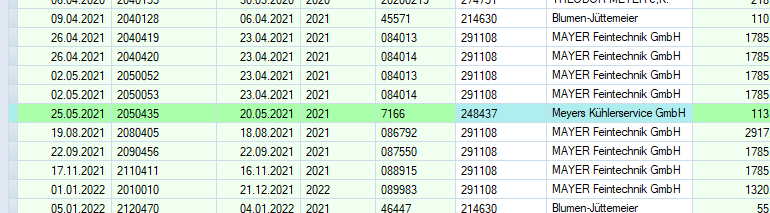
With HideSelection (No Selection visible):

With Transparent (Selection using Selection Colors or Fore/Backcolor):

Screenshot shows also Row numbers.
Working with the selection i get a little backcolor problem on systemcolors.window - fixed it.
`private static void GridSemiTransparentSelection_RowPrePaint(object sender, DataGridViewRowPrePaintEventArgs e) { KryptonDataGridView dataGridView = sender as KryptonDataGridView;
foreach (DataGridViewCell cell in dataGridView.Rows(e.RowIndex).Cells)
{
    if (cell.Selected == false)
        continue;

    Color bgColorCell = Color.Empty;
    Color fgColorCell = Color.Empty;

    if (dataGridView.Columns.Item(cell.ColumnIndex).DefaultCellStyle.BackColor != Color.Empty)
        bgColorCell = dataGridView.Columns.Item(cell.ColumnIndex).DefaultCellStyle.BackColor;
    if (dataGridView.Columns.Item(cell.ColumnIndex).DefaultCellStyle.BackColor != Color.Empty)
        bgColorCell = dataGridView.Columns.Item(cell.ColumnIndex).DefaultCellStyle.BackColor;
    if (cell.Style.BackColor != Color.Empty)
        bgColorCell = cell.Style.BackColor;

    if (dataGridView.Rows(e.RowIndex).DefaultCellStyle.ForeColor != Color.Empty)
        fgColorCell = dataGridView.Rows(e.RowIndex).DefaultCellStyle.ForeColor;
    if (dataGridView.Columns.Item(cell.ColumnIndex).DefaultCellStyle.ForeColor != Color.Empty)
        bgColorCell = dataGridView.Columns.Item(cell.ColumnIndex).DefaultCellStyle.ForeColor;
    if (cell.Style.ForeColor != Color.Empty)
        fgColorCell = cell.Style.ForeColor;

    if (bgColorCell != Color.Empty && bgColorCell != SystemColors.Window)
        cell.Style.SelectionBackColor = ControlPaint.LightLight(ControlPaint.LightLight(ControlPaint.Dark(bgColorCell)));
    if (fgColorCell != Color.Empty)
        cell.Style.SelectionForeColor = fgColorCell;
}
} `