

 Koenkk
Cannot OTA update Philips end-devices
What happened
Note: see update.
I am completely unable to OTA update any devices like the Philips motion sensor - 9290012607 (currently 4 paired) and the Hue dimmer switch - 324131092621 (currently 8 paired) for quite a while now.
Update: I am able to update the motion sensors by retrying a few times in a short interval, but not any of the remotes.
Update 2 (Dec 28 2021):
- For motion sensors (9290012607) I can sometimes start the process after trying a few times, but most of the time it won't finish the OTA update.
- For the remotes (324131092621) it's still quite impossible to OTA update. These remotes seem to never respond to OTA requests.
What did you expect to happen
To be able to update these devices via Zigbee2MQTT.
How to reproduce it (minimal and precise)
- Pair a device like
9290012607(firmware I have:6.1.1.27575) or324131092621(firmware I have:5.45.1.17846) - Go to OTA screen in Z2M UI
- Click "update device firmware"
- Wait a while while inspecting the logs
Logs, each appear at a different stage:
Updating 'buckram_quad_remote' to latest firmware
Info MQTT publish: topic 'zigbee2mqtt/bridge/log', payload '{"message":"Updating 'buckram_quad_remote' to latest firmware","meta":{"device":"buckram_quad_remote","status":"update_in_progress"},"type":"ota_update"}'
Debug Updating to latest '0x0017880108f1d611' (RWL021)
Debug Using endpoint '2'
Error Update of 'buckram_quad_remote' failed (Device didn't respond to OTA request)
Debug Error: Device didn't respond to OTA request at requestOTA (/app/node_modules/zigbee-herdsman-converters/lib/ota/common.js:196:15) at Object.updateToLatest (/app/node_modules/zigbee-herdsman-converters/lib/ota/common.js:278:21) at OTAUpdate.onMQTTMessage (/app/lib/extension/otaUpdate.ts:234:21)
Debug info
Zigbee2MQTT version: 1.22.1-1 Adapter hardware: Conbee II
Workarounds I've tried
- Knowing that these devices do not report very frequently, I tried adjusting the intervals under the
Reportingtab to very small values and initiate the OTA update afterwards. That did not help.

@SHxKM Did you press any button on the dimmers after you click update? I had to wake up the devices for OTA...
I don't know if there is anything in Z2M, like -> "after pressing the OTA button wait for the device to wake up by itself (e.g. report battery) and then send an OTA-command". For me it usually times out after some time...
Seb

@Bascht74,
Did you press any button on the dimmers after you click update?
I have, it rarely helps. Even if it does, the operation will time out after little progress.
Did you press any button on the dimmers after you click update?
For me it usually times out after some time...
So does this mean clicking a button works for you, or does not?
So does this mean clicking a button works for you, or does not?
Yes, that worked for me for all hue devices…
So does this mean clicking a button works for you, or does not?
Yes, that worked for me for all hue devices…
Unfortunately does not work for me. Clicking any button before/after and both before and after the update command does not work.
Update (Dec 28 2021):
- For motion sensors (9290012607) I can sometimes start the process after trying a few times, but most of the time it won't finish the OTA update.
- For the remotes (324131092621) it's still quite impossible to OTA update.
@Koenkk any idea why this might be happening? is there any way to "force" the device to respond to OTA request?
After also getting the same Error. I was finally able to update my remote 324131092621 to (6.1.1.28573) through the OTA update.
It didn't go smoothly though. Needed to press a button every few minutes so it wouldn't lose connection. Then after it finished nothing really changed. But in the logs the status said no update available anymore.
Then I needed to get it to update in zigbee2mqtt because it didn't show the correct firmware yet. So I tried a few things ( remove remote, re-insert battery, holding setup till it flashed, re-pairing) and then after two tries I saw that is was updated. (maybe not exactly in that order, I tried a few things).

It didn't go smoothly though. Needed to press a button every few minutes so it wouldn't lose connection.
I have tried this exactly numerous times, without success.
Hello
For 324131092621 I can update it but though z2m write it is successfull, the firmware version is the same and thedevice is stillavaillble for a new update. Realy strange behavior. For philipps or ikea bulbs no issue.
Antoine

@Koenkk - do you recognize these bindings? you told me Z2M shouldn't create certain bindings in another issue, could these bindings be the cause of trouble here?
It seems that some devices (well, one) are bound like this:
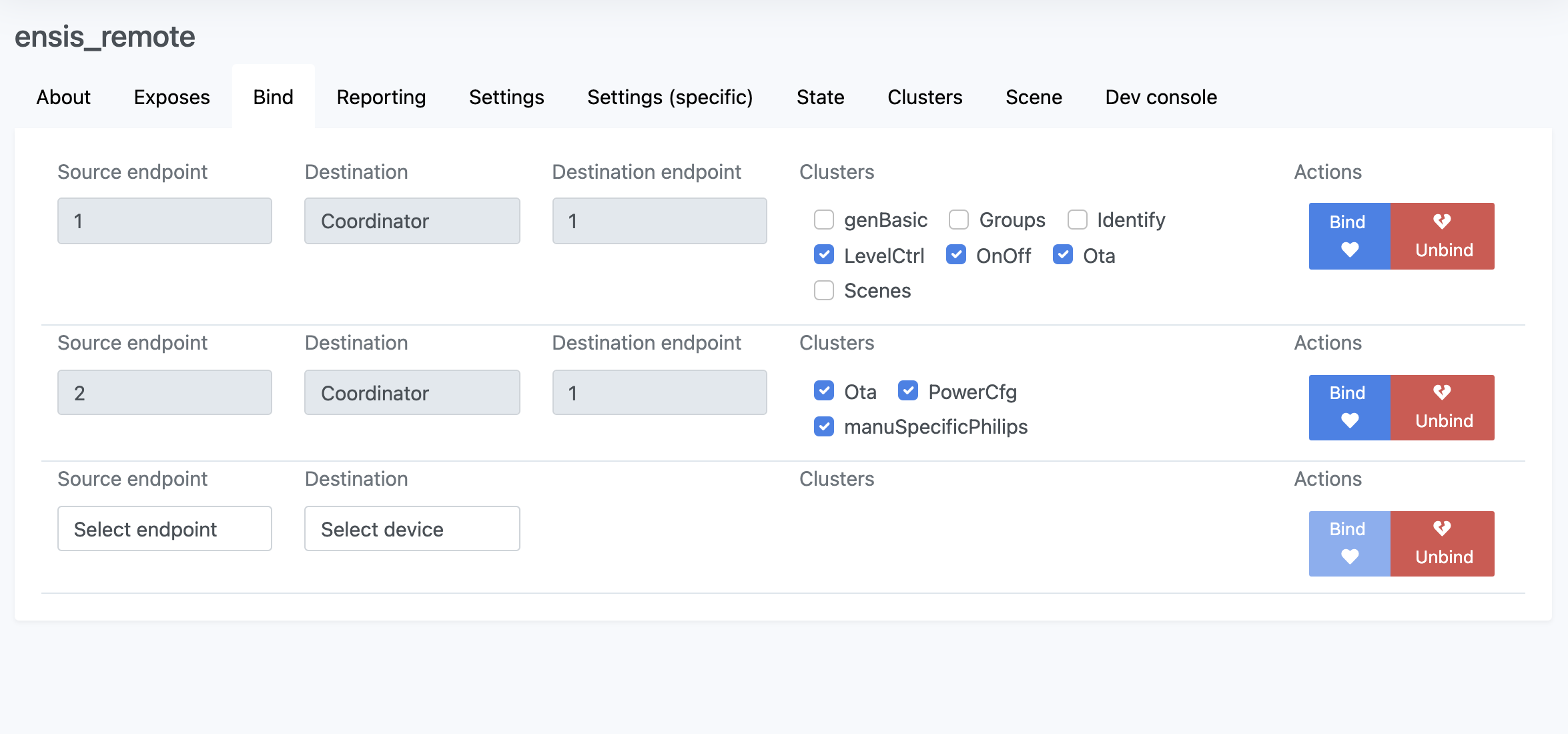
While most are bound like this:
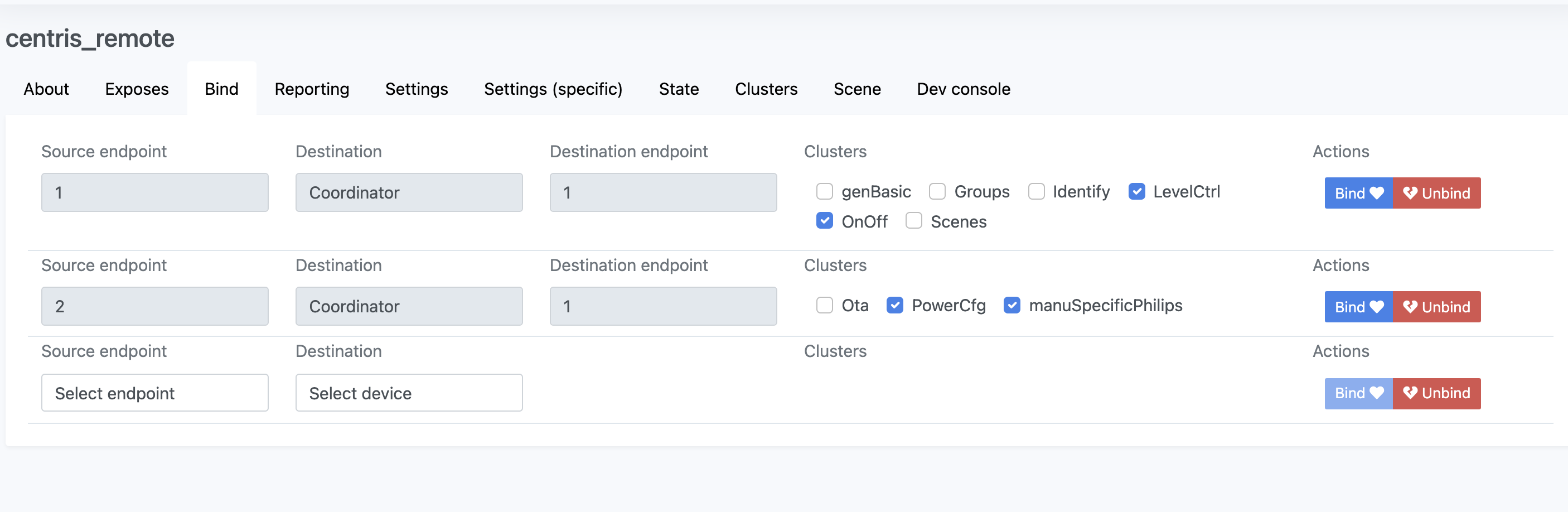
Well this is super weird.
I decided to try following @jeroenhoebe's advice and try once again with a 324131092621 (first-gen remote). After several failed attempts to even start the update process, here's what happened:
- The device started the process, got to ~35%. Then Failed.
- The device started the process, got to ~35-40%. Then Failed.
- During all those attempts I held the device's hand: click off every few minutes, and read
swBuildIdevery few minutes. - Third attempt was successful, but at the end of the process the firmware was the same version it was before the "successful" update:
5.45.1.17846. - Reading
swBuildIdfrom the dev console also shows5.45.1.17846. - BUT, the device now shows "Check for new updates" and reports no new firmware version in the UI. Super weird because before the "successful" update, it was on the same version, and it wanted a new one. It doesn't seem to have had one installed, neither from the UI nor by reading
swBuildId.
Update:
After a while the device went to back to show the red "Update device firmware", and I can at least press that to try and start the update process. However, this is starting to look more and more like #5194 - if the update does complete (after a lot of hand-holding), the firmware both in the UI and when reading the clusters, is the version before the update.
6. BUT, the device now shows "Check for new updates" and reports no new firmware version in the UI. Super weird because before the "successful" update, it was on the same version, and it wanted a new one. It doesn't seem to have had one installed, neither from the UI nor by reading
swBuildId.
Remove the device from Z2M, restart Z2M (e.g. restart docker / adding) and join the device again. This is probably a known bug: doesn’t show the right firmware version after OTA.

- BUT, the device now shows "Check for new updates" and reports no new firmware version in the UI. Super weird because before the "successful" update, it was on the same version, and it wanted a new one. It doesn't seem to have had one installed, neither from the UI nor by reading
swBuildId.Remove the device from Z2M, restart Z2M (e.g. restart docker / adding) and join the device again. This is probably a known bug: doesn’t show the right firmware version after OTA.
Please read my update. I will try this anyway.
Was just able to update a HUE DIMMER (324131092621) via zigbee2mqtt. Steps followed:
- Force remove device from z2m
- Reset device with paper clip
- Rejoin device to z2m (keep default name)
- OTA update
- Press button every minute
- Wait and see updated version :)
Next steps:
- Update another dimmer switch regular way (press button once before update, click OTA update, wait)
- Restart z2m to see if first updated dimmer switch still reports correct version
Tried this multiple times before but failed every time .. only things that have changed in the meantime are newer z2m version (1.22.2) and newer coordinator firmware installed today (20211217).
Will update here: Current status second dimmer - updating regular way: 15h03 - dimmer updating 28% 15h31 - still updating, no more buttons pressed - 88% 15h43 - update done, logs showing update from version 5.45.1.17846 to 5.45.1.17846 (for the previous dimmer it showed 5.45.1.17846 to 6.1.1.28573) So update failed - will retry with procedure 1.
Updating second dimmer - removed/rejoin device + regular button press: 15h51 - dimmer updating 3% 16h30 - dimmer updating and still pressing button now and then 70% 16h54 - "update complete" but again updated to same older version

Was just able to update a HUE DIMMER (324131092621) via zigbee2mqtt. Steps followed:
- Force remove device from z2m
- Reset device with paper clip
- Rejoin device to z2m (keep default name)
- OTA update
- Press button every minute
- Wait and see updated version :)
Next steps:
- Update another dimmer switch regular way (press button once before update, click OTA update, wait)
- Restart z2m to see if first updated dimmer switch still reports correct version
Tried this multiple times before but failed every time .. only things that have changed in the meantime are newer z2m version (1.22.2) and newer coordinator firmware installed today (20211217).
Will update here: Current status second dimmer - updating regular way: 15h03 - dimmer updating 28% 15h31 - still updating, no more buttons pressed - 88% 15h43 - update done, logs showing update from version 5.45.1.17846 to 5.45.1.17846 (for the previous dimmer it showed 5.45.1.17846 to 6.1.1.28573) So update failed - will retry with procedure 1.
Updating second dimmer - removed/rejoin device + regular button press: 15h51 - dimmer updating 3%
Unrealistic to me because I have > 10 of those remotes and it would take days, and I would have to remap every automation, group, etc...that these entities belong to. And not that it worked for me anyway.
Unrealistic to me because I have > 10 of those remotes and it would take days, and I would have to remap every automation, group, etc...that these entities belong to. And not that it worked for me anyway.
Yeah I understand, I have now done 2 and took up an entire afternoon pressing the buttons .. one more to go after this if it works. Luckily all logic/automation is in nodered, so after rejoining and updating with the default name, I can very easily rename the device again to get all up and running again.
Unrealistic to me because I have > 10 of those remotes and it would take days, and I would have to remap every automation, group, etc...that these entities belong to. And not that it worked for me anyway.
Yeah I understand, I have now done 2 and took up an entire afternoon pressing the buttons .. one more to go after this if it works. Luckily all logic/automation is in nodered, so after rejoining and updating with the default name, I can very easily rename the device again to get all up and running again.
Yeah using the same name is a good strategy, I can do the same. But again, too many devices in my case :)
Did method 1 work for the second remote?
No .. did not work .. same error again:
MQTT publish: topic 'zigbee2mqtt/bridge/log', payload '{"message":{"id":"0x0017880108f1bcce","transaction":"21m3s-4"},"meta":{"device":"0x0017880108f1bcce","from":{"dateCode":"20160302","softwareBuildID":"5.45.1.17846"},"status":"update_succeeded","to":{"dateCode":"20160302","softwareBuildID":"5.45.1.17846"}},"type":"ota_update"}'
Guess I was lucky the first time.
Message of the first dimmer:
Zigbee2MQTT:info 2022-01-03 14:44:40: MQTT publish: topic 'zigbee2mqtt/bridge/log', payload '{"message":{"id":"0x0017880108f1bcd2","transaction":"wbavb-2"},"meta":{"device":"0x0017880108f1bcd2","from":{"dateCode":"20160302","softwareBuildID":"5.45.1.17846"},"status":"update_succeeded","to":{"dateCode":"20190410","softwareBuildID":"6.1.1.28573"}},"type":"ota_update"}'
I have exactly the same problem with my 324131092621. I have updated it numerous times but only ends up with the same version. Removed, repaired, reset, new batteries, still firmware 5.45.1.17846.

I discovered the same issue when updating my Philips HUE devices.
Hue dimmer switch with firmware 5.45.1.17846: https://www.zigbee2mqtt.io/devices/324131092621.html#philips-324131092621
Hue white ambiance Aurelle rectangle panel light with firmware 1.16.1_r19181: https://www.zigbee2mqtt.io/devices/3216331P5.html#philips-3216331p5
The update process was according to the log successful. Remove, reset and reconnect device does not help.

I discovered the same issue when updating my Philips HUE devices.
Hue dimmer switch with firmware 5.45.1.17846: https://www.zigbee2mqtt.io/devices/324131092621.html#philips-324131092621
Hue white ambiance Aurelle rectangle panel light with firmware 1.16.1_r19181: https://www.zigbee2mqtt.io/devices/3216331P5.html#philips-3216331p5
The update process was according to the log successful. Remove, reset and reconnect device does not help.
I think your issue (at least with the Aurelle) is different and has more to do with #10131, this topic is strictly about the end devices (and probably only the remote at this point). I'm sure if you follow the steps I outlined in #10131 (read cluster, restart) you'll see that the Aurelle update did work, it's just that Z2M is unaware of it for some reason.
I discovered the same issue when updating my Philips HUE devices. Hue dimmer switch with firmware 5.45.1.17846: https://www.zigbee2mqtt.io/devices/324131092621.html#philips-324131092621 Hue white ambiance Aurelle rectangle panel light with firmware 1.16.1_r19181: https://www.zigbee2mqtt.io/devices/3216331P5.html#philips-3216331p5 The update process was according to the log successful. Remove, reset and reconnect device does not help.
I think your issue (at least with the Aurelle) is different and has more to do with #10131, this topic is strictly about the end devices (and probably only the remote at this point). I'm sure if you follow the steps I outlined in #10131 (read cluster, restart) you'll see that the Aurelle update did work, it's just that Z2M is unaware of it for some reason.
I followed the instructions from the other ticket but still the same issue for me. Both devices are not updated.
So I just tried updating a remote and have some logs. I managed to keep the OTA update going until 100%, but it seems that it fails right at that point and reverts.
Here are two snippets I see when it goes near the end (the device I'm updating is called buckram_quad_remote):
Debug Got upgrade end request for '0x00XXXX0108f1d611': {"status":0,"manufacturerCode":4107,"imageType":265,"fileVersion":1107324829}
Debug Update succeeded, waiting for device to restart
Debug Device 'buckram_quad_remote' announced itself
Info MQTT publish: topic 'zigbee2mqtt/bridge/event', payload '{"data":{"friendly_name":"buckram_quad_remote","ieee_address":"0x00XXXX0108f1d611"},"type":"device_announce"}'
Info MQTT publish: topic 'zigbee2mqtt/bridge/log', payload '{"message":"announce","meta":{"friendly_name":"buckram_quad_remote"},"type":"device_announced"}'
Debug Received Zigbee message from 'buckram_quad_remote', type 'attributeReport', cluster 'genPowerCfg', data '{"batteryPercentageRemaining":200}' from endpoint 2 with groupID null
Info MQTT publish: topic 'zigbee2mqtt/buckram_quad_remote', payload '{"action":null,"action_duration":null,"battery":100,"brightness":255,"counter":1,"linkquality":183,"update":{"progress":99.53,"remaining":9,"state":"updating"},"update_available":false}'
Debug Retrieving state of 'buckram_quad_remote' after reconnect
and after that
Info Configuring 'buckram_quad_remote'
Error Publish 'set' 'read' to 'buckram_quad_remote' failed: 'Error: Read 0x00XXXX0108f1d611/1 genBasic(["swBuildId"], {"timeout":10000,"disableResponse":false,"disableRecovery":false,"disableDefaultResponse":true,"direction":0,"srcEndpoint":null,"reservedBits":0,"manufacturerCode":null,"transactionSequenceNumber":null,"writeUndiv":false}) failed (no response received)'
Debug Error: Read 0x00XXXX0108f1d611/1 genBasic(["swBuildId"], {"timeout":10000,"disableResponse":false,"disableRecovery":false,"disableDefaultResponse":true,"direction":0,"srcEndpoint":null,"reservedBits":0,"manufacturerCode":null,"transactionSequenceNumber":null,"writeUndiv":false}) failed (no response received) at DeconzAdapter.sendZclFrameToEndpoint (/app/node_modules/zigbee-herdsman/src/adapter/deconz/adapter/deconzAdapter.ts:641:23) at Endpoint.sendRequest (/app/node_modules/zigbee-herdsman/src/controller/model/endpoint.ts:291:20) at Endpoint.read (/app/node_modules/zigbee-herdsman/src/controller/model/endpoint.ts:422:28) at Object.convertSet (/app/node_modules/zigbee-herdsman-converters/converters/toZigbee.js:39:28) at Publish.onMQTTMessage (/app/lib/extension/publish.ts:246:36)
Info MQTT publish: topic 'zigbee2mqtt/bridge/log', payload '{"message":"Publish 'set' 'read' to 'buckram_quad_remote' failed: 'Error: Read 0x00XXXX0108f1d611/1 genBasic([\"swBuildId\"], {\"timeout\":10000,\"disableResponse\":false,\"disableRecovery\":false,\"disableDefaultResponse\":true,\"direction\":0,\"srcEndpoint\":null,\"reservedBits\":0,\"manufacturerCode\":null,\"transactionSequenceNumber\":null,\"writeUndiv\":false}) failed (no response received)'","meta":{"friendly_name":"buckram_quad_remote"},"type":"zigbee_publish_error"}'
Debug Received Zigbee message from 'buckram_quad_remote', type 'readResponse', cluster 'genPowerCfg', data '{"batteryPercentageRemaining":200}' from endpoint 2 with groupID null
Info MQTT publish: topic 'zigbee2mqtt/buckram_quad_remote', payload '{"action":null,"action_duration":null,"battery":100,"brightness":255,"counter":1,"linkquality":183,"update":{"state":"idle"},"update_available":false}'
Info Successfully configured 'buckram_quad_remote'
Error Publish 'set' 'read' to 'buckram_quad_remote' failed: 'Error: Read 0x00XXXX0108f1d611/1 genBasic(["swBuildId"], {"timeout":10000,"disableResponse":false,"disableRecovery":false,"disableDefaultResponse":true,"direction":0,"srcEndpoint":null,"reservedBits":0,"manufacturerCode":null,"transactionSequenceNumber":null,"writeUndiv":false}) failed (no response received)'
Debug Error: Read 0x00XXXX0108f1d611/1 genBasic(["swBuildId"],
I don't know if this means anything.
@Koenkk The 1.23 has still this issue. I troed to update my two 324131092621 but no success.
Antoine
@Koenkk Just tried with 1.23 and it did not succeed for me. After holding its hand with reading the swBuildId throughout the update, these are the logs. Goes from 0% to 100% and then just goes back to report the same verison.
info  2022-02-03 20:14:34: Update of 'centris_remote' at 97.67%, ≈ 1 minutes remaining
info  2022-02-03 20:14:34: MQTT publish: topic 'zigbee2mqtt/centris_remote', payload '{"action":null,"action_duration":null,"battery":100,"brightness":159,"counter":1,"linkquality":255,"update":{"progress":97.67,"remaining":60,"state":"updating"},"update_available":false}'
info  2022-02-03 20:14:34: MQTT publish: topic 'zigbee2mqtt/bridge/log', payload '{"message":"Update of 'centris_remote' at 97.67%, ≈ 1 minutes remaining","meta":{"device":"centris_remote","progress":97.67,"status":"update_progress"},"type":"ota_update"}'
info  2022-02-03 20:15:05: Update of 'centris_remote' at 98.86%, ≈ 0 minutes remaining
info  2022-02-03 20:15:05: MQTT publish: topic 'zigbee2mqtt/centris_remote', payload '{"action":null,"action_duration":null,"battery":100,"brightness":159,"counter":1,"linkquality":255,"update":{"progress":98.86,"remaining":30,"state":"updating"},"update_available":false}'
info  2022-02-03 20:15:05: MQTT publish: topic 'zigbee2mqtt/bridge/log', payload '{"message":"Update of 'centris_remote' at 98.86%, ≈ 0 minutes remaining","meta":{"device":"centris_remote","progress":98.86,"status":"update_progress"},"type":"ota_update"}'
info  2022-02-03 20:15:35: Update of 'centris_remote' at 100.00%
info  2022-02-03 20:15:35: MQTT publish: topic 'zigbee2mqtt/centris_remote', payload '{"action":null,"action_duration":null,"battery":100,"brightness":159,"counter":1,"linkquality":255,"update":{"progress":100,"remaining":30,"state":"updating"},"update_available":false}'
info  2022-02-03 20:15:35: MQTT publish: topic 'zigbee2mqtt/bridge/log', payload '{"message":"Update of 'centris_remote' at 100.00%","meta":{"device":"centris_remote","progress":100,"status":"update_progress"},"type":"ota_update"}'
debug 2022-02-03 20:15:37: Device 'centris_remote' announced itself
info  2022-02-03 20:15:37: MQTT publish: topic 'zigbee2mqtt/bridge/event', payload '{"data":{"friendly_name":"centris_remote","ieee_address":"0x0017880108f77dd2"},"type":"device_announce"}'
info  2022-02-03 20:15:37: MQTT publish: topic 'zigbee2mqtt/bridge/log', payload '{"message":"announce","meta":{"friendly_name":"centris_remote"},"type":"device_announced"}'
info  2022-02-03 20:15:37: Finished update of 'centris_remote'
info  2022-02-03 20:15:37: MQTT publish: topic 'zigbee2mqtt/centris_remote', payload '{"action":null,"action_duration":null,"battery":100,"brightness":159,"counter":1,"linkquality":255,"update":{"state":"idle"},"update_available":false}'
debug 2022-02-03 20:15:37: Received Zigbee message from 'centris_remote', type 'readResponse', cluster 'genBasic', data '{"dateCode":"20160302","swBuildId":"5.45.1.17846"}' from endpoint 1 with groupID null
info  2022-02-03 20:15:37: Configuring 'centris_remote'
info  2022-02-03 20:15:37: Device 'centris_remote' was updated from 'null' to '{"dateCode":"20160302","softwareBuildID":"5.45.1.17846"}'
info  2022-02-03 20:15:38: MQTT publish: topic 'zigbee2mqtt/bridge/log', payload '{"message":{"id":"centris_remote","transaction":"6daf2-1"},"meta":{"device":"centris_remote","from":null,"status":"update_succeeded","to":{"dateCode":"20160302","softwareBuildID":"5.45.1.17846"}},"type":"ota_update"}'
info  2022-02-03 20:15:38: MQTT publish: topic 'zigbee2mqtt/bridge/response/device/ota_update/update', payload '{"data":{"from":null,"id":"centris_remote","to":{"date_code":"20160302","software_build_id":"5.45.1.17846"}},"status":"ok","transaction":"6daf2-1"}'
debug 2022-02-03 20:15:38: Received Zigbee message from 'centris_remote', type 'attributeReport', cluster 'genPowerCfg', data '{"batteryPercentageRemaining":200}' from endpoint 2 with groupID null
info  2022-02-03 20:15:38: MQTT publish: topic 'zigbee2mqtt/centris_remote', payload '{"action":null,"action_duration":null,"battery":100,"brightness":159,"counter":1,"linkquality":255,"update":{"state":"idle"},"update_available":false}'
debug 2022-02-03 20:15:39: Retrieving state of 'centris_remote' after reconnect
debug 2022-02-03 20:15:41: Received Zigbee message from 'centris_remote', type 'readResponse', cluster 'genPowerCfg', data '{"batteryPercentageRemaining":200}' from endpoint 2 with groupID null
info  2022-02-03 20:15:41: MQTT publish: topic 'zigbee2mqtt/centris_remote', payload '{"action":null,"action_duration":null,"battery":100,"brightness":159,"counter":1,"linkquality":255,"update":{"state":"idle"},"update_available":false}'
info  2022-02-03 20:15:41: Successfully configured 'centris_remote'
debug 2022-02-03 20:16:50: Received Zigbee message from 'centris_remote', type 'commandQueryNextImageRequest', cluster 'genOta', data '{"fieldControl":0,"fileVersion":1107314102,"imageType":265,"manufacturerCode":4107}' from endpoint 2 with groupID null
debug 2022-02-03 20:16:50: Device 'centris_remote' requested OTA
info  2022-02-03 20:16:51: MQTT publish: topic 'zigbee2mqtt/centris_remote', payload '{"action":null,"action_duration":null,"battery":100,"brightness":159,"counter":1,"linkquality":255,"update":{"state":"available"},"update_available":true}'
info  2022-02-03 20:16:51: Update available for 'centris_remote'
info  2022-02-03 20:16:51: MQTT publish: topic 'zigbee2mqtt/bridge/log', payload '{"message":"Update available for 'centris_remote'","meta":{"device":"centris_remote","status":"available"},"type":"ota_update"}'
debug 2022-02-03 20:17:00: Received Zigbee message from 'centris_remote', type 'commandQueryNextImageRequest', cluster 'genOta', data '{"fieldControl":0,"fileVersion":1107314102,"imageType":265,"manufacturerCode":4107}' from endpoint 2 with groupID null
debug 2022-02-03 20:17:00: Device 'centris_remote' requested OTA
debug 2022-02-03 20:17:10: Received Zigbee message from 'centris_remote', type 'commandQueryNextImageRequest', cluster 'genOta', data '{"fieldControl":0,"fileVersion":1107314102,"imageType":265,"manufacturerCode":4107}' from endpoint 2 with groupID null
debug 2022-02-03 20:17:10: Device 'centris_remote' requested OTA
debug 2022-02-03 20:17:20: Received Zigbee message from 'centris_remote', type 'commandQueryNextImageRequest', cluster 'genOta', data '{"fieldControl":0,"fileVersion":1107314102,"imageType":265,"manufacturerCode":4107}' from endpoint 2 with groupID null
debug 2022-02-03 20:17:20: Device 'centris_remote' requested OTA
debug 2022-02-03 20:17:30: Received Zigbee message from 'centris_remote', type 'commandQueryNextImageRequest', cluster 'genOta', data '{"fieldControl":0,"fileVersion":1107314102,"imageType":265,"manufacturerCode":4107}' from endpoint 2 with groupID null
debug 2022-02-03 20:17:30: Device 'centris_remote' requested OTA
Just adding this comment so I see any updates on this issue, and to let you know I have the same problem with my Hue v1 dimmers.

I have the same problem, could update only 4 of my 12 devices. Firmware version is 5.45.1.17846.

I think the hue dimmer switch requires a 2 step upgrade in some cases, but I don't have any other firmwares (https://github.com/Koenkk/zigbee2mqtt/issues/10131#issuecomment-1017841050)
Mhm, I also can't find any images between file version 1107314102 and 1107324829 (that update is already older than 1,5 years) for image type 265. (To me, it doesn't look like an intermediate version is required.) Are there any other OTAs I should look for?
(Perhaps trying -- with another stick -- and ZHA's OTA process can "solve it"? Not sure what it would do do differently though, as the image seems to be successfully sent with Z2M(?))
