

 KnapsackPro
Ability to ignore some CI nodes
I run multiple tasks on CirrusCI, and I use knapsack_pro only for rspec. I have two other tasks which are unrelated but since they're counted in CI_NODE_TOTAL, knapsack_pro thinks there's no timing data for these nodes.
 (only 7 out of 9 nodes are actually run
 rspec tests)
I'd like to have the ability to ignore these nodes in knapsack_pro somehow.

Hi @leshik
- You can tell knapsack_pro how many parallel nodes you have with env var:
KNAPSACK_PRO_CI_NODE_TOTAL=7.
Then for each parallel nodes, you need to set env var: KNAPSACK_PRO_CI_NODE_INDEX starting from 0 to 6. This way knapsack_pro will think you run 7 parallel nodes instead of 9.
Here is a similar example for Heroku CI where I use a bash script to set env var: https://knapsackpro.com/faq/question/how-to-run-knapsack_pro-only-on-a-few-parallel-ci-nodes-instead-of-all
-
If you already run knapsack_pro only on the first 7th parallel nodes then maybe setting only env var
KNAPSACK_PRO_CI_NODE_TOTAL=7would be enough becauseCI_NODE_INDEXwould have already values from 0 to 6. -
If you like you can still run knapsack_pro on 9 parallel nodes and keep other tasks running on 2 nodes before you run knapsack_pro command on that 2 nodes. knapsack_pro Queue Mode will autobalance tests split. See example: https://knapsackpro.com/faq/question/what-is-optimal-order-of-test-commands
How Queue Mode works: https://docs.knapsackpro.com/2020/how-to-speed-up-ruby-and-javascript-tests-with-ci-parallelisation

CirrusCI populates these variables already, doing this manually would be an unnecessary burden.
I don't think I can predict which nodes are used to schedule tasks, now tasks are scheduled more to like 2 to 8, rather than 0 to 6.
What about some special ENV like KNAPSACK_PRO_NODE_SKIP=true or something like this? Would be much easier.
You can run knapsack_pro in Queue Mode on all nodes after the rake tasks. If Queue is already consumed then knapsack_pro would record 0 test files executed for the node. This would be exactly the same behavior as "special skip option" you proposed.
Queue Mode doesn't work – it triples the time
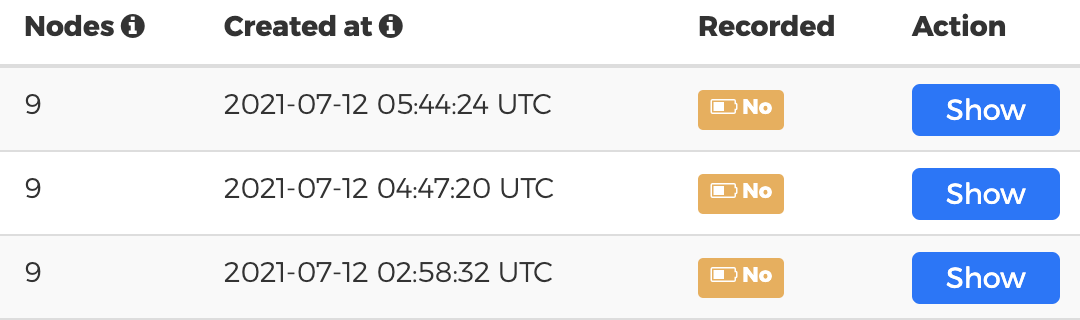
I see you have multiple Knapsack Pro API tokens for RSpec. For which one you see tripled time?
Are you running tests on CI server and you see tripled time there? Is each parallel node has its own resources CPU/RAM? Often when tests are slow it's because of lack of performance of the CI machine.
Please also ensure you recorded tests for all parallel nodes for at least one CI build. I see all your API tokens only recorded partially nodes. You should see the green label Yes in the Recorded column on the list of CI builds for a given API token.
plus many tests are failing.
If you see many tests failing or randomly failing for RSpec when using Knapsack Pro Queue Mode please see this: https://knapsackpro.com/faq/question/why-when-i-use-queue-mode-for-rspec-then-my-tests-fail
Your RSpec test suite could be written in a way that prevents RSpec from running tests in batches. We need to fix the problem on the RSpec level before you could use knapsack_pro Queue Mode properly.
RSpec does not clear RSpec World properly and global state of tests affects next batch of tests which leads to random failures. It's a matter of fixing issues in the tests that are causing problems.
You can share backtrace of errors you see here or over [email protected] (if that's sensitive data). We can try to debug it and find the root issue.
- As per the documentation, at first I created tokens for all tasks we invoke knapsack with a different pattern. Then I ran tests in regular mode:

Here, all tests except javascript are using knapsack. Notice the last one - Features (shard 3) - which takes longer than others because knapsack doesn't know we have fewer nodes than Cirrus CI reports. That's the problem we're trying to solve with Queue Mode (as per your suggestion #3).
- These are the same tests in Queue Mode (second run with 3 new tokens):

- We run our tests on CirrusCI. Each shard has its own set of resources, which are equal. The lack of performance is not an issue here.
-
Please also ensure you recorded tests for all parallel nodes for at least one CI build. I see all your API tokens only recorded partially nodes. You should see the green label Yes in the Recorded column on the list of CI builds for a given API token.
This can't be done, see above. That's why I have opened this issue.
- We'll investigate further the issue of why tests are failing. It's not clear yet.
Regarding first screenshot. Do you want Features (shard 1,2,3) graph bar makes all 3 of them equal to better distribute tests between those 3 shards? Queue Mode would do it. I see on the 2nd screen that tests were equally distributed between 3 shards for Features tests. 3 red bars on the graph are close to equal. That's good. You need only fix failing tests.
If you are asking how to make all bars on the graph equal (make all 8 green bars from 1st screenshot equal) then you can do it by using Queue Mode and running each pattern of tests (Code, Requests, Features) on all 8 nodes instead of only 2 or 3. This is what most people do to achieve the optimal distribution of tests (utilize all your resources from all 8 nodes instead of creating 2 & 3 nodes groups that constrain the utilization of all 8 nodes).
Example how to utilize all resources:
Node 0:
- run Code tests
- run requests tests
- run features tests
Node 1:
- run Code tests
- run requests tests
- run features tests
...etc
Node 7 (the last node 8 out of 8):
- run Code tests
- run requests tests
- run features tests
This way each type of tests (Code, Requests, Features) is executed on all 8 nodes. Queue Mode will autobalance all tests on all 9 nodes. You should see green bars on 1st screenshot equal among all nodes. This is how most people do it.
BTW
CirrusCI populates these variables already, doing this manually would be an unnecessary burden.
If you don't want to populate KNAPSACK_PRO_CI_NODE_TOTAL and KNAPSACK_PRO_CI_NODE_INDEX then have you try my other suggestion below?
You can run knapsack_pro in Queue Mode on all nodes after the rake tasks. If Queue is already consumed then knapsack_pro would record 0 test files executed for the node. This would be exactly the same behavior as "special skip option" you proposed.
This is the intended behavior for Queue Mode and smart way to just run knapsack on all 8 nodes and knapsack_pro would run tests there to utilize nodes' resources fully. It's a common approach among other users. It would result in all 8 nodes green bars equal (the shortest CI build).
As long as you run your custom rake tasks before knapsack_pro command then the rake task won't affect green bars on the graph. Knapsack Pro will simply run less or no tests on nodes that started knapsack_pro command late or after the queue was already consumed by other nodes.
One more link that might be useful. If you run a set of tests from the test suite for a given API token (for instance only Requests tests). It's better to use test file patter KNAPSACK_PRO_TEST_FILE_PATTERN instead of RSpec tag option in Queue Mode to not load test files that are not executed at all (there is no point to load Code test files when you run only Requests test files).
https://knapsackpro.com/faq/question/dir-glob-pattern-examples-for-knapsack_pro_test_file_pattern-and-knapsack_pro_test_file_exclude_pattern
I noticed you have a features spec file that takes 7 minutes to run tests. It's possible to automatically divide test examples from single test file and run them in parallel nodes. This way you can split 7 minutes test cases between multiple nodes. https://knapsackpro.com/faq/question/how-to-split-slow-rspec-test-files-by-test-examples-by-individual-it
This feature works in Regular Mode and Queue Mode for RSpec. If you want to use it with Queue Mode please ensure your tests are passing green first just to narrow down the debugging for your random failures.
@leshik If there is anything we can help with, please let me know. Otherwise, we are going to close this issue.