

 Kitware
Inconsistent representation of cropping widget in slices.
When using the cropping widget of paraview-glance I noticed that the representation of the cropping is inconsistent (from a user perspective). I have illustrated the behavior of the widget in
the following figure:
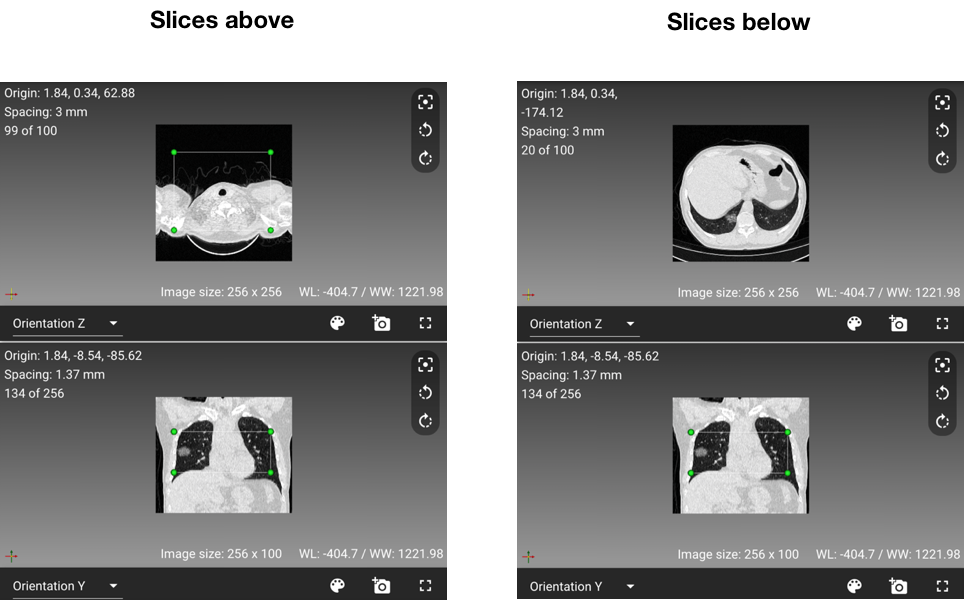
In the axial view the box disappears (right) when you go in a slice below the box. However the box remains visible (left) when you are in the slices above the box. The same issues occur for the sagittal and the coronal views. I believe it might be better if the box would disappear whenever the slice is not inside in the box anymore.
I understand that this comes from the way it is rendered in the widget representations. Therefore I was trying to fix it by adapting/extending (vtkSphereHandleRepresentation & vtkOutlineContextRepresentation) but I got stuck as I'm still quite new to vtk and paraview-glance.
Any suggestions on how to fix this? Thank you!

The easiest way to fix this would be to do this at the application level. Specifically, whenever the cropping widget state changes, you would, for each slice in each view, check to see if the slice is within the cropping bounds along that view axis. If not, then hide the widget, otherwise show the widget.
If you want to take a shot at fixing it, a good starting point would be the file CropTool/script.js.
