

 KennethScott
Noob installation guide
First of all I apologize for my lack of knowledge on the subject but my area of expertise is infrastructure. Currently the vast majority of tasks have been moving from GUI to Powershell and that is why SpecOps would be very useful to us since we have an endless list of powershell scripts and they continue to grow. The problem is that I am not clear about the installation procedure to put it into production, my goal is extremely simple: Install a 2019/22 server with IIS and mount SpecOps. My request is if you have a guide with general installation/configuration guidelines for microsoft windows server, especially the additional modules that must be installed from the framework for it to work.
Thank you very much

Hey @rusomenace, that's been on my to-do list for a while, but unfortunately I don't have any kind of formal instructions yet.
If you already have the server and IIS up and running, the main steps should simply be:
-
Install the .NET Core Hosting Bundle Installer on the server running IIS. This should be the only dependency.
-
Create an AppPool in IIS by right-clicking on Application Pools and choosing Add. Set it to use "No Managed Code" for the CLR version, and "Integrated" for the Pipeline.
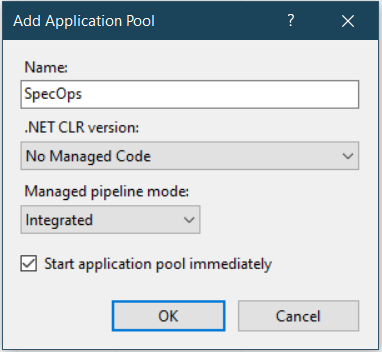
Then set your new app pool to use a domain service account or identity with the appropriate access to run your scripts by right-clicking on it and selecting Advanced Settings -> Identity.
- Unzip the latest release zip into a folder on the server. Then add a new "Application" in IIS by right-clicking on your site (usually Default Web Site), point it to your extracted folder, and set it to use your new AppPool you just created.
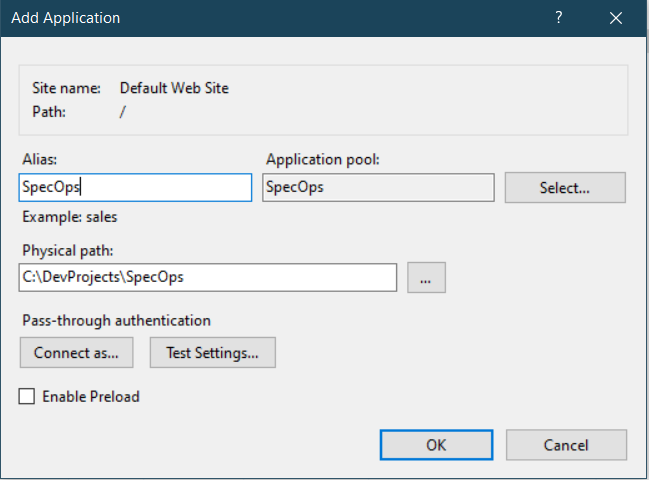
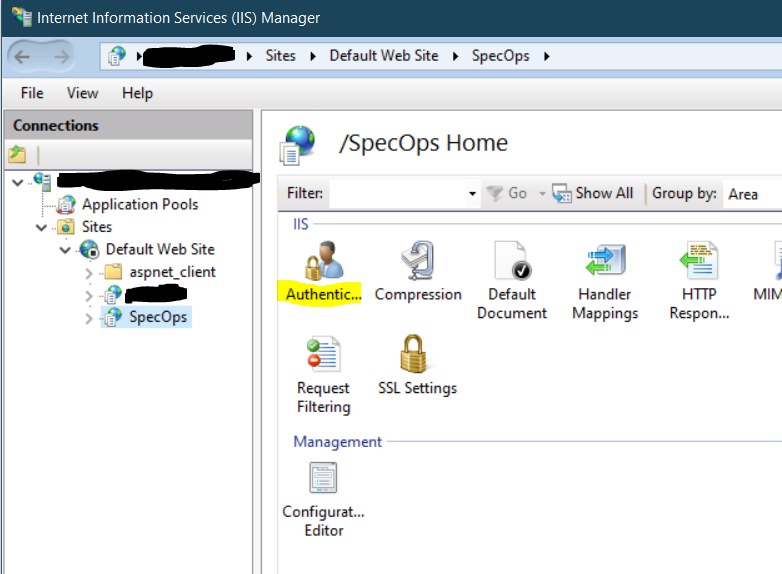
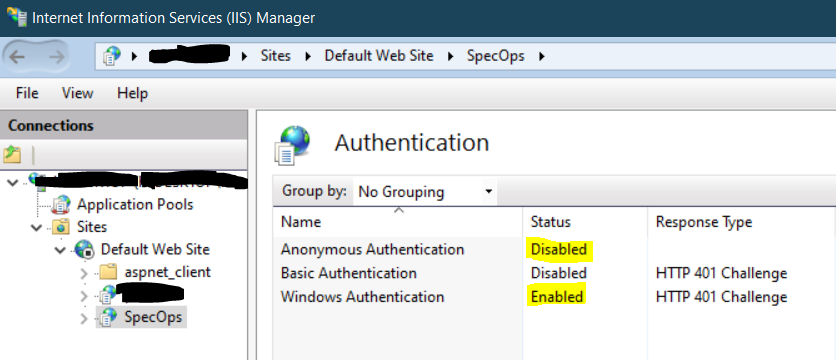
Change the Authentication for your new application so that only Windows Auth is checked/enabled.
You can Require SSL if you want.
Then just browse to http://yourserver/specops (or https) and see if it comes up.
Just remember to give yourself access in the appsettings.json file or you'll get a 403 error. You should be able to see the demo script options when it comes up. Then you'd just swap out your own scripts and make the necessary changes to the scriptsettings.json file to configure your scripts.
Let me know how it goes!

You are amazing, many thanks to take time to reply me :)
Big thank you :)