

 Jochem-W
Properly hide nodes instead of removing them
Currently, the only way to "hide" hidden sub meshes in the vnext version is to completely remove them from the model. It's possible to use a glTF extension to mark nodes as hidden. Unsure if animations also have a list of sub meshes that should be hidden.

This can be done with the KHR_materials_variants extension and an extra material with an alphaMode of MASK and alphaCutoff of >1.
Notes:
- This extension has already been implemented for most popular glTF viewers.
- Some viewers (only Babylon) don't properly display the transparent material without extra steps.
- It might not be possible to easily show/hide primitives; only toggling between showing everything and hiding primitives that should be hidden.
- Transparent != hidden.
Alternatively, a custom extension can be made that contains a single boolean property for each primitive along with timestamps and booleans for each animation.
Notes:
- glTF viewers have to be modified for this to work properly. If the model is opened in a viewer that hasn't been modified, all primitives will be visible at all times.
Teemo.gg hides nodes during animations using the extras property, e.g. for Akshan (compressed download):
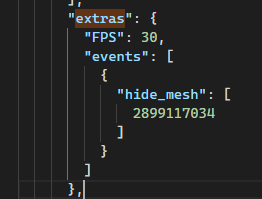
This might be easier to work with than a custom extension.