

 JesusFreke
PermissionError when executing
Hi, as the title says, when I execute my code from PyCharm, a windows shows in Fusion with the next message after copying the Public key hash:

Just to be clear, the message says that I'm using PyCharm 2021.1.1, but I already upgraded it, the directory keeps its old name, though.
Should I reinstall PyCharm? I tried running it and Fusion360 as administrator but nothing happens.
Also, I don't know if it's related, but I have to disable the plugin support (on Languages & Frameworks) before closing the project, because, when I reopen it, an error closes the IDE.
My PyCharm version is 2022.2.3:

And Fusion360 was updated last week:


Hmmm. I'm not really sure. Maybe something to do with the windows user having restricted permissions or something?
Does that path that's it's giving a permission denied on actually exist on your machine?

I also initially thought about permissions, and tried to change them, but to no avail, that folder says "Read only". That path does exist, I also checked it. I even reinstalled PyCharm to a new location, but nothing happens.
I just tried it with the same version of pycharm, and it's working fine for me. I'm also on the same version of windows, and fusion.
Hi, I had the same issue, and debuged the add-in and the plugin to get to this conclusion:
When you start the IDE, the "Run/Debug in Fusion 360" is disabled:

To enable the "Run in Fusion 360" option you should run it first with any configuration. It will fail, but the "Run in Fusion 360" option will be available after that.
The problem is that it seems if you have run configuration set up, you had to fill it out properly even if you don't run that but you run.
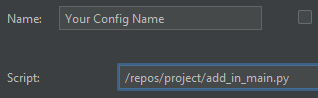 You have to provide "script" in the configuration, otherwise the plugin will send the "jbr/bin" folder as script, which is not a file but a folder hence "Permission Denied" error is generated.
Set it up, to point your script file, and it will work.

Interesting, thanks for digging into it. Were you using PyCharm as well? I'll see if I can reproduce and hopefully fix/improve this.
Yes:
PyCharm 2022.3.2 (Community Edition)
Build #PC-223.8617.48, built on January 24, 2023
Runtime version: 17.0.5+1-b653.25 amd64
VM: OpenJDK 64-Bit Server VM by JetBrains s.r.o.
Windows 10 10.0
GC: G1 Young Generation, G1 Old Generation
Memory: 750M
Cores: 20
Non-Bundled Plugins:
    org.jf.fusionIdea (0.6.5)
I confirm my problem was solved following your advice, thank you very much.
I'm not able to reproduce the problem here. When I follow the steps at https://github.com/JesusFreke/fusionIdea/wiki/Getting-started-with-PyCharm-(Windows), the "Run in Fusion 360" and "Debug in Fusion 360" options in the editor context menu and in the run menu are enabled and work fine.
The only thing I can think of is that the plugin checks for either an adsk.core or adsk.fusion import, and the presence of a top level run() function, and doesn't show/enable the "Run/Debug in Fusion 360" options for that file if it doesn't find them.