

 JedWatson
menuShouldScrollIntoView does not scroll all menu into view
React-select with menuShouldScrollIntoView set to true does not scrolled into view properly. Although menu is scrolled into view, last options are still invisible.
On the screenshot below, only option 1 to 4 is visible and options 5 and 6 are not. Parent size is expanded to accommodate full menu and parent can be scrolled manually to see full menu.
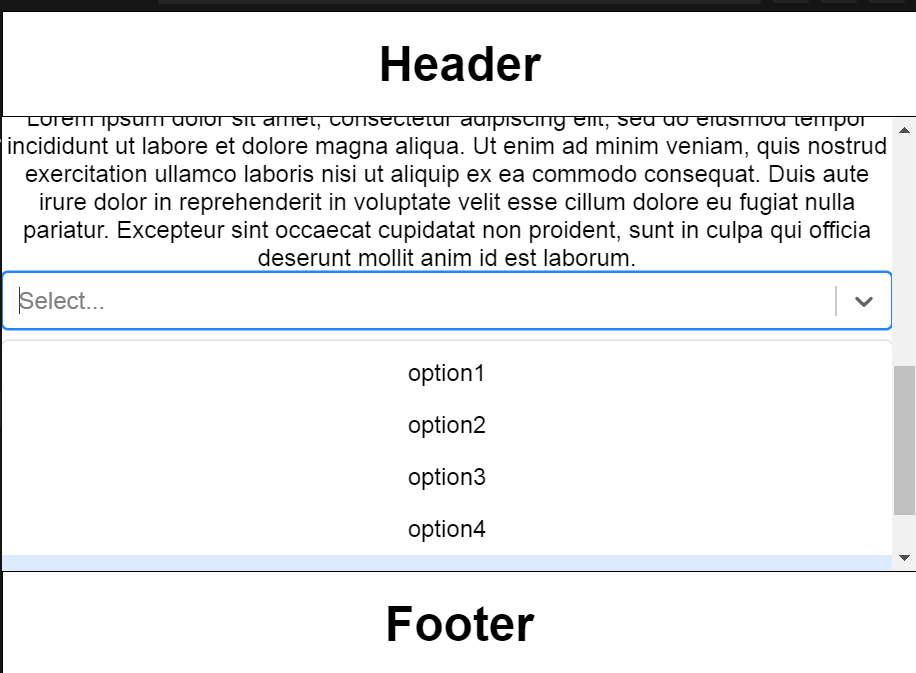
Sandbox is here https://codesandbox.io/s/reactselectscrollintoview-44b7n
To reproduce:
- Make sure, that react select is located at the very bottom of the window, Just above the footer. There should be no empty space between react-select and footer. (it may be required to decrease browser window size)
- Open react-select.
- Observe, that although container has been scrolled down, it is not scrolled down enough to include all options. To see last options, manual scrolling of the container is required.
Expected result: container is scrolled to accommodate all options.
Also, if header and footer will not be present, parent will be scrolled properly.


For the future people.
menuShouldScrollIntoView doesn't always work, especially if there is a re-render. To fix this, memoize the value and options props when adding menuShouldScrollIntoView.
