

 JedWatson
menu is wrongly placed at bottom
Are you reporting a bug or runtime error?
I think it's a bug. menuPosition is default (auto). When there is no enough space for menu, it still appears in the bottom. The reason is: In Menu.js, this getMenuPlacement will calculate a wrong menuHeight. In my situation, the menu will load data asynchrously, so it will display 'Loading' (loading message) in the menu first, then the data after it's loaded. But getMenuPlacement only calculates the height of 'Loading' and decides to put the menu at the bottom.
Expected
should calcuate the menuHeight when the data is loaded and decides the placement again.

maybe I should use react-select/async instead of react-select. Will update later.
Greetings @hasakilol, there are several issues and misunderstandings with the menuPlacement that will be a focus in the near future.
Currently the measurement is based on the available space to the bottom of the screen and not based on any recursive DOM ancestor search where overflow is hidden. Not sure if this is a part of your expectations.

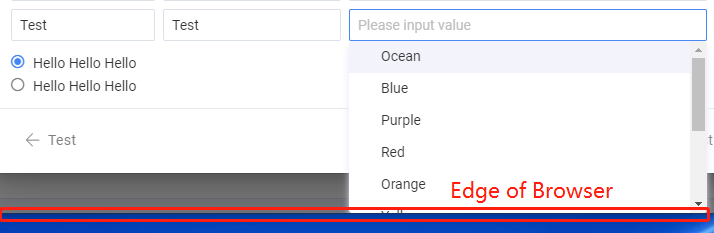 When using react-select/async, the placement is correct. It falls into
 // 3: the menu will fit, if constrained, not // 1: the menu will fit, do nothing if I use react-select.
 In contrast, when using react-select, the placement is wrong and falls into
 // 1: the menu will fit, do nothing
My Suggestion is: Maybe react-select should recalculate the placement when options change.
@hasakilol got it. We'll be looking at this in the very near future. We're updating from Flow to Typescript and this type of behavior will be the next on the list.


We are seeing this in react-select/async as well, not just react-select:
Are there any workarounds possible before a final fix goes in?

OK, how I solved it in my case is adding menuPortalTarget into the mix. My case in particular had this issue when the react-select was inside a scrollable modal window. What worked was setting menuPortalTarget={document.body} in combination with menuPlacement="auto". Your mileage may vary though. I hope this helps someone.
That does help in cases where it's very close to the bottom, thank you. However, it still clips at the bottom when it chooses to have the menu open downward.