

 JedWatson
menuplacement auto in div with overflow not correct
Menuplacement auto in a div with overflow auto, puts the menu to the bottom. Even when there is not enough space. This makes the form or div scrollable when it doesn't need to. This occurs when the select is put on the bottom of the form.
Examples:

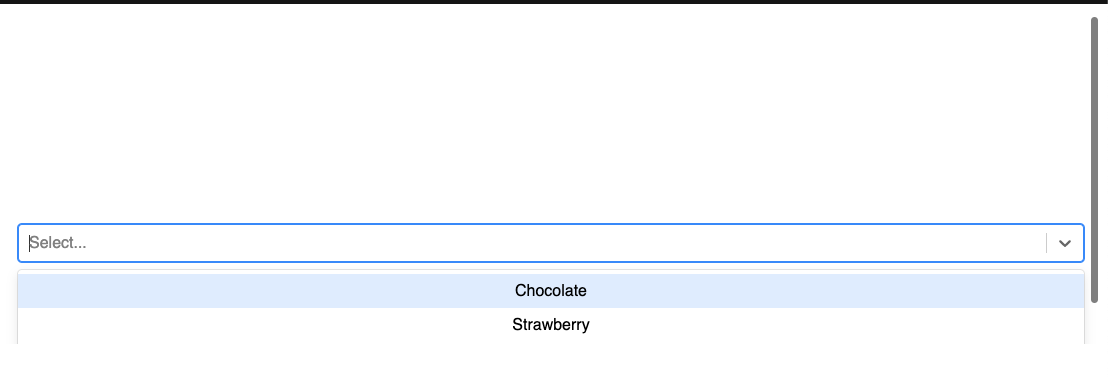 This screenshot comes from my CodeSandBox: https://codesandbox.io/s/react-select-menu-placement-479mi?file=/src/App.js:405-410
Version used: 3.1.0

@Brozart your example works perfectly fine, if <Select /> tag is placed at the bottom of the page when there is no sufficient height for accommodating the menu. It is in the in-built behavior of the library itself. Check this example here https://jhlkd.csb.app/

@pmehta-18 I know, but you need to make the browser smaller in height. There is a small area where the menu is still placed to the bottom when there isn't enough space.
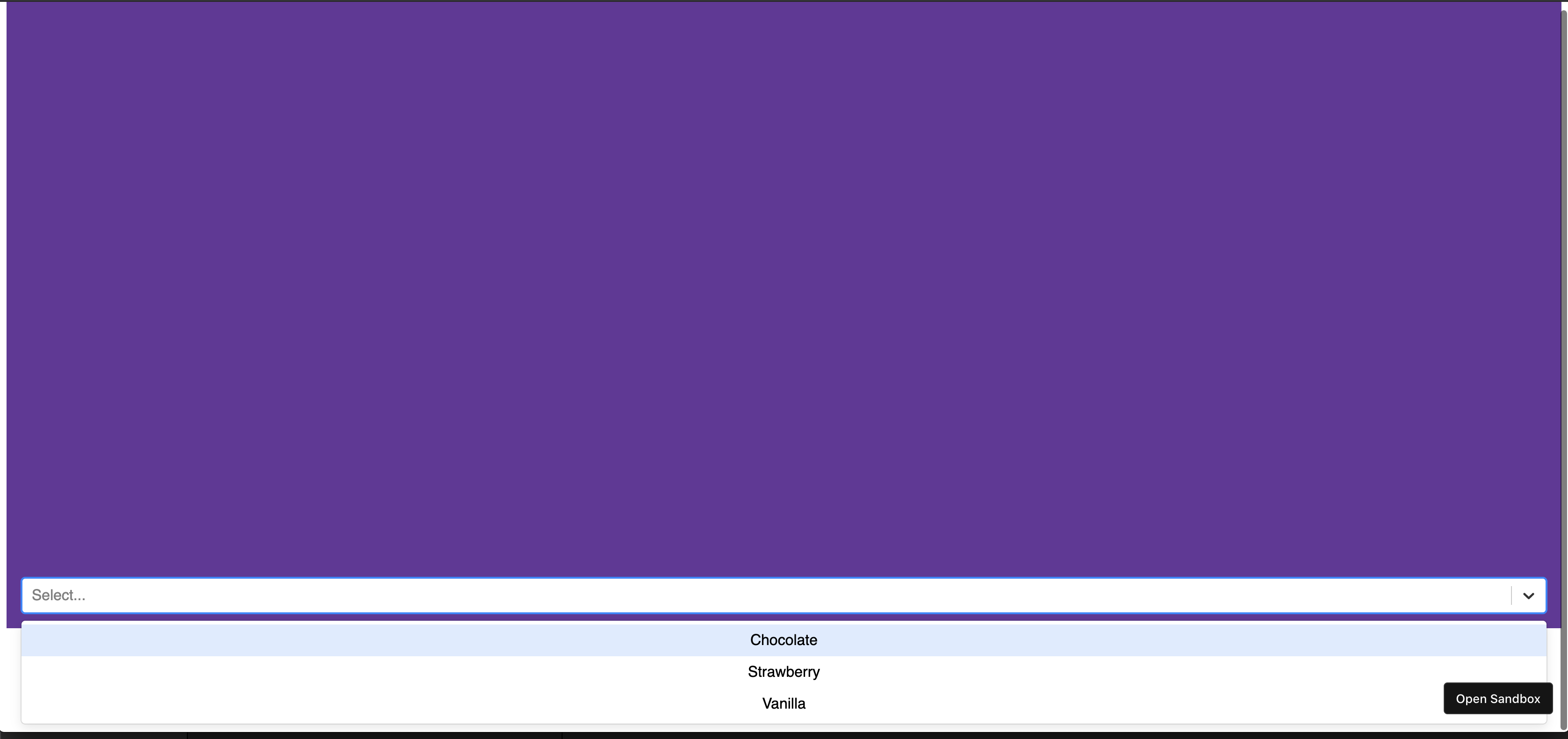
Same problem for me, with a small screen and, when the component is close to the bottom of the window.


Greetings all,
It would seem that the positioning is determined not to be the available space, but rather by the edge of the viewport. https://github.com/JedWatson/react-select/blob/45f6f292b44e434fe6286e6017e43245528b72fb/packages/react-select/src/components/Menu.js#L76
Here is a forked example of your code with the select positioned near the bottom of the screen that is working as expected.
codesandbox: demo
In regards to what the behavior should be, I think this is hard to say. If you are positioning the element absolute or fixed, then it is implicit that the menu is outside the layout flow already.
For example, updating your container div to have overflow visible presents no issues with properly positioning the menu to the top. I don't know how feasible it is to calculate this on pageScroll and may be a better candidate to look at when we are able to refactor the menu to perhaps leverage IntersectionObserver, but certainly the documentation should be a bit more clear about this behavior.

Just a note, I began looking at how IntersectionObserver could be used. This does not entirely work as designed as onMenuOpen is called after the menu is opened so the first placement is incorrect, but exploring ideas of how to better calculate changes to the available space.
demo: codesandbox

Greetings all,
It would seem that the positioning is determined not to be the available space, but rather by the edge of the viewport.
https://github.com/JedWatson/react-select/blob/45f6f292b44e434fe6286e6017e43245528b72fb/packages/react-select/src/components/Menu.js#L76
Here is a forked example of your code with the select positioned near the bottom of the screen that is working as expected.
codesandbox: demo
In regards to what the behavior should be, I think this is hard to say. If you are positioning the element absolute or fixed, then it is implicit that the menu is outside the layout flow already.
For example, updating your
containerdiv to have overflow visible presents no issues with properly positioning the menu to the top. I don't know how feasible it is to calculate this on pageScroll and may be a better candidate to look at when we are able to refactor the menu to perhaps leverage IntersectionObserver, but certainly the documentation should be a bit more clear about this behavior.
There is any posibility to fix the issue by itself without editiing the library code or fork it?

+1 to this problem, menuPlacement: "auto" , calculated relatively to viewport of the screen instead of parent element

+1 to this problem. We have a footer element that is calculated as part of the view port so the dropdown thinks it has plenty of room to expand into. We have different size footers depending on the environment, too, so being able to send in something like "bottomViewportOffest" for a viewport modifier (and a topViewportOffest while we are at it) for the viewHeight calculation feels like a reasonable if a bit hacky solution. Or has this issue been addressed by other properties at this point?
Edit: modified the above example to include a footer

DIY solution for my own problem was to go fixed mode IE
menuPortalTarget: document.body, menuPosition: 'fixed',
then override any of the styles you have configured with
styles: { menuPortal: {insert styles here} }
I dunno, perhaps that is the correct way to address this and I just missed it in the docs. But that is what I came up with when looking through all of the stackover flows and select props that made sense to me.
Are there any solutions for it till now? and why react-select doesn't fix it.

Are there any solutions for it till now? and why react-select don't fix it
So I had to do a bunch of hacking since the fixed solution removes it from the tree of the body and broke all our functional tests. What I ended up doing is creating a bunch of React.createRef() objects that tracked the menu, our header, footer and other options like if the sidebar was open or not etc etc.
once that is done, you can do a bunch of header.getBoundingClientRect().bottom/top/height calls to get the bonded areas of things and where they are on the page. I called all this in the open function they give access to, so something like onMenuOpen: this.updateDirection
in the helper function, I set a delay since this object doesn't exist yet then query the page to get element sizes, something like
setTimeout(() => {
      const footer = document.querySelector('footer');
      const header = document.querySelector('#siteHeader.header');
      this.dropList.current = document.querySelector('.dropList__menu-list');
      const { direction, newHeight } = comboboxDirection({
        footer,
        parent: this.parentBox.current,
        header,
        menu: this.dropList.current,
        isSidebarOpen: isSidebarOpen(),
        useBlockForm
      });
    }, 1);
I use all those refs to call the helper to help me understand if I should set the direction up or down, then assign that to a state value, then finally use the built in direction function to assign that value.
menuPlacement: direction,
To prevent bliping (it showing down then showing up for a split section) you can set a custom style for the menu to be visibility: hidden to prevent it showing until you have run your helper function. This got the desired effect, I had to do some other things like calculate remaining space to help size it when things got to small but that basic logic will get you like 90% of the way there. It is, however, a lot of code and still kinda fidgety. Took me about 400ish lines to get it all working correctly for our usage.
maybe this will help someone, but be sure to pass it on innerRef
import { useEffect, useRef, useState } from 'react';
import { components, MenuProps } from 'react-select';

import { SIZES } from '@shared/constants';
import { useIsScrolling } from '@shared/hooks';

import { type Option } from '../../lib';

export interface GroupedOption {
  readonly label: string;
  readonly options: readonly Option[];
}

// The worst hack I've ever written, because react-select team doesn't fix it
// https://github.com/JedWatson/react-select/issues/4108

const Menu = (
  { children, ...props }: MenuProps<Option, false, GroupedOption>,
) => {
  const {
    // @ts-ignore
    inputValue, isLoading, innerRef,
  } = props.selectProps;

  const menuRef = useRef<HTMLDivElement>(null);

  const isScrolling = useIsScrolling();
  const [isNotEnoughSpace, setIsNotEnoughSpace] = useState<boolean>(false);

  useEffect(() => {
    const menuGap = 8;
    const ref = menuRef && menuRef.current;
    const controlRef = innerRef && innerRef.current && innerRef.current.controlRef;
    const isAvailableCalculate = window
      && ref
      && controlRef
      && inputValue
      && !isLoading
      && !isScrolling;

    if (isAvailableCalculate) {
      const rect = controlRef.getBoundingClientRect();
      const viewportHeight = window.innerHeight - SIZES.footerMenu;
      const menuBottomPosition = Math.ceil(rect.bottom + menuGap + ref.clientHeight);

      if (menuBottomPosition > viewportHeight) {
        setIsNotEnoughSpace(true);
      } else {
        setIsNotEnoughSpace(false);
      }
    }
  }, [inputValue, isLoading, isScrolling, innerRef]);

  return (
    <components.Menu<Option, false, GroupedOption>
      {...props}
      innerRef={menuRef}
      placement={isNotEnoughSpace ? 'top' : 'bottom'}
    >
      {children}
    </components.Menu>
  );
};

export default Menu;

You can try adding minMenuHeight prop, its value should be the maximum size that MenuList can reach. In my case (Select inside a modal), set minMenuHeight and menuPortalTarget: document.body worked
