

 JanssenProject
unable to reinstall jans on RHEL8/CentOS8
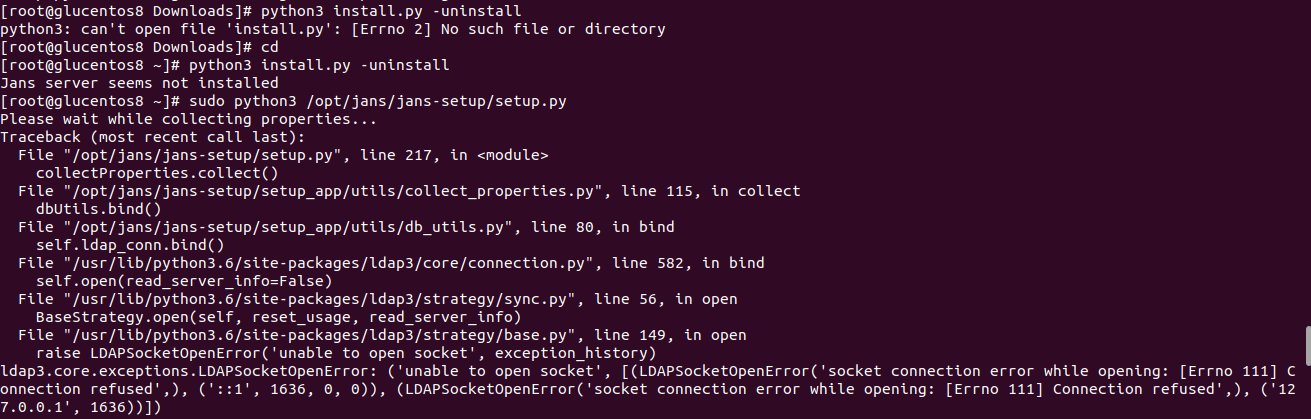
Describe the bug unable to reinstall jans
To Reproduce Steps to reproduce the behavior:
yum -y install https://dl.fedoraproject.org/pub/epel/epel-release-latest-8.noarch.rpm yum module enable mod_auth_openidc yum install curl download rpm file yum install -y ./jans-1.0.1-el8.x86_64.rpm sudo python3 /opt/jans/jans-setup/setup.py yum remove jans yum install -y ./jans-1.0.1-el8.x86_64.rpm sudo python3 /opt/jans/jans-setup/setup.py
Expected behavior should able to install jans
Screenshots
Desktop (please complete the following information):
- OS: RHEL8/CentOS8
- Browser
- Version 8
Smartphone (please complete the following information):
- Device: [e.g. iPhone6]
- OS: [e.g. iOS8.1]
- Browser [e.g. stock browser, safari]
- Version [e.g. 22]
Additional context unable to uninstall jans properly setup.log

This is packaging issue, package manager should remove/rename the following directories
-
/etc/jans -
/etc/certs
